

Introduction to Containers, Actually: Building Real Local Dev Environments
From first principles to a real Windows-based Docker stack
Series: Containers, Actually: Building Real Local Dev Environments
Next: Why Containerized Local Development Exists
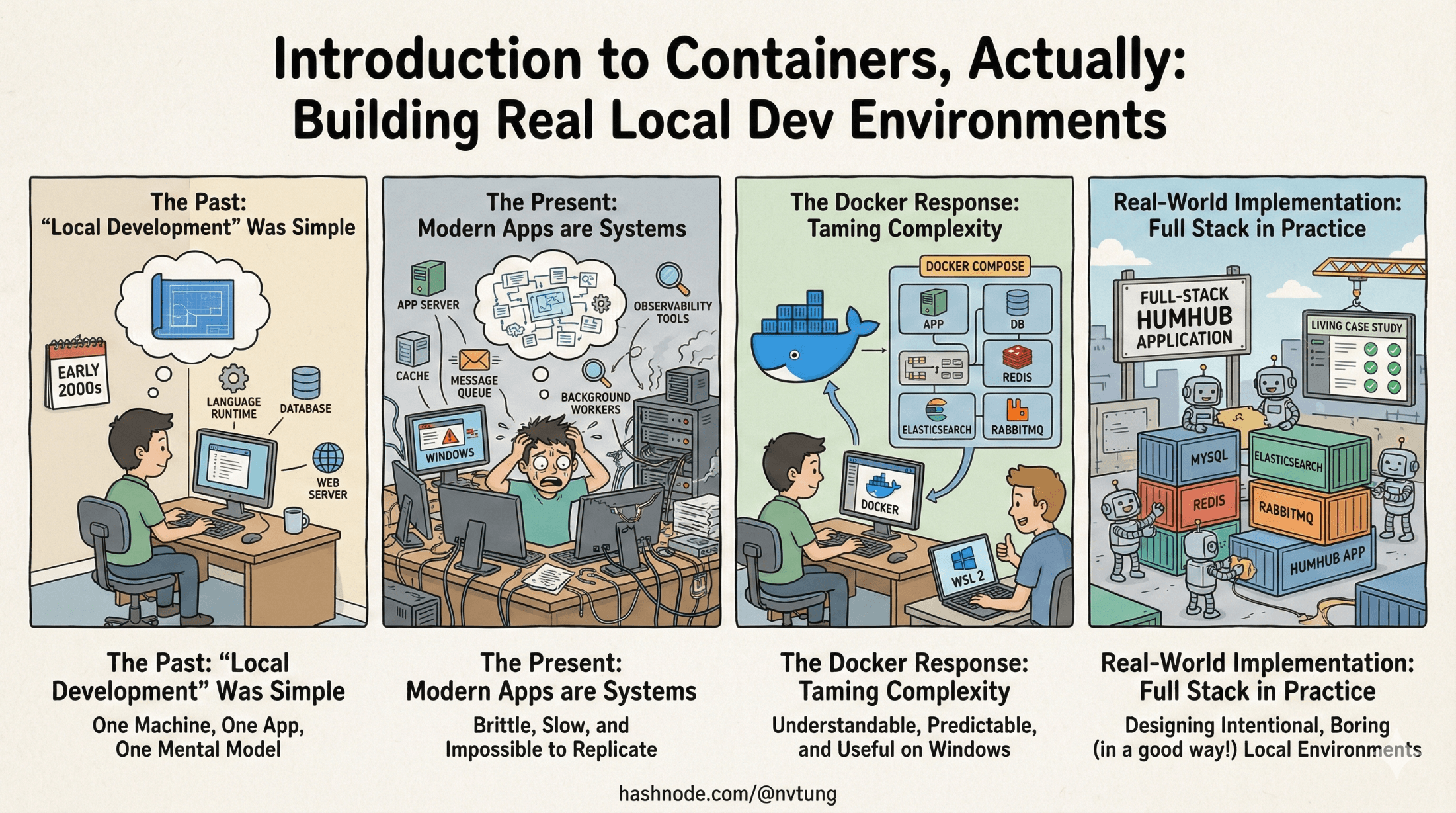
For a long time, “local development” meant installing a language runtime, a database, and maybe a web server. You could carry the entire mental model of your app in your head. That era is over.
Modern web applications are not just an app—they are systems. A typical stack now includes an application server, a database, a cache, a message queue, a search engine, background workers, and observability tools. Each component evolves independently, speaks different protocols, and comes with its own operational assumptions. Installing all of this natively on a single machine—especially on Windows—is brittle, slow, and nearly impossible to keep consistent across teams.
Docker emerged as a response to this complexity, but it’s often introduced backwards: commands first, understanding later. Developers learn how to run docker-compose up, but not what is actually happening, why certain patterns exist, or where things go wrong—particularly on Windows, where Docker behaves differently than on Linux.
This series is about correcting that inversion.
We’ll start from the ground up: what containerized local development really means, why modern apps demand multiple services, and how Docker helps tame environment drift. From there, we’ll focus specifically on Windows-based development, including WSL 2, filesystem performance, resource tuning, and tooling choices that actually hold up under daily use.
Finally, theory will give way to practice. We’ll walk through a real production-adjacent implementation that I’ve had experience in: a full-stack HumHub-based application running with Docker, backed by MySQL, Redis, Elasticsearch, RabbitMQ, and more. Not as a perfect template, but as a living case study—warts, trade-offs, and lessons included.
The aim isn’t to convince you that Docker is magical. It isn’t.
The aim is to make it understandable, predictable, and genuinely useful as part of your everyday development workflow.
By the end of this series, you should be able to design your own local environments with intention—knowing which problems containers solve, which they don’t, and how to make a complex stack feel boring in the best possible way.
Disclaimer: Note that because this implementation was done in 2021, there may have been some new ways to implement this in current time.
🧭 Series Goal & Audience
Goal
Teach developers—especially Windows-based full-stack developers—how to design, reason about, and operate a production-adjacent local development environment using Docker, covering not just the “how” but the “why”.
Audience
Mid → senior developers
Windows users frustrated by Linux-first docs
Teams onboarding into complex stacks (web app + DB + cache + search + queues)
Developers who’ve used Docker but don’t fully trust it yet
🧱 Overall Structure of the Series
The series is divided into three acts:
Foundations – universal concepts and best practices
Windows + Docker Reality – constraints, trade-offs, tooling
A Real Implementation – my HumHub-based stack as a case study
Each act builds vocabulary and mental models that the next act relies on.
ACT I — Foundations: Containerized Local Development (Conceptual)
Article 1 — Why Containerized Local Development Exists
Purpose: Establish motivation and shared pain.
Key themes:
“Works on my machine” as a systemic failure
Why full-stack apps need more than just Node/PHP
Parity: local vs staging vs production
Why containers beat VM-only and native installs
Concepts introduced:
Environment drift
Dependency graphs
Immutable infrastructure (light intro)
Reproducibility
Outcome:
Readers understand what problem Docker actually solves, not just how to run it.
Article 2 — What a Modern Full-Stack App Really Is
Purpose: Demystify “associated services”.
Topics:
The anatomy of a modern web app:
App server
Database
Cache
Search engine
Message broker
Background workers
Why these services exist
Why they should NOT live inside your app container
Mental model:
“Your app is a city. Docker is zoning law.”
Outcome:
Readers stop thinking in “single server” terms.
Article 3 — Core Docker Concepts Without the Mysticism
Purpose: Build precise mental models.
Concepts explained clearly:
Images vs containers
Layers and caching
Volumes vs bind mounts
Networks
Ports and exposure
Dockerfilevsdocker-compose.yml
Best practices:
One concern per container
Stateless app containers
Data lives in volumes
Containers are cattle, not pets (with nuance)
Outcome:
Readers can read a docker-compose.yml and reason about it.
ACT II — Docker on Windows (Reality, Not Marketing)
Article 4 — Docker on Windows: The Good, the Bad, and WSL 2
Purpose: Address Windows head-on.
Topics:
Why Windows is “special” in Docker land
Hyper-V vs WSL 2 (historical context)
Why WSL 2 is effectively Linux
NTFS vs ext4 performance implications
Explain:
Why code should live inside WSL
Why mounting from
C:\hurts performanceWhat Docker Desktop actually does behind the scenes
Outcome:
Windows users stop fighting the system and start cooperating with it.
Article 5 — WSL 2 as a First-Class Development Environment
Purpose: Elevate WSL from “hack” to “platform”.
Topics:
Choosing a distro
Folder structure best practices
.wslconfigexplainedCPU/RAM tuning trade-offs
Interop between Windows ↔ WSL
Tools:
Windows Terminal
VS Code Remote WSL
Outcome:
Readers feel confident living inside WSL daily.
Article 6 — Tooling Stack for a Containerized Workflow
Purpose: Show how tools cooperate.
Cover:
Docker Desktop
docker-compose
VS Code Remote extensions
Node.js in a Dockerized world
Package managers (npm, yarn, composer)
Automation scripts (Chocolatey, setup scripts)
Best practices:
What belongs on host vs container
When to install Node locally vs inside container
Version pinning strategies
Outcome:
Readers build a coherent toolchain, not a Frankenstein stack.
ACT III — Real Implementation: My HumHub Stack
This is where theory meets friction.
Article 7 — Architecture Overview of the Real Stack
Purpose: Orient the reader before diving into commands.
Topics:
High-level diagram of my setup
Services used and why:
Nginx + PHP-FPM
MySQL
Redis
Elasticsearch + Kibana
RabbitMQ
How they communicate
What docker-compose is responsible for
Outcome:
Readers know what they are about to build before building it.
Article 8 — Repository Structure & Design Decisions
Purpose: Explain choices, not just files.
Cover:
Folder layout
Why certain configs live where they do
Dockerfiles vs shared images
Volumes and persistence strategy
Environment variable management
Explain trade-offs:
Convenience vs correctness
Local dev vs production parity
Outcome:
Readers learn how to design their own repo, not just copy.
Article 9 — Step-by-Step: Bootstrapping the Environment
Purpose: Practical execution.
Walk through:
Installing prerequisites
WSL setup
Cloning repo
First
docker-compose buildFirst
docker-compose up -d
Explain:
What each command actually triggers
Common failure points
How to verify each service is healthy
Outcome:
Readers can reproduce environment reliably.
Article 10 — Working Day-to-Day Inside the Stack
Purpose: Make it livable.
Topics:
Running commands in containers vs WSL
Logs and debugging
Rebuilding images safely
Database access
Resetting state
Hot reloads and file watching
Outcome:
Readers can work in this setup, not just launch it.
Article 11 — Performance, Stability, and Resource Management
Purpose: Address long-term usage.
Topics:
Docker + WSL resource tuning
When containers get slow
Volume performance tips
Memory leaks & runaway services
Cleaning up responsibly
Outcome:
Readers avoid the “Docker is slow” trap.
Article 12 — Lessons Learned & What I’d Do Differently
Purpose: Close with wisdom.
Discuss:
Unexpected pain points
Trade-offs that weren’t obvious
What scaled well
What didn’t
How this setup compares to alternatives (DevContainers, Tilt, local installs)
Outcome:
Credibility. This is where experience crystallizes.
🌟 Optional Extensions
🧩 Using Dev Containers (
.devcontainer)🔁 CI/CD parity with docker-compose
🗂️ Multi-env setups (dev / test / staging)
🔒 Security considerations in local containers
☸️ Migrating this stack to Kubernetes (conceptual)




