

Auth at the Boundary: Integrating Feide Identity via the BFF
Connecting the BFF to Feide — Norway's government-issued identity provider for educational organisations. OAuth 2.0 + OIDC flow, the Token Handler pattern, and why cookie-based sessions beat tokens in the browser.
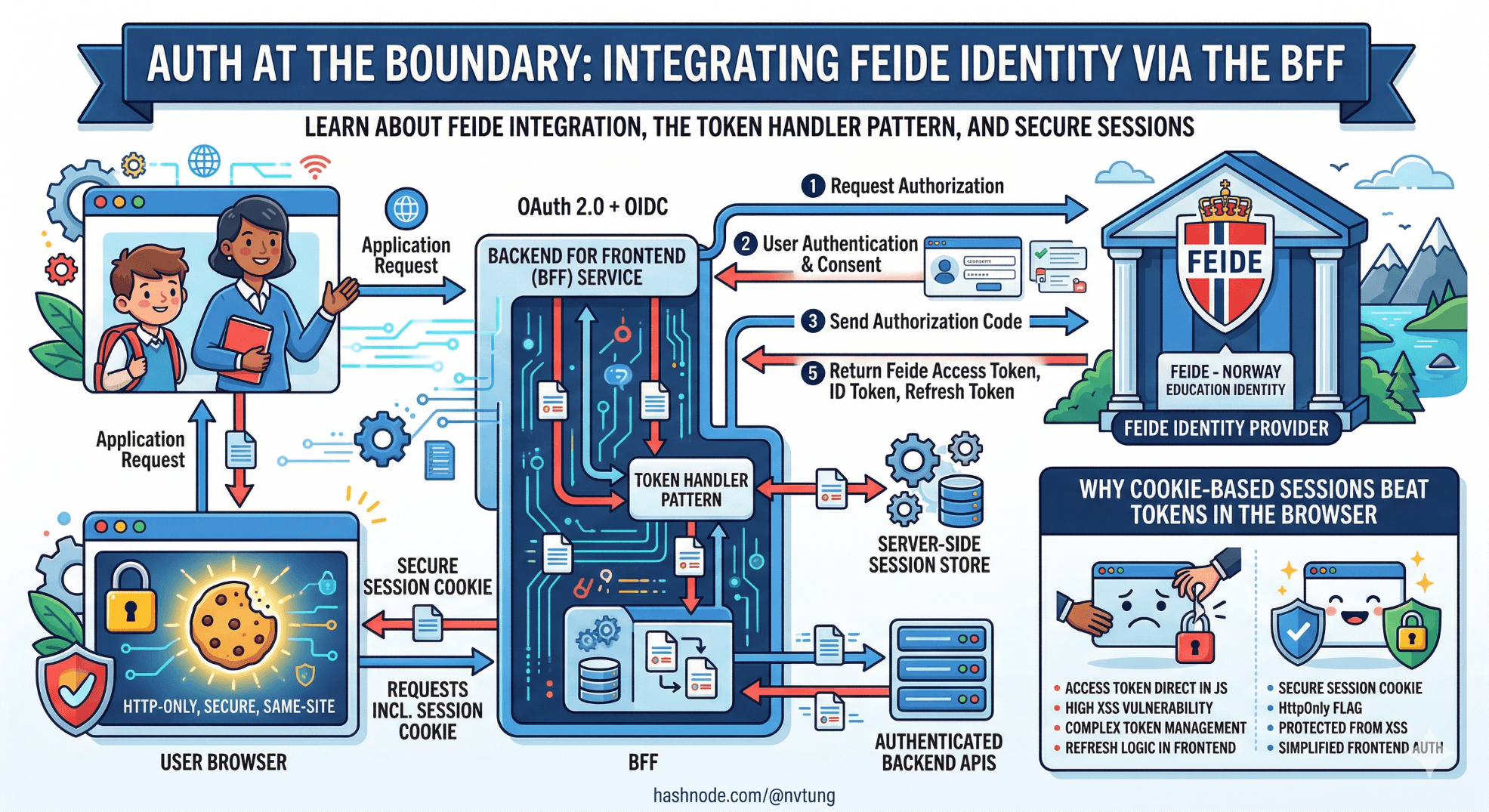
A note on the code in this article. The implementation shown here is derived from a production authentication integration built for a Norwegian enterprise education platform using Feide as the identity provider. Tenant identifiers, internal endpoint paths, and certain configuration details have been generalised to meet NDA obligations. The OAuth 2.0 / OIDC flow, Token Handler pattern implementation, session management strategy, and the specific failure modes each decision addresses are drawn directly from what was deployed and operated in production.
Authentication is the decision in a BFF architecture where getting it wrong is most expensive to undo. A poorly designed aggregation layer can be refactored incrementally. A poorly designed authentication boundary — tokens in the browser, session management scattered across client and server, a leaky security perimeter — creates vulnerabilities that propagate into every part of the system and are painful to retrofit.
This article covers the authentication architecture for the education platform at the centre of this series. The identity provider is Feide — the Norwegian government-issued federated identity system used by educational institutions across Norway, from primary schools to universities. Feide is OIDC-compliant and follows standard OAuth 2.0 flows, but its institutional context introduces specific requirements around organisation-scoped claims and role hierarchies that shape implementation decisions.
The core argument of this article: the BFF is the right place to own authentication, tokens should never reach the browser, and cookie-based sessions managed server-side are more secure and simpler to reason about than browser-held tokens — despite what the proliferation of JWT-in-localStorage tutorials might suggest.
Why tokens in the browser are the wrong model
Before the implementation, the security argument deserves to be made explicitly, because the alternative — storing access tokens in localStorage or sessionStorage and attaching them to requests from the Vue application — is common, documented in many identity provider tutorials, and genuinely wrong for this class of application.
The problem is the browser's threat model. localStorage is accessible to any JavaScript running on the page. In a complex web application with third-party dependencies — analytics scripts, support widgets, UI libraries — the attack surface for cross-site scripting is real. A single XSS vulnerability in any dependency gives an attacker access to every token in storage. An access token for Feide, which carries institutional identity and role claims, is a meaningful target in an education context.

HttpOnly cookies are not accessible to JavaScript at all. An XSS attack that compromises a page's JavaScript cannot read an HttpOnly cookie. The cookie is attached to requests by the browser's network stack, not by application code. This does not eliminate all attack vectors — CSRF remains a concern — but it removes the entire class of token theft via script injection, which is the higher-probability attack.
The Token Handler pattern implements this correctly: the BFF holds the access token server-side, issues a session cookie to the browser, and exchanges the cookie for the token on every upstream API call. The browser never sees the token. The Vue application never handles authentication directly. This is not additional complexity — it is relocating complexity from the browser (where it cannot be properly secured) to the server (where it can).
Feide: what it is and what it provides
Feide (Felles Elektronisk IDentitet — common electronic identity) is the identity federation service operated by Sikt for Norwegian educational institutions. It provides federated single sign-on across universities, university colleges, and primary and secondary schools. An institution's staff and students authenticate with their institutional credentials; Feide issues identity tokens that carry organisation membership, role information, and a persistent identifier that is stable across sessions.

For an education platform, this means:
Users authenticate once with their institution's credentials — no separate account registration
The platform receives verified organisational membership and role claims (
eduPersonAffiliation,eduPersonPrimaryAffiliation,orgMembership)A stable, pseudonymous identifier (
feidePersonPrincipalName, typicallyusername@institution.no) is available for user recordsThe platform can scope data access by institution without maintaining its own organisation identity store
Feide exposes a standard OIDC provider at https://auth.dataporten.no. The integration uses the Authorization Code flow with PKCE, which is the correct flow for server-side applications that can keep a client secret. The production system used Feide's Dataporten platform, which wraps Feide identity with additional APIs for group membership and course data — though those APIs are not covered here as they are specific to the platform's data architecture.
The authentication flow, end to end
The full flow involves four parties: the Vue application (browser), the BFF (.NET Core), Feide (the identity provider), and the upstream services.

The browser participates in the OIDC flow via redirects only — it is never given a token. The BFF holds all three tokens (access, ID, refresh) in an encrypted server-side session. The Vue application interacts with the BFF exclusively via its session cookie.
Setting up OIDC in .NET Core
Install the required packages:
dotnet add package Microsoft.AspNetCore.Authentication.OpenIdConnect
dotnet add package Microsoft.AspNetCore.Authentication.Cookies
The authentication configuration in Program.cs:
// Program.cs

var feideConfig = builder.Configuration.GetSection("Feide");

builder.Services
    .AddAuthentication(options =>
    {
        options.DefaultScheme = CookieAuthenticationDefaults.AuthenticationScheme;
        options.DefaultChallengeScheme = OpenIdConnectDefaults.AuthenticationScheme;
    })
    .AddCookie(CookieAuthenticationDefaults.AuthenticationScheme, options =>
    {
        options.Cookie.Name = "__bff_session";
        options.Cookie.HttpOnly = true;
        options.Cookie.SecurePolicy = CookieSecurePolicy.Always;
        options.Cookie.SameSite = SameSiteMode.Strict;
        options.Cookie.MaxAge = TimeSpan.FromHours(8); // Align with Feide session lifetime
        options.SlidingExpiration = true;
        options.ExpireTimeSpan = TimeSpan.FromHours(8);

        // Redirect API requests to 401 instead of the login page
        options.Events.OnRedirectToLogin = ctx =>
        {
            if (ctx.Request.Path.StartsWithSegments("/api"))
            {
                ctx.Response.StatusCode = StatusCodes.Status401Unauthorized;
                return Task.CompletedTask;
            }
            ctx.Response.Redirect(ctx.RedirectUri);
            return Task.CompletedTask;
        };
    })
    .AddOpenIdConnect(OpenIdConnectDefaults.AuthenticationScheme, options =>
    {
        options.Authority = feideConfig["Authority"]; // https://auth.dataporten.no
        options.ClientId = feideConfig["ClientId"];
        options.ClientSecret = feideConfig["ClientSecret"];

        options.ResponseType = OpenIdConnectResponseType.Code; // Auth Code flow
        options.UsePkce = true;

        options.Scope.Clear();
        options.Scope.Add("openid");
        options.Scope.Add("profile");
        options.Scope.Add("email");
        options.Scope.Add("groups");        // Feide group membership
        options.Scope.Add("userinfo-feide"); // Feide-specific claims

        options.CallbackPath = "/auth/callback";
        options.SignedOutCallbackPath = "/auth/signout-callback";

        options.SaveTokens = true; // Stores tokens in the session — critical for Token Handler

        options.GetClaimsFromUserInfoEndpoint = true;

        // Map Feide-specific claims to standard .NET claim types
        options.ClaimActions.MapJsonKey(ClaimTypes.Email, "email");
        options.ClaimActions.MapJsonKey("feide:orgid", "eduPersonOrgDN");
        options.ClaimActions.MapJsonKey("feide:role", "eduPersonPrimaryAffiliation");
        options.ClaimActions.MapJsonKey("feide:principal", "feidePersonPrincipalName");

        options.TokenValidationParameters = new TokenValidationParameters
        {
            NameClaimType = "feidePersonPrincipalName",
            RoleClaimType = "eduPersonAffiliation"
        };

        options.Events = new OpenIdConnectEvents
        {
            OnTokenValidated = ctx =>
            {
                // Add the Feide principal name as the NameIdentifier claim
                // so ctx.User.FindFirstValue(ClaimTypes.NameIdentifier) works
                // consistently throughout the BFF
                var principal = ctx.Principal!;
                var feidePrincipal = principal.FindFirstValue("feidePersonPrincipalName");
                if (feidePrincipal is not null)
                {
                    var identity = (ClaimsIdentity)principal.Identity!;
                    identity.AddClaim(new Claim(ClaimTypes.NameIdentifier, feidePrincipalName));
                }
                return Task.CompletedTask;
            },

            OnAuthenticationFailed = ctx =>
            {
                var logger = ctx.HttpContext.RequestServices
                    .GetRequiredService<ILogger<Program>>();
                logger.LogError(ctx.Exception,
                    "Feide authentication failed. CorrelationId: {CorrelationId}",
                    ctx.HttpContext.TraceIdentifier);
                ctx.Response.Redirect("/auth/error");
                ctx.HandleResponse();
                return Task.CompletedTask;
            }
        };
    });

builder.Services.AddAuthorization();
Three decisions in this configuration deserve attention.
SaveTokens = true is the Token Handler pivot. This instructs the OIDC middleware to persist the access token, ID token, and refresh token in the encrypted cookie session. The BFF retrieves the access token from the session on every upstream API call. Without this, the token exchange would need to be implemented manually.
The OnRedirectToLogin event handler separates browser and API requests. Without this, a request to /api/dashboard with an expired session returns a 302 redirect to the Feide login page — which the fetch call in the Vue composable receives as a 200 with HTML content and breaks silently. The handler returns a clean 401 for API paths, which the useApi composable handles explicitly.
Claim mapping from Feide-specific types to standard .NET claim types. Feide's userinfo endpoint returns claims with LDAP-style keys (eduPersonPrimaryAffiliation, feidePersonPrincipalName). The ClaimActions.MapJsonKey calls map these to keys the BFF's claim-reading code can use consistently. The OnTokenValidated event ensures ClaimTypes.NameIdentifier is set from the Feide principal name — so the user ID extraction in every aggregator (ctx.User.FindFirstValue(ClaimTypes.NameIdentifier)) works without Feide-specific knowledge.

The auth endpoints
Three endpoints handle the authentication lifecycle:
// Endpoints/AuthEndpoints.cs
public static class AuthEndpoints
{
    public static IEndpointRouteBuilder MapAuthEndpoints(
        this IEndpointRouteBuilder app)
    {
        app.MapGet("/auth/login", LoginAsync);
        app.MapGet("/auth/logout", LogoutAsync).RequireAuthorization();
        app.MapGet("/auth/me", GetCurrentUserAsync).RequireAuthorization();

        return app;
    }

    // Triggers the OIDC challenge — redirects to Feide
    private static IResult LoginAsync(HttpContext ctx)
    {
        var returnUrl = ctx.Request.Query["returnUrl"].FirstOrDefault() ?? "/";

        // Validate returnUrl to prevent open redirects
        if (!Uri.TryCreate(returnUrl, UriKind.Relative, out _))
            returnUrl = "/";

        return Results.Challenge(
            new AuthenticationProperties { RedirectUri = returnUrl },
            [OpenIdConnectDefaults.AuthenticationScheme]);
    }

    // Signs out locally and triggers Feide end-session endpoint
    private static async Task<IResult> LogoutAsync(HttpContext ctx)
    {
        await ctx.SignOutAsync(CookieAuthenticationDefaults.AuthenticationScheme);
        return Results.SignOut(
            new AuthenticationProperties { RedirectUri = "/" },
            [OpenIdConnectDefaults.AuthenticationScheme]);
    }

    // Returns the current user's profile — consumed by the Vue session store
    private static IResult GetCurrentUserAsync(HttpContext ctx)
    {
        var user = ctx.User;

        var profile = new AuthenticatedUserResponse(
            PrincipalName: user.FindFirstValue("feidePersonPrincipalName")!,
            DisplayName: user.FindFirstValue(ClaimTypes.Name)
                ?? user.FindFirstValue("feidePersonPrincipalName")!,
            Email: user.FindFirstValue(ClaimTypes.Email),
            Role: TranslateFeideRole(user.FindFirstValue("feidePersonPrincipalName")!,
                  user.FindFirstValue("eduPersonPrimaryAffiliation")),
            OrgId: ExtractOrgId(user.FindFirstValue("eduPersonOrgDN"))
        );

        return Results.Ok(profile);
    }

    private static string TranslateFeideRole(string principal, string? affiliationCode) =>
        affiliationCode switch
        {
            "staff"    => "Teacher",
            "student"  => "Student",
            "faculty"  => "Teacher",
            "employee" => "Staff",
            _          => "Unknown"
        };

    // eduPersonOrgDN is an LDAP DN: dc=uninett,dc=no → extract org identifier
    private static string? ExtractOrgId(string? orgDn)
    {
        if (orgDn is null) return null;
        var parts = orgDn.Split(',');
        return parts.FirstOrDefault(p => p.StartsWith("dc=", StringComparison.OrdinalIgnoreCase))
            ?.Split('=').ElementAtOrDefault(1);
    }
}
The /auth/me endpoint is what the Vue session store calls on application load to hydrate the user profile. It reads from the claims already in the session — no upstream call required. This is fast and safe: the session cookie validates the user's identity; the claims in the cookie provide the profile data.
The Token Handler: forwarding tokens to upstream services
The most important implementation detail in this architecture is how the access token — held server-side in the session — is forwarded to upstream services on behalf of the authenticated user.
The Token Handler is a DelegatingHandler that intercepts every HttpClient call and attaches the access token from the current user's session:
// Infrastructure/FeideTokenHandler.cs
public sealed class FeideTokenHandler(IHttpContextAccessor contextAccessor)
    : DelegatingHandler
{
    protected override async Task<HttpResponseMessage> SendAsync(
        HttpRequestMessage request,
        CancellationToken ct)
    {
        var ctx = contextAccessor.HttpContext;

        if (ctx?.User.Identity?.IsAuthenticated == true)
        {
            // Retrieve the access token stored by SaveTokens = true
            var accessToken = await ctx.GetTokenAsync(
                CookieAuthenticationDefaults.AuthenticationScheme,
                "access_token");

            if (accessToken is not null)
            {
                request.Headers.Authorization =
                    new AuthenticationHeaderValue("Bearer", accessToken);
            }
            else
            {
                // Token missing from session — likely expired without refresh
                // Log and let the upstream return 401, which the BFF maps to a 503
                var logger = ctx.RequestServices
                    .GetRequiredService<ILogger<FeideTokenHandler>>();
                logger.LogWarning(
                    "Access token not available in session for user {User}. " +
                    "Request to {RequestUri} will proceed without authorization header.",
                    ctx.User.FindFirstValue(ClaimTypes.NameIdentifier),
                    request.RequestUri);
            }
        }

        return await base.SendAsync(request, ct);
    }
}
Register it as a transient service and attach it to every typed client:
// Program.cs
builder.Services.AddTransient<FeideTokenHandler>();

builder.Services.AddHttpClient<CourseServiceClient>(client =>
    client.BaseAddress = new Uri(builder.Configuration["Services:CourseService:BaseUrl"]!))
    .AddHttpMessageHandler<FeideTokenHandler>()
    .AddStandardResilienceHandler();

builder.Services.AddHttpClient<SessionServiceClient>(client =>
    client.BaseAddress = new Uri(builder.Configuration["Services:SessionService:BaseUrl"]!))
    .AddHttpMessageHandler<FeideTokenHandler>()
    .AddStandardResilienceHandler();

// Repeat for every upstream client
The FeideTokenHandler is registered once and applied to every HTTP client that calls authenticated upstream services. The upstream services receive a standard Bearer token in the Authorization header — they never know or care that the token came from a server-side session rather than a browser-held JWT.
Token refresh: handling expiry transparently
Feide access tokens have a limited lifetime. In the production system, tokens expired after one hour. A user with an active eight-hour session must have their token refreshed transparently without being redirected to Feide to re-authenticate.
The refresh is handled by an OIDC events hook that fires when the cookie session is validated:
// Infrastructure/TokenRefreshService.cs
public sealed class TokenRefreshService(IHttpClientFactory httpClientFactory)
{
    public async Task<bool> TryRefreshAsync(HttpContext ctx)
    {
        var refreshToken = await ctx.GetTokenAsync(
            CookieAuthenticationDefaults.AuthenticationScheme,
            "refresh_token");

        if (refreshToken is null) return false;

        var client = httpClientFactory.CreateClient();
        var feideAuthority = ctx.RequestServices
            .GetRequiredService<IConfiguration>()["Feide:Authority"];

        var tokenResponse = await client.PostAsync(
            $"{feideAuthority}/openid/token",
            new FormUrlEncodedContent(new Dictionary<string, string>
            {
                ["grant_type"]    = "refresh_token",
                ["refresh_token"] = refreshToken,
                ["client_id"]     = ctx.RequestServices
                    .GetRequiredService<IConfiguration>()["Feide:ClientId"]!,
                ["client_secret"] = ctx.RequestServices
                    .GetRequiredService<IConfiguration>()["Feide:ClientSecret"]!
            }));

        if (!tokenResponse.IsSuccessStatusCode)
        {
            var logger = ctx.RequestServices.GetRequiredService<ILogger<TokenRefreshService>>();
            logger.LogWarning(
                "Token refresh failed for user {User}. Status: {Status}. " +
                "User will need to re-authenticate.",
                ctx.User.FindFirstValue(ClaimTypes.NameIdentifier),
                tokenResponse.StatusCode);
            return false;
        }

        var tokens = await tokenResponse.Content
            .ReadFromJsonAsync<TokenRefreshResponse>();

        // Update the tokens stored in the session
        var authResult = await ctx.AuthenticateAsync(
            CookieAuthenticationDefaults.AuthenticationScheme);

        if (authResult?.Properties is null) return false;

        authResult.Properties.UpdateTokenValue("access_token", tokens!.AccessToken);
        authResult.Properties.UpdateTokenValue("expires_at",
            DateTimeOffset.UtcNow
                .AddSeconds(tokens.ExpiresIn)
                .ToString("o"));

        if (tokens.RefreshToken is not null)
            authResult.Properties.UpdateTokenValue("refresh_token", tokens.RefreshToken);

        await ctx.SignInAsync(
            CookieAuthenticationDefaults.AuthenticationScheme,
            authResult.Principal!,
            authResult.Properties);

        return true;
    }

    private sealed record TokenRefreshResponse(
        [property: JsonPropertyName("access_token")] string AccessToken,
        [property: JsonPropertyName("expires_in")] int ExpiresIn,
        [property: JsonPropertyName("refresh_token")] string? RefreshToken
    );
}
Wire the refresh into the FeideTokenHandler, so it fires automatically when the token is close to expiry:
// Infrastructure/FeideTokenHandler.cs — updated
public sealed class FeideTokenHandler(
    IHttpContextAccessor contextAccessor,
    TokenRefreshService tokenRefresh)
    : DelegatingHandler
{
    protected override async Task<HttpResponseMessage> SendAsync(
        HttpRequestMessage request,
        CancellationToken ct)
    {
        var ctx = contextAccessor.HttpContext;

        if (ctx?.User.Identity?.IsAuthenticated == true)
        {
            var expiresAt = await ctx.GetTokenAsync(
                CookieAuthenticationDefaults.AuthenticationScheme,
                "expires_at");

            // Refresh proactively if within 5 minutes of expiry
            if (DateTimeOffset.TryParse(expiresAt, out var expiry)
                && expiry < DateTimeOffset.UtcNow.AddMinutes(5))
            {
                await tokenRefresh.TryRefreshAsync(ctx);
            }

            var accessToken = await ctx.GetTokenAsync(
                CookieAuthenticationDefaults.AuthenticationScheme,
                "access_token");

            if (accessToken is not null)
                request.Headers.Authorization =
                    new AuthenticationHeaderValue("Bearer", accessToken);
        }

        return await base.SendAsync(request, ct);
    }
}
The five-minute proactive refresh window prevents the edge case where a token expires between the check and the upstream call completing. The refresh is synchronous within the handler, which adds latency to requests that trigger it — in practice, this happens at most once per hour per user, and the upstream call still completes successfully.
Register TokenRefreshService:
builder.Services.AddTransient<TokenRefreshService>();
CSRF protection
SameSite=Strict on the session cookie is the first line of CSRF defence — cross-site requests do not include the cookie at all. For the production system, where the Vue application and the BFF share an origin (same domain, served behind Azure Front Door), SameSite=Strict was sufficient.
For deployments where the Vue application and BFF are on different subdomains, SameSite=Lax is required, and explicit CSRF token validation is necessary. The BFF generates a CSRF token, sets it in a non-HttpOnly cookie (so the Vue application's JavaScript can read it), and the Vue apiClient attaches it as a request header:
// Middleware/CsrfMiddleware.cs
public sealed class CsrfMiddleware(RequestDelegate next, IAntiforgery antiforgery)
{
    public async Task InvokeAsync(HttpContext ctx)
    {
        if (ctx.Request.Path.StartsWithSegments("/api")
            && !HttpMethods.IsGet(ctx.Request.Method)
            && !HttpMethods.IsHead(ctx.Request.Method))
        {
            await antiforgery.ValidateRequestAsync(ctx);
        }

        // Set the CSRF token cookie on every response so Vue can read it
        var tokens = antiforgery.GetAndStoreTokens(ctx);
        ctx.Response.Cookies.Append("XSRF-TOKEN", tokens.RequestToken!, new CookieOptions
        {
            HttpOnly = false, // Must be readable by JavaScript
            Secure = true,
            SameSite = SameSiteMode.Lax
        });

        await next(ctx);
    }
}
In the Vue apiClient, the CSRF token is read from the cookie and attached to mutation requests:
// src/api/client.ts — CSRF-aware post
function getCsrfToken(): string | null {
  const match = document.cookie.match(/XSRF-TOKEN=([^;]+)/)
  return match ? decodeURIComponent(match[1]) : null
}

export const apiClient = {
  async post<T>(path: string, body: unknown, init?: RequestInit): Promise<T> {
    const csrfToken = getCsrfToken()
    const response = await fetch(`/api${path}`, {
      ...init,
      method: 'POST',
      headers: {
        'Content-Type': 'application/json',
        'Accept': 'application/json',
        ...(csrfToken ? { 'X-XSRF-TOKEN': csrfToken } : {}),
        ...init?.headers
      },
      body: JSON.stringify(body),
      credentials: 'include'
    })
    return handleResponse<T>(response)
  }
}
In the production system, the shared-origin deployment made this unnecessary. It is included here because the pattern is needed the moment the deployment topology changes.
The Vue session store: connecting auth to the UI
The Vue application needs to know whether the user is authenticated, and if so, who they are. The session store from Article 5 calls the /auth/me endpoint on application startup:
// src/stores/session.ts
import { defineStore } from 'pinia'
import { ref, computed } from 'vue'
import { apiClient, ApiResponseError } from '@/api/client'
import type { AuthenticatedUserResponse } from '@/api/types'

export const useSessionStore = defineStore('session', () => {
  const profile = ref<AuthenticatedUserResponse | null>(null)
  const isAuthenticated = computed(() => profile.value !== null)
  const isLoading = ref(false)

  async function initialise() {
    isLoading.value = true
    try {
      profile.value = await apiClient.get<AuthenticatedUserResponse>('/auth/me')
    } catch (e) {
      if (e instanceof ApiResponseError && e.status === 401) {
        // Not authenticated — expected on first visit
        profile.value = null
      } else {
        // Unexpected error — log but do not block the application
        console.error('Session initialisation failed:', e)
        profile.value = null
      }
    } finally {
      isLoading.value = false
    }
  }

  function redirectToLogin(returnUrl = window.location.pathname) {
    window.location.href = `/auth/login?returnUrl=${encodeURIComponent(returnUrl)}`
  }

  function clearSession() {
    profile.value = null
    window.location.href = '/auth/logout'
  }

  return {
    profile,
    isAuthenticated,
    isLoading,
    initialise,
    redirectToLogin,
    clearSession
  }
})
Initialise the store in App.vue before rendering protected routes:
<!-- src/App.vue -->
<script setup lang="ts">
import { onMounted } from 'vue'
import { useSessionStore } from '@/stores/session'

const session = useSessionStore()
onMounted(() => session.initialise())
</script>
And protect routes with a navigation guard:
// src/router/index.ts
import { useSessionStore } from '@/stores/session'

router.beforeEach(async (to) => {
  if (!to.meta.requiresAuth) return true

  const session = useSessionStore()

  // Wait for session to initialise on first navigation
  if (session.isLoading) {
    await new Promise<void>(resolve => {
      const stop = watch(session.isLoading, loading => {
        if (!loading) { stop(); resolve() }
      })
    })
  }

  if (!session.isAuthenticated) {
    session.redirectToLogin(to.fullPath)
    return false
  }

  return true
})
The navigation guard waits for the session initialisation to complete before evaluating authentication status. Without this wait, a page refresh on a protected route redirects to login before the /auth/me response has returned — even for authenticated users.
The appsettings configuration
// appsettings.json
{
  "Feide": {
    "Authority": "https://auth.dataporten.no",
    "ClientId": "",
    "ClientSecret": ""
  }
}
ClientId and ClientSecret are empty in appsettings.json and are never committed to source control. In Azure Container Instances, they are injected as environment variables:
Feide__ClientId       → injected from Azure Key Vault reference
Feide__ClientSecret   → injected from Azure Key Vault reference
.NET's configuration system maps double-underscore environment variable names to nested JSON paths, so Feide__ClientId maps to Feide.ClientId. Article 7 covers the Key Vault reference configuration in the ACI deployment pipeline.
What the production system learned about Feide integration
Several decisions were revised during the production deployment:
The session cookie lifetime must align with Feide's session. An early implementation used a 24-hour cookie with a one-hour Feide access token and no refresh logic. The result: after one hour, the session cookie was valid but the access token was expired. Every upstream call returned 401. The fix — proactive token refresh in the FeideTokenHandler — was added in the second sprint after first deployment. The current eight-hour cookie lifetime and five-minute refresh window are the values that matched observed usage patterns.
GetClaimsFromUserInfoEndpoint = true is required for Feide-specific claims. The standard ID token from Feide does not include organisation membership or affiliation claims — these come from the Feide userinfo endpoint. Without GetClaimsFromUserInfoEndpoint = true, the BFF receives only the standard OIDC claims and the role translation returns "Unknown" for every user. This was a non-obvious configuration gap that took half a day to diagnose in the staging environment.
The OnRedirectToLogin event handler is not optional. Before it was added, the Vue application's composables received HTML login-page redirects as successful 200 responses. The useDashboard composable silently failed to parse HTML as JSON, data.value remained null, and the dashboard rendered in a permanently loading state. The fix was the API-path 401 handler in the cookie options — immediate and unambiguous failure is more debuggable than silent null data.

What comes next
With authentication established at the BFF boundary, the next article addresses deployment: building the Docker image, publishing artifacts through the pipeline, and running the BFF on Azure Container Instances — including environment variable injection for secrets and the health probe configuration that keeps the container in rotation when it is healthy and out of it when it is not.




