

Shipping BFF to Azure: Docker Images, Artifact Publishing & Azure Container Instances
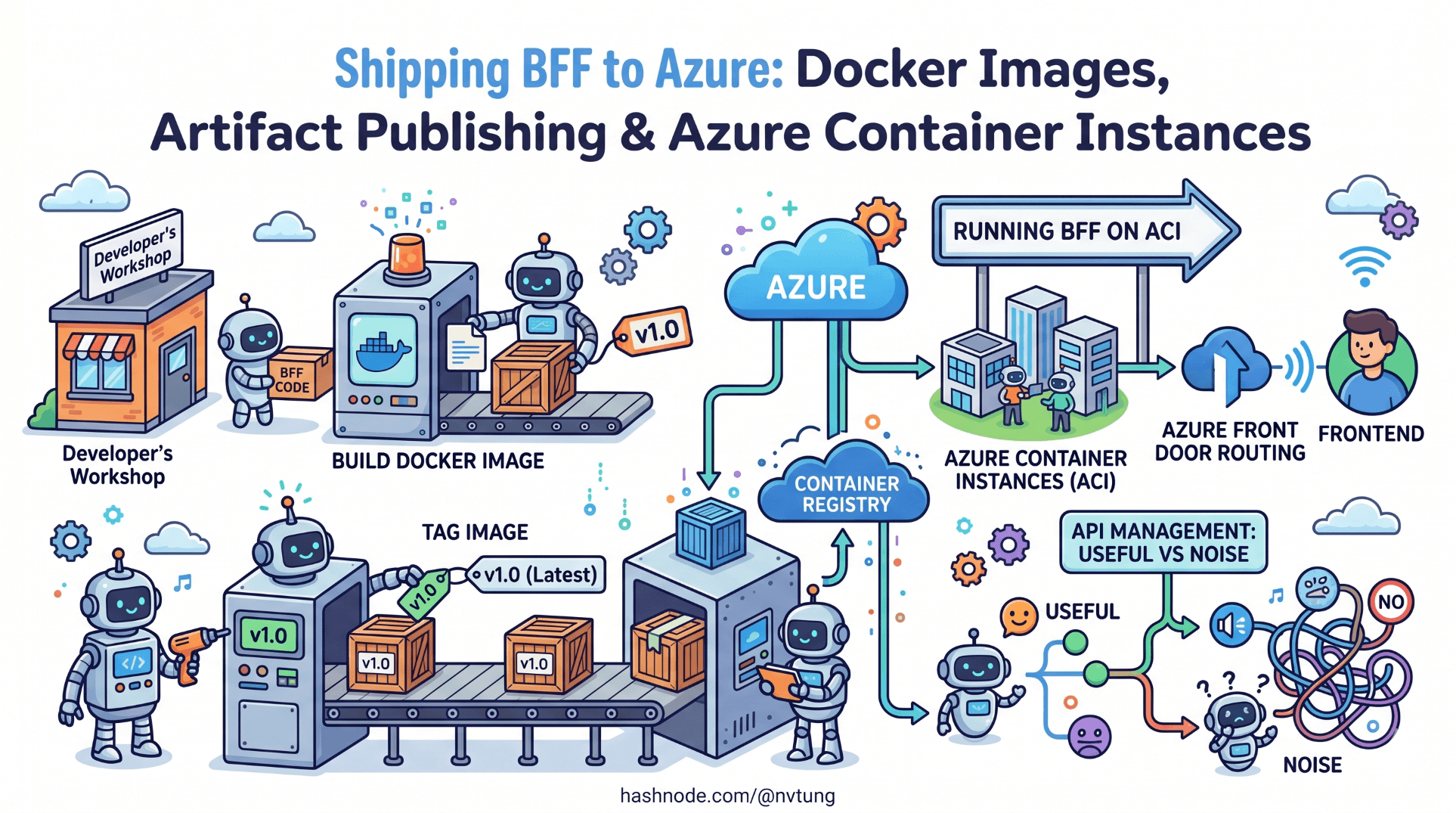
Full IaaS deployment pipeline — building and tagging Docker images, publishing artifacts, and running the BFF on Azure Container Instances. Includes Azure Front Door routing and when API Management adds value vs noise.
A note on the code in this article. The pipeline configuration, Dockerfile, and infrastructure definitions shown here are derived from a production deployment built for a Norwegian enterprise education platform. Registry names, resource group identifiers, subscription IDs, and certain environment-specific configuration values have been generalised to meet NDA obligations. The deployment strategy, container configuration, secret management approach, and the specific operational decisions each choice addresses are drawn directly from what was deployed and operated in production.
The BFF is built. Authentication works. The Vue application consumes the API layer cleanly. What remains is getting all of it into production reliably, repeatedly, and without the kind of manual steps that turn deployments into incidents.
This article covers the full deployment pipeline: writing a production-grade Dockerfile for the .NET Core BFF, building and tagging images in CI, pushing to Azure Container Registry, and running the service on Azure Container Instances. It then covers the routing layer — Azure Front Door in front of the BFF — and addresses the APIM question directly: when it adds genuine value and when it adds cost without benefit.
The deployment approach is IaaS rather than PaaS. Azure Container Instances was chosen over App Service because the production system needed predictable container isolation, direct control over the runtime environment, and a deployment model where the exact image that passed CI is the exact image running in production. ACI provides all three without the operational overhead of a full Kubernetes cluster.
The Dockerfile
The BFF Dockerfile uses a multi-stage build. The first stage compiles and publishes the application. The second stage runs it. The published output from the first stage is the only thing copied into the final image — build tools, SDK, and intermediate files stay out of the production image entirely.
# Dockerfile

# ── Stage 1: Build ────────────────────────────────────────────────────────────
FROM mcr.microsoft.com/dotnet/sdk:8.0-alpine AS build
WORKDIR /src

# Copy project file and restore dependencies separately from source
# This layer is cached as long as the .csproj does not change
COPY ["EducationPlatform.Bff/EducationPlatform.Bff.csproj", "EducationPlatform.Bff/"]
RUN dotnet restore "EducationPlatform.Bff/EducationPlatform.Bff.csproj" \
    --runtime linux-musl-x64

# Copy source and publish
COPY . .
WORKDIR "/src/EducationPlatform.Bff"
RUN dotnet publish "EducationPlatform.Bff.csproj" \
    --configuration Release \
    --runtime linux-musl-x64 \
    --self-contained true \
    --output /app/publish \
    -p:PublishSingleFile=true \
    -p:PublishTrimmed=true

# ── Stage 2: Runtime ──────────────────────────────────────────────────────────
FROM mcr.microsoft.com/dotnet/runtime-deps:8.0-alpine AS runtime
WORKDIR /app

# Create non-root user — never run production containers as root
RUN addgroup -S bff && adduser -S bff -G bff
USER bff

# Copy only the published output from the build stage
COPY --from=build --chown=bff:bff /app/publish .

# Health check — ACI uses this to determine container readiness
HEALTHCHECK --interval=30s --timeout=5s --start-period=10s --retries=3 \
    CMD wget --no-verbose --tries=1 --spider http://localhost:8080/health/live || exit 1

EXPOSE 8080
ENV ASPNETCORE_URLS=http://+:8080

ENTRYPOINT ["./EducationPlatform.Bff"]
Several decisions here warrant explanation.
Alpine base with linux-musl-x64 runtime and --self-contained true. The Alpine image is significantly smaller than the default Debian-based image — the final runtime image sits around 90MB rather than 300MB. Self-contained publishing includes the .NET runtime in the output, which means the runtime image does not need a .NET runtime layer at all. The runtime-deps base image provides only the native dependencies that a self-contained .NET binary requires.
PublishSingleFile=true and PublishTrimmed=true. Single-file publishing packages the application and its dependencies into one executable. Trimming removes unused framework code from the output. Together they reduce the published output to roughly a third of an untrimmed multi-file publish. In a deployment model where the image is rebuilt and repushed on every merge to main, smaller images mean faster pushes and faster container starts.
Non-root user. Running as root inside a container is a security risk that is trivially avoidable. The adduser step creates a dedicated system user; the COPY --chown ensures the published files are owned by that user. ACI does not require root for any of the operations the BFF performs.
HEALTHCHECK directive. The health check command uses wget — available in Alpine — rather than curl, which is not included by default. The /health/live endpoint was defined in Article 4; it returns 200 if the process is responsive, without checking upstream dependencies. ACI monitors this endpoint to determine whether the container should receive traffic.
The CI pipeline
The production system used GitHub Actions. The pipeline has three jobs: build-and-test, docker-build-and-push, and deploy-to-aci. The jobs run sequentially — deployment only proceeds if the tests pass and the image is published successfully.
# .github/workflows/deploy.yml
name: Build and Deploy BFF

on:
  push:
    branches: [main]
  pull_request:
    branches: [main]

env:
  REGISTRY: educationplatformbff.azurecr.io
  IMAGE_NAME: bff
  RESOURCE_GROUP: rg-education-platform-prod
  CONTAINER_GROUP: cg-bff-prod
  CONTAINER_NAME: bff

jobs:
  # ── Job 1: Build and test ───────────────────────────────────────────────────
  build-and-test:
    runs-on: ubuntu-latest
    steps:
      - uses: actions/checkout@v4

      - name: Setup .NET 8
        uses: actions/setup-dotnet@v4
        with:
          dotnet-version: '8.0.x'

      - name: Restore dependencies
        run: dotnet restore

      - name: Build
        run: dotnet build --no-restore --configuration Release

      - name: Run tests
        run: dotnet test --no-build --configuration Release --verbosity normal

      # Generate OpenAPI spec and validate Vue types in CI
      - name: Setup Node.js
        uses: actions/setup-node@v4
        with:
          node-version: '20'

      - name: Install Vue dependencies
        working-directory: ./frontend
        run: npm ci

      - name: Start BFF for type generation
        run: |
          dotnet run --project EducationPlatform.Bff \
            --configuration Release &
          sleep 8  # Wait for startup

      - name: Generate API types
        working-directory: ./frontend
        run: npm run generate:api:ci
        env:
          BFF_SWAGGER_URL: http://localhost:8080/swagger/v1/swagger.json

      - name: TypeScript type check
        working-directory: ./frontend
        run: npx tsc --noEmit

  # ── Job 2: Build and push Docker image ─────────────────────────────────────
  docker-build-and-push:
    runs-on: ubuntu-latest
    needs: build-and-test
    if: github.ref == 'refs/heads/main'  # Push only on main, not PRs
    outputs:
      image-tag: ${{ steps.meta.outputs.tags }}
      image-digest: ${{ steps.build-push.outputs.digest }}

    steps:
      - uses: actions/checkout@v4

      - name: Login to Azure Container Registry
        uses: azure/docker-login@v1
        with:
          login-server: ${{ env.REGISTRY }}
          username: ${{ secrets.ACR_USERNAME }}
          password: ${{ secrets.ACR_PASSWORD }}

      - name: Extract metadata for Docker
        id: meta
        uses: docker/metadata-action@v5
        with:
          images: \({{ env.REGISTRY }}/\){{ env.IMAGE_NAME }}
          tags: |
            type=sha,prefix=,format=short
            type=raw,value=latest,enable={{is_default_branch}}

      - name: Build and push Docker image
        id: build-push
        uses: docker/build-push-action@v5
        with:
          context: .
          push: true
          tags: ${{ steps.meta.outputs.tags }}
          labels: ${{ steps.meta.outputs.labels }}
          cache-from: type=gha
          cache-to: type=gha,mode=max

  # ── Job 3: Deploy to Azure Container Instances ──────────────────────────────
  deploy-to-aci:
    runs-on: ubuntu-latest
    needs: docker-build-and-push
    if: github.ref == 'refs/heads/main'
    environment: production

    steps:
      - name: Login to Azure
        uses: azure/login@v1
        with:
          creds: ${{ secrets.AZURE_CREDENTIALS }}

      - name: Deploy to Azure Container Instances
        uses: azure/cli@v1
        with:
          azcliversion: latest
          inlineScript: |
            az container create \
              --resource-group ${{ env.RESOURCE_GROUP }} \
              --name ${{ env.CONTAINER_GROUP }} \
              --image \({{ env.REGISTRY }}/\){{ env.IMAGE_NAME }}:${{ github.sha }} \
              --registry-login-server ${{ env.REGISTRY }} \
              --registry-username ${{ secrets.ACR_USERNAME }} \
              --registry-password ${{ secrets.ACR_PASSWORD }} \
              --cpu 1 \
              --memory 1.5 \
              --ports 8080 \
              --protocol TCP \
              --restart-policy Always \
              --environment-variables \
                ASPNETCORE_ENVIRONMENT=Production \
                Services__UserService__BaseUrl=${{ secrets.USER_SERVICE_URL }} \
                Services__CourseService__BaseUrl=${{ secrets.COURSE_SERVICE_URL }} \
                Services__SessionService__BaseUrl=${{ secrets.SESSION_SERVICE_URL }} \
                Services__NotificationService__BaseUrl=${{ secrets.NOTIFICATION_SERVICE_URL }} \
                ApplicationInsights__ConnectionString=${{ secrets.APPINSIGHTS_CONNECTION_STRING }} \
              --secure-environment-variables \
                Feide__ClientId=${{ secrets.FEIDE_CLIENT_ID }} \
                Feide__ClientSecret=${{ secrets.FEIDE_CLIENT_SECRET }} \
                DataProtection__Key=${{ secrets.DATA_PROTECTION_KEY }} \
              --health-probe-http-path /health/live \
              --health-probe-port 8080 \
              --health-probe-interval-in-seconds 30
Three points on the pipeline design:
The image tag uses the Git commit SHA, not latest. The latest tag is updated in the registry, but the ACI deployment command references the SHA-tagged image explicitly. This means the deployed image and the CI build that produced it are always traceable to a specific commit. A latest deployment is unauditable — you cannot tell from the running container which commit it came from.
--secure-environment-variables for secrets. Azure CLI's az container create accepts two environment variable flags. --environment-variables sets variables that appear in the container's environment and are visible in the Azure portal. --secure-environment-variables sets variables that are injected securely and are not visible after deployment — they do not appear in portal logs or CLI output. All credentials use the secure flag. Service base URLs, which are not secrets, use the standard flag — they are useful to inspect from the portal when debugging connectivity issues.
environment: production on the deploy job. GitHub Environments add a required review gate before the deployment runs. In the production system, merges to main triggered an automatic build and test, but the actual ACI deployment required a manual approval from a second engineer. This is a lightweight but effective change control mechanism.
Data protection: encrypting the session cookie
The BFF uses ASP.NET Core's Data Protection API to encrypt the session cookie that holds the Feide tokens. In a single-instance deployment this works out of the box — the key ring is generated on startup and lives in memory. In a deployment with container restarts or multiple instances, the key ring must be persisted externally, or users are signed out every time the container restarts.
The production system persisted the key ring to Azure Blob Storage:
dotnet add package Microsoft.AspNetCore.DataProtection.AzureStorage
dotnet add package Azure.Storage.Blobs
// Program.cs — Data Protection configuration
var blobServiceClient = new BlobServiceClient(
    builder.Configuration["DataProtection:StorageConnectionString"]);

var containerClient = blobServiceClient.GetBlobContainerClient("data-protection");
await containerClient.CreateIfNotExistsAsync();

builder.Services
    .AddDataProtection()
    .PersistKeysToAzureBlobStorage(containerClient, "bff-keys.xml")
    .SetApplicationName("education-platform-bff")
    .SetDefaultKeyLifetime(TimeSpan.FromDays(90));
The SetApplicationName call is important. Data Protection uses the application name as part of the key derivation. If you deploy two versions of the BFF simultaneously — during a rolling update — they must share the same application name to be able to decrypt each other's cookies. Omitting this caused sign-out loops during the first rolling update in the production system.
Azure Container Registry: image retention policy
The pipeline pushes a new image on every merge to main. Without a retention policy, the registry accumulates images indefinitely. The production system used a lifecycle policy to retain the last 10 images and delete older untagged manifests:
# Set retention policy — keep 10 most recent images, purge after 30 days
az acr config retention update \
  --registry educationplatformbff \
  --status enabled \
  --days 30 \
  --type UntaggedManifests

# One-time cleanup of untagged images older than 1 day
az acr run \
  --registry educationplatformbff \
  --cmd "acr purge --filter 'bff:.*' --untagged --ago 30d" \
  /dev/null
This is housekeeping, but it matters at the registry billing level. Azure Container Registry charges for storage by GB, and a registry that accumulates 200 untagged image layers over six months costs meaningfully more than one that retains 10.
Azure Container Instances: the infrastructure definition
The az container create command in the pipeline creates or updates the container group. For infrastructure that changes infrequently — CPU allocation, memory, port mapping — an ARM template or Bicep definition is more auditable than a long CLI command. The production system used a Bicep definition for the baseline infrastructure, with the CI pipeline overriding only the image tag on each deployment:
// infra/bff-container.bicep
param location string = resourceGroup().location
param imageTag string
param acrLoginServer string
param acrUsername string
@secure()
param acrPassword string
@secure()
param feideClientId string
@secure()
param feideClientSecret string
@secure()
param dataProtectionConnectionString string
param appInsightsConnectionString string
param userServiceUrl string
param courseServiceUrl string
param sessionServiceUrl string
param notificationServiceUrl string

resource containerGroup 'Microsoft.ContainerInstance/containerGroups@2023-05-01' = {
  name: 'cg-bff-prod'
  location: location
  properties: {
    osType: 'Linux'
    restartPolicy: 'Always'

    imageRegistryCredentials: [
      {
        server: acrLoginServer
        username: acrUsername
        password: acrPassword
      }
    ]

    containers: [
      {
        name: 'bff'
        properties: {
          image: '\({acrLoginServer}/bff:\){imageTag}'
          ports: [{ port: 8080, protocol: 'TCP' }]

          resources: {
            requests: { cpu: 1, memoryInGB: 1 }
            limits:   { cpu: 1, memoryInGB: 1 }  // Hard limits — predictable billing
          }

          environmentVariables: [
            { name: 'ASPNETCORE_ENVIRONMENT',              value: 'Production' }
            { name: 'ASPNETCORE_URLS',                     value: 'http://+:8080' }
            { name: 'Services__UserService__BaseUrl',       value: userServiceUrl }
            { name: 'Services__CourseService__BaseUrl',     value: courseServiceUrl }
            { name: 'Services__SessionService__BaseUrl',    value: sessionServiceUrl }
            { name: 'Services__NotificationService__BaseUrl', value: notificationServiceUrl }
            { name: 'ApplicationInsights__ConnectionString', value: appInsightsConnectionString }
            { name: 'Feide__ClientId',      secureValue: feideClientId }
            { name: 'Feide__ClientSecret',  secureValue: feideClientSecret }
            { name: 'DataProtection__StorageConnectionString',
                      secureValue: dataProtectionConnectionString }
          ]

          livenessProbe: {
            httpGet: { path: '/health/live', port: 8080, scheme: 'HTTP' }
            initialDelaySeconds: 10
            periodSeconds: 30
            failureThreshold: 3
          }

          readinessProbe: {
            httpGet: { path: '/health/ready', port: 8080, scheme: 'HTTP' }
            initialDelaySeconds: 5
            periodSeconds: 10
            failureThreshold: 3
          }
        }
      }
    ]

    ipAddress: {
      type: 'Public'
      ports: [{ port: 8080, protocol: 'TCP' }]
      dnsNameLabel: 'education-platform-bff'
    }
  }
}

output containerFqdn string = containerGroup.properties.ipAddress.fqdn
The Bicep definition is committed to the repository. The sensitive parameters are passed at deploy time from GitHub Secrets. This gives you infrastructure-as-code for everything that does not change per deployment, and runtime injection for everything that does.
Azure Front Door: routing and TLS termination
ACI containers have public IP addresses but no TLS. Azure Front Door sits in front, terminates TLS, and provides a single stable hostname for both the Vue application (static files from Azure Storage or a CDN origin) and the BFF (the ACI container).
The routing rules:
https://platform.example.no/api/*→ BFF container (education-platform-bff.{region}.azurecontainer.io:8080)https://platform.example.no/*→ Vue application static files (Azure Blob Storage static website)
// infra/front-door.bicep (abbreviated)
resource frontDoorProfile 'Microsoft.Cdn/profiles@2023-05-01' = {
  name: 'afd-education-platform'
  location: 'global'
  sku: { name: 'Standard_AzureFrontDoor' }
}

// BFF origin group
resource bffOriginGroup 'Microsoft.Cdn/profiles/originGroups@2023-05-01' = {
  parent: frontDoorProfile
  name: 'og-bff'
  properties: {
    loadBalancingSettings: {
      sampleSize: 4
      successfulSamplesRequired: 3
      additionalLatencyInMilliseconds: 50
    }
    healthProbeSettings: {
      probePath: '/health/ready'
      probeRequestType: 'GET'
      probeProtocol: 'Http'
      probeIntervalInSeconds: 30
    }
  }
}

resource bffOrigin 'Microsoft.Cdn/profiles/originGroups/origins@2023-05-01' = {
  parent: bffOriginGroup
  name: 'bff-aci'
  properties: {
    hostName: bffContainerFqdn  // Output from bff-container.bicep
    httpPort: 8080
    originHostHeader: bffContainerFqdn
    priority: 1
    weight: 1000
    enabledState: 'Enabled'
  }
}

// Route: /api/* → BFF
resource bffRoute 'Microsoft.Cdn/profiles/afdEndpoints/routes@2023-05-01' = {
  name: 'route-bff'
  properties: {
    originGroup: { id: bffOriginGroup.id }
    patternsToMatch: ['/api/*']
    forwardingProtocol: 'HttpOnly'  // Front Door → ACI is internal, HTTP is fine
    httpsRedirect: 'Enabled'
    linkToDefaultDomain: 'Enabled'
  }
}
Front Door adds two things the ACI container cannot provide on its own: a trusted TLS certificate on a custom domain, and global edge caching for the Vue application's static assets. The BFF responses are not cached at the Front Door layer — they are authenticated and user-specific — but the Vue JS/CSS bundles benefit significantly from edge caching across Azure's PoPs.
One Front Door note from production: the forwardingProtocol: 'HttpOnly' between Front Door and ACI is intentional. The BFF container listens on HTTP on port 8080. The TLS boundary is at Front Door — the traffic between Front Door and ACI traverses Azure's internal network, which does not leave Microsoft's infrastructure. Establishing a second TLS hop to ACI adds latency and complexity without adding meaningful security. This is a deliberate, documented trade-off, not a configuration oversight.
Azure API Management: when it adds value and when it does not
API Management sits between Front Door and the BFF in the architecture described in Article 3. Whether to include it in the production deployment is a question the architecture series has deferred until here — because the answer depends on what you are actually deploying, and the honest answer is nuanced.
When APIM is worth the overhead
Centralised JWT validation before the BFF. APIM can validate the Feide JWT at the network perimeter — before the request reaches the BFF — using an inbound policy. This offloads cryptographic validation from the BFF and means an invalid token never consumes BFF resources:
<!-- APIM inbound policy -->
<inbound>
  <validate-jwt header-name="Authorization" failed-validation-httpcode="401">
    <openid-config url="https://auth.dataporten.no/.well-known/openid-configuration" />
    <audiences>
      <audience>your-client-id</audience>
    </audiences>
  </validate-jwt>
  <base />
</inbound>
Rate limiting per client or per user. APIM's rate limit policies can throttle by subscription key, IP, or JWT claim. For a platform with institutional clients, rate limiting per organisation prevents one institution's usage patterns from affecting another's:
<rate-limit-by-key calls="1000" renewal-period="60"
  counter-key="@(context.Request.Headers.GetValueOrDefault("X-Org-Id", "anonymous"))" />
Request logging with correlation across tenants. APIM emits structured request logs to Application Insights that include the subscription key, caller IP, response code, and latency — with no code changes to the BFF. For a multi-tenant education platform, this per-organisation visibility is valuable for capacity planning and SLA reporting.
When APIM adds cost without benefit
Single-tenant, single-client deployments. If the BFF serves one Vue application for one organisation, APIM's multi-tenancy features are unused overhead. The Standard tier costs roughly €130/month. For a deployment that would not use routing policies, subscription management, or the developer portal, that is €130/month for request proxying that Front Door already provides.
When the BFF handles auth itself. The production system this series describes authenticates via Feide's OIDC flow — a server-side redirect flow, not a bearer token in the request header. APIM's JWT validation policy is not applicable. The auth boundary is the cookie session managed by the BFF, not a token at the network perimeter. In this specific configuration, APIM's primary value proposition does not apply.
The honest answer for this production system: APIM was not included in the production deployment. The authentication model (cookie-based session, not JWT in header), the single-tenant deployment, and the cost overhead put it outside the value threshold. Front Door provided TLS termination, routing, and basic DDoS protection. The BFF provided everything else. APIM would be the first thing added if the platform expanded to serve multiple institutions as independent tenants with per-tenant rate limiting requirements.
This is the decision the architecture series promised in Article 3: here is the specific context, here is the reasoning, here is the call.
Environment promotion: staging before production
The production pipeline had two environments: staging and production. The staging environment used the same ACI / Front Door topology with different resource names and configuration values. Every push to main deployed to staging automatically. Promotion to production required a manual approval gate in GitHub Environments.
The staging ACI container pointed to staging instances of the upstream services. The Feide integration used Feide's test environment (https://auth.dataporten-test.no), which allows test institution credentials without affecting production identity records.
The environment variable difference between staging and production was entirely in GitHub Secrets — the Bicep definition was identical. This is the correct model: infrastructure code is environment-agnostic; environment-specific values are injected at deployment time.
Rollback
ACI's deployment model creates or replaces a container group. There is no built-in rollback command. The production rollback procedure was:
# Redeploy the last known-good image tag (stored as a GitHub Actions output)
az container create \
  --resource-group rg-education-platform-prod \
  --name cg-bff-prod \
  --image educationplatformbff.azurecr.io/bff:${LAST_GOOD_SHA} \
  # ... remaining flags identical to the original deployment
The last-good SHA was recorded as a GitHub Actions environment variable after each successful deployment. This is manual, but it is fast — a rollback to the previous image completes in under two minutes, which is the ACI container start time plus the registry pull time.
For teams that need zero-downtime rollbacks, the correct tool is Azure Container Apps or AKS rather than ACI. ACI's container group replacement causes a brief interruption — typically 30 to 60 seconds — while the new container starts and the health probe validates it. For the production education platform, deployments were scheduled during low-traffic windows (evenings, weekends) and the brief interruption was acceptable.
Observability wiring: Application Insights in the container
The Serilog Application Insights sink configured in Article 4 requires one environment variable to function: the Application Insights connection string. This was injected as a plain (non-secure) environment variable in the ACI deployment — connection strings are not credentials in the traditional sense, but they do identify your Application Insights resource. The production team treated them as non-secret but non-public.
Verify the telemetry pipeline is working after the first deployment:
# Query Application Insights for BFF requests in the last 5 minutes
az monitor app-insights query \
  --app ai-education-platform \
  --analytics-query "requests | where timestamp > ago(5m) | project timestamp, name, resultCode, duration | order by timestamp desc | limit 20"
If the BFF is running and the connection string is correct, this query returns the last 20 requests with their status codes and durations within seconds of them completing. No requests appearing means either the container is not running, the connection string is wrong, or the Serilog sink is not configured. Article 9 covers the full observability setup in depth.
The complete deployment, end to end
A merge to main triggers this sequence:
GitHub Actions: run .NET tests, generate OpenAPI types, TypeScript type check.
If all pass: build Docker image tagged with the commit SHA, push to ACR.
Manual approval gate (GitHub Environments) — second engineer reviews.
Deploy:
az container createreplaces the existing ACI container group with the new image.ACI pulls the image from ACR, starts the container, waits for
/health/liveto return 200.Azure Front Door health probe (
/health/ready) validates upstream connectivity.Once both probes pass, the container receives traffic.
Application Insights begins receiving telemetry within 30 seconds of startup.

Total time from merge to production traffic: approximately 8 to 12 minutes, including the approval gate. The approval gate accounts for roughly 2 of those minutes on average — the remainder is build, push, and container start time.
What comes next
The BFF is deployed, authenticated, and observable. The final two articles in the core series address the engineering discipline that keeps it that way: Article 8 covers testing strategy — unit, integration, and consumer-driven contract tests with Pact — and Article 9 covers the full observability setup with structured logging, distributed tracing, and Application Insights dashboards.




