

Authentication Flows: Choosing the Right One
A practical guide to understanding OAuth2 and OIDC flows—and how to choose the right one for your app.
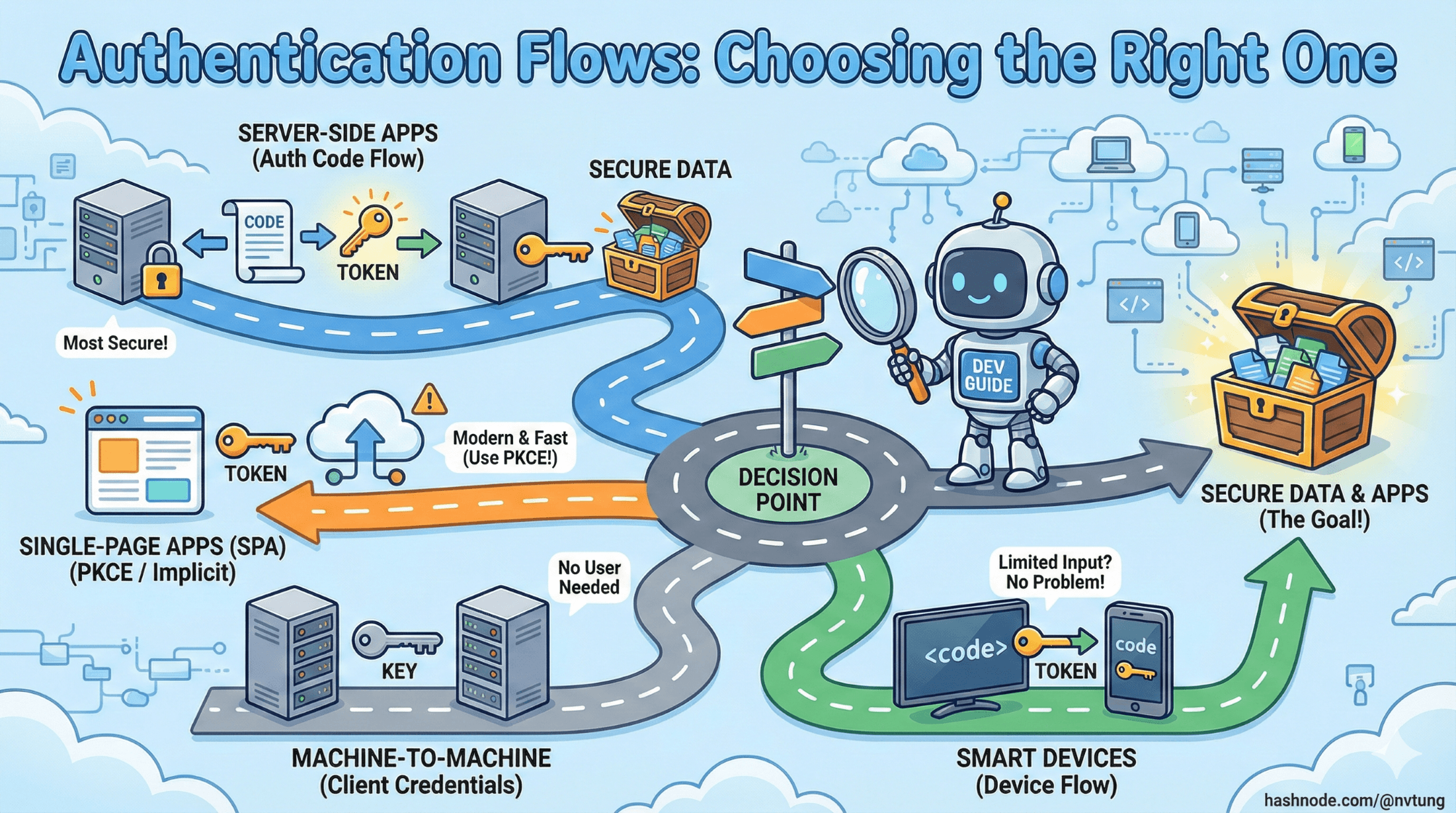
Series: Web Authentication Demystified — From Concepts to Real-World
ARC 1 — FOUNDATIONS OF USER AUTHENTICATION
Previous: Understanding OAuth2 & OpenID Connect (OIDC)
Next: Sessions vs Token-Based Authentication
Modern web and mobile applications rely on OAuth2 and OpenID Connect (OIDC) flows to authenticate users and obtain tokens securely. But each flow was designed for a specific scenario, and choosing the wrong one can introduce both security and UX issues.
This article provides a grounded walk-through of the major authentication flows, explains how they work, and gives you a practical decision-making framework for selecting the right flow for web apps, SPAs, mobile apps, and backend services.
Why Authentication Flows Exist
Different environments have different constraints: browsers expose tokens to JavaScript, mobile apps can't keep secrets, servers can, and IoT devices may have no keyboard at all. The OAuth2/OIDC ecosystem solves this through a standardized set of flows that shift responsibility between client, user, and server in predictable ways.
Think of flows as recipes for obtaining tokens safely under specific conditions.
1. OAuth2 Authorization Code Flow (Classic Server-Side Web Apps)
The Authorization Code Flow is the most widely used and secure flow when the client has a backend server capable of storing secrets.
How It Works (Simple Diagram)
Browser → App Server → Authorization Endpoint
                                ↓ (user logs in)
Browser ← Redirect with Authorization Code
Browser → App Server → Token Endpoint (exchange code → tokens)
App Server → Resource/API (use access token)

Key Idea
The authorization code is delivered to the backend, not directly to the browser.
This prevents tokens from being exposed to client-side scripts.
Pros
Very secure (tokens kept server-side)
Works well with traditional web apps
Perfect for server-rendered frameworks (PHP, Rails, Django, ASP.NET)
Cons
Requires backend infrastructure
Not suitable for SPAs without PKCE
Best For
Traditional websites
Applications with server-rendered pages
Backends that keep secrets securely
2. Authorization Code + PKCE (For SPAs & Mobile)
PKCE (Proof Key for Code Exchange) was created because SPAs and mobile apps cannot safely store client secrets.
PKCE adds a cryptographic challenge that proves the client that began the flow is the one completing it.
How It Works
SPA/Mobile → Create code_verifier → Hash → code_challenge
SPA → Authorization Endpoint + code_challenge
                       ↓
Redirect back with Authorization Code
SPA → Token Endpoint + code_verifier
Token issued only if verifier matches the challenge

Why PKCE Matters
If an attacker intercepts the authorization code, they cannot exchange it without the secret code_verifier.
Pros
Highly secure, even for public clients
Works for mobile apps and SPAs
Recommended by all providers (Google, Auth0, Azure AD)
Cons
Requires careful handling of tokens in the browser
Still vulnerable if tokens are stored incorrectly (e.g., localStorage)
Best For
Single Page Applications (React, Vue, Angular)
Native mobile apps (iOS, Android)
Any public client that cannot hold secrets
3. Implicit Flow (Obsolete — Do Not Use)
The implicit flow was originally designed for SPAs because they couldn't perform a secure back-channel request.
Tokens were returned directly in the browser URL hash, making them easy to steal.

Why It’s Obsolete
No ID token validation
Tokens exposed to the browser via URL
Vulnerable to replay and leakage via referrer headers
All major providers now recommend Authorization Code + PKCE instead
Best For
- Nothing today. Avoid it completely.
4. Client Credentials Flow (Machine-to-Machine)
This flow is for backend services, not users.
It issues an access token based on the app’s identity, not a person's.
How It Works
Server A → Token Endpoint (client_id + client_secret)
Token → Server A → Server B (API)

Pros
Simple and secure for server-to-server communication
No user interaction
Secret stays on backend
Cons
Cannot represent a real user
Only suitable for service authentication
Best For
Microservices calling each other
Background jobs
Cron jobs accessing APIs
Internal service accounts
5. Device Code Flow (For Devices With No Keyboard)
Used by:
Smart TVs
Consoles
IoT devices
Where typing a password is painful.
How It Works
Device → Gets user_code + verification URL
User → Browser → verification URL → login
Device polls → Token issued once login completed

Pros
Great UX for limited input devices
Secure — device never sees credentials
Cons
Requires polling
More complex to implement
Best For
TVs, set-top boxes
Smart appliances
CLI tools
6. Resource Owner Password Flow (Obsolete & Dangerous)
This flow asks the user to give their password directly to the application, which then exchanges it for tokens.

Why It’s Bad
Completely breaks security boundaries
The client (which may be malicious) gains the user’s password
No MFA support
Impossible to enforce security policies
Best For
- Absolutely nothing. Avoid it entirely in modern systems.
7. Refresh Token Flow (Token Renewal)
Not a standalone authentication flow, but a mechanism to renew access tokens without re-authenticating the user.
How It Works
App → Token Endpoint (refresh_token)
IdP → Issues new access token (and sometimes new refresh token)

Pros
Enables long-lived sessions
Reduces need for the user to log in repeatedly
Works across web, mobile, and backend apps
Cons
Must be stored securely
If leaked, attacker can mint new access tokens
Best For
SPAs & mobile apps (with secure storage)
Server-side apps needing long sessions
8. Hybrid OIDC Flow (Legacy)
The Hybrid Flow is an OpenID Connect flow that combines elements of both:
Authorization Code Flow (secure, backend-driven, uses a code exchange)
Implicit Flow (immediate delivery of ID tokens to the front-end)
Pros
Front-end gets user identity immediately (good for UX)
Backend still uses secure code exchange
Supports both old browsers and complicated enterprise infrastructure
Cons
ID token exposed via front-channel (less secure)
Complex implementation
Deprecated in many modern SPA patterns
PKCE-based Auth Code Flow solves most of its use cases more safely
When to Use
you maintain a legacy OIDC integration
you need immediate ID token delivery for UI before backend processing
your IdP or enterprise ecosystem requires Hybrid Flow
you have a multi-page app that renders UI before your backend finishes token exchange

Today, most apps prefer Authorization Code + PKCE instead.
Choosing the Right Flow: A Decision Framework
Here's a practical, no-nonsense guide:

⭐ 1. Are you building a server-side web app (PHP, Rails, Django, ASP.NET)?
Use Authorization Code Flow (no PKCE)
Backend holds tokens — safest option.
⭐ 2. Are you building a SPA (React, Vue, Angular)?
Use Authorization Code + PKCE
Never use implicit flow.
⭐ 3. Are you building a mobile app (iOS, Android)?
Use Authorization Code + PKCE
Store tokens securely (Keychain / Secure Enclave).
⭐ 4. Are you building microservices / backend-to-backend authentication?
Use Client Credentials Flow
No user involved.
⭐ 5. Are you building apps for TVs or IoT devices?
Use Device Code Flow
⭐ 6. Are you thinking about Resource Owner Password Flow?
Stop. Don’t.
Use OIDC-based flows instead.
⭐ 7. Do you need long-lived sessions?
Use Refresh Token Flow
Rotate refresh tokens regularly.
Real Use Case Decision Flow (based on my experience)
Use Case:
A teacher at a public-sector education institute logs into a 3rd-party educational web app using their government-issued identity (via a central IdP). The app is a traditional server-rendered web application.
Step 1 — Is the app a traditional server-side web application?
Yes.
The 3rd-party education web app is server-rendered, has a backend, and can store secrets.
➡️ Candidate flows:
Authorization Code Flow
Authorization Code + PKCE
Hybrid OIDC
(Implicit Flow excluded — obsolete)
(Password Flow excluded — insecure)
Step 2 — Can the app securely store secrets on the backend?
Yes.
The 3rd-party platform has a backend server (PHP/Yii in my implementation).
➡️ Authorization Code Flow is strongly suitable.
Step 3 — Do you need strong protection against code interception (PKCE)?
Not required.
PKCE is essential for public clients like SPAs or mobile apps, not for confidential server-side applications that can safely store secrets.
➡️ PKCE is optional (useful but not necessary).
Step 4 — Does the frontend require immediate ID Token access before the backend finishes the code exchange?
No.
Traditional server-rendered apps don’t need instant client-side identity for reactive UI.
➡️ Hybrid Flow is unnecessary.
Step 5 — Is the user a real human who must authenticate interactively?
Yes — the teacher must log in manually using their government identity.
➡️ Client Credentials Flow is invalid (machine-to-machine only).
➡️ Device Code Flow is irrelevant (not a TV/IoT device).
Step 6 — Are refresh tokens needed for long session continuity?
Possibly yes.
The backend can store and rotate refresh tokens securely, extending user sessions without requiring re-login to the IdP.
➡️ Refresh Token Flow may be used alongside Authorization Code Flow.
✔ Final Decision: The Correct Flow for the Scenario
Use the OAuth2 / OIDC Authorization Code Flow (with optional refresh tokens)
with:
response_type=codeStandard OIDC scopes (
openid email profile)Backend-only token storage
Refresh token rotation for persistent login
JWT validation through the IdP’s JWKS endpoint

This is the industry-standard choice for:
Server-rendered web apps
Confidential clients capable of storing secrets
Human users logging in interactively
Integrations with enterprise/government IdPs
Secure token handling on backend servers
Optional Enhancements:
Add PKCE if the IdP or regulation framework requires it
Use Refresh Tokens to avoid frequent re-logins
Use OIDC to retrieve ID Tokens for identity mapping
Use scopes (
openid,email,profile) to control access
Final Thoughts
OAuth2 and OIDC offer a range of flows because authentication isn’t one-size-fits-all. By choosing the right flow, you ensure:
Better security
A smoother user experience
Fewer vulnerabilities
Cleaner architecture
Now that we’ve explored authentication flows, the next article will dive into how sessions and token-based authentication compare, and how real-world applications bridge the two models.




