

CloudFront Signed Cookies — How They Work and Why We Used Them
How signed cookies extend authentication to the CDN layer and securely protect static assets in a real-world system.
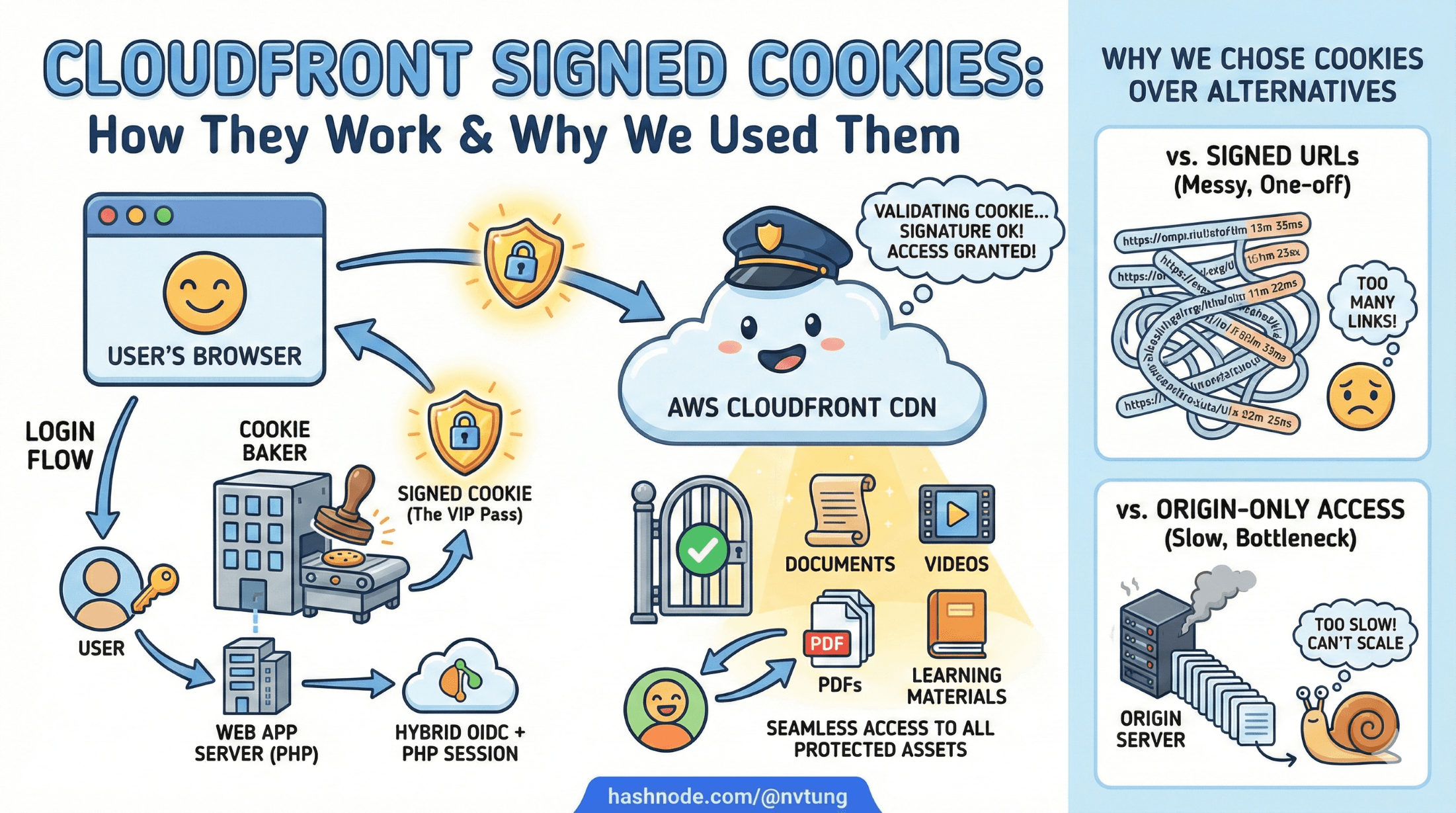
Series: Web Authentication Demystified — From Concepts to Real-World
When people think about authentication, they usually think about logging users into an application. But in real systems—especially those serving large amounts of static content—authentication doesn’t stop at the web app boundary. It extends all the way to the CDN.
In my CSL system, authentication doesn’t just decide who can access the web app. It also decides who can download protected static assets—documents, PDFs, videos, and other learning materials delivered through CloudFront.
This article explains:
what CloudFront signed cookies are
how they actually work
why they fit naturally into a hybrid OIDC + PHP session architecture
how they’re generated and validated
and why we chose them over alternatives like signed URLs or origin-only access
Along the way, we’ll look at practical implementation examples and real design trade-offs.
The Problem: Authenticated Users, Public CDNs
CloudFront is designed to be fast and public. By default:
anyone who knows a URL can fetch an object
CloudFront doesn’t know who my users are
CloudFront doesn’t understand sessions or OIDC
But CSL has strict requirements:
Only authenticated teachers may access learning materials
Assets must be cached globally for performance
Direct S3 access must be blocked
URLs must not be shareable indefinitely

In short:
We needed CloudFront to respect authentication without turning the CDN into an application server.
This is exactly the gap signed cookies are designed to fill.
What Are CloudFront Signed Cookies (Conceptually)?

Signed cookies allow CloudFront to enforce access rules without knowing who the user is.
Instead of saying:
“User X is allowed”
CloudFront enforces:
“Any request that presents valid cryptographic proof is allowed”
That proof comes in the form of three cookies:
CloudFront-PolicyCloudFront-SignatureCloudFront-Key-Pair-Id
If those cookies:
are correctly signed
are not expired
match the requested resource
CloudFront serves the content.
If not, access is denied.
Signed Cookies vs Signed URLs (Why Cookies Win Here)
CloudFront offers two ways to restrict access:

Signed URLs
Each asset URL contains a signature
Good for single-file downloads
URLs are long, ugly, and leakable
Hard to rotate for many assets
Signed Cookies
One signature applies to many URLs
Cleaner URLs
Better for logged-in users browsing multiple assets
Easy to revoke by expiring cookies
For CSL—where users browse many protected files per session—signed cookies were the obvious choice.
How Signed Cookies Fit into the CSL Authentication Flow
Signed cookies are not part of authentication.
They are part of authorization at the CDN layer.

In CSL, the flow looks like this:
User authenticates via IdP (OIDC)
Backend validates identity
PHP session is created (Redis-backed)
CloudFront signed cookies are generated
Browser receives:
PHPSESSIDCloudFront cookies
Browser can now:
access the web app
access protected static assets via CloudFront
Importantly:
CloudFront cookies are issued only after successful authentication
They are short-lived
They never identify the user directly
The Three CloudFront Cookies Explained
1. CloudFront-Policy
This defines what is allowed.
A simplified policy might say:
{
  "Statement": [{
    "Resource": "https://assets.example.com/protected/*",
    "Condition": {
      "DateLessThan": {
        "AWS:EpochTime": 1733683200
      }
    }
  }]
}
Meaning:
any file under
/protected/until a specific expiration time
2. CloudFront-Signature
This is the cryptographic signature of the policy.
Generated using a CloudFront key pair’s private key
Proves the policy was issued by a trusted signer
CloudFront verifies this signature before serving content.
3. CloudFront-Key-Pair-Id
Identifies which public key CloudFront should use to verify the signature.
CloudFront already knows the public key.
You never expose the private key.

Key Security Property
CloudFront never asks:
who the user is
whether the session is valid
It only asks:
“Is this cryptographic proof valid right now?”
This is exactly what you want from a CDN.
Generating Signed Cookies (PHP Example)
Below is a simplified, NDA-safe version of how signed cookies are generated in the CSL backend.

1. Generate the policy
function generatePolicy(string $resource, int $expiresAt): string
{
    return json_encode([
        'Statement' => [[
            'Resource' => $resource,
            'Condition' => [
                'DateLessThan' => [
                    'AWS:EpochTime' => $expiresAt
                ]
            ]
        ]]
    ], JSON_UNESCAPED_SLASHES);
}
2. Sign the policy
function signPolicy(string $policy, string $privateKeyPath): string
{
    $privateKey = openssl_pkey_get_private(
        file_get_contents($privateKeyPath)
    );

    openssl_sign($policy, $signature, $privateKey, OPENSSL_ALGO_SHA1);

    return strtr(base64_encode($signature), '+/=', '-_~');
}
CloudFront still supports SHA1 for this specific use case (legacy, but required).
3. Set the cookies
$response = Yii::$app->response;

$response->cookies->add(new Cookie([
    'name' => 'CloudFront-Policy',
    'value' => base64_encode($policy),
    'domain' => '.example.com',
    'path' => '/',
    'secure' => true,
    'httpOnly' => true,
]));

$response->cookies->add(new Cookie([
    'name' => 'CloudFront-Signature',
    'value' => $signature,
    'domain' => '.example.com',
    'path' => '/',
    'secure' => true,
    'httpOnly' => true,
]));

$response->cookies->add(new Cookie([
    'name' => 'CloudFront-Key-Pair-Id',
    'value' => $keyPairId,
    'domain' => '.example.com',
    'path' => '/',
    'secure' => true,
    'httpOnly' => true,
]));
At this point, the browser can access protected CloudFront assets.
Why Cookies Are HttpOnly

You may notice:
- CloudFront cookies are marked
HttpOnly
That’s intentional.
Even if an attacker injects JavaScript:
they cannot steal CloudFront access
they cannot replay cookies elsewhere easily
expiration limits damage
The browser sends cookies automatically; JS never sees them.
Short-Lived Policies: Limiting Damage
In CSL, signed cookies are short-lived.

Typical expiration:
- 5–15 minutes
Why so short?
CDN access doesn’t need long-lived authorization
Session already exists server-side
Cookies can be refreshed silently on navigation
If a cookie leaks:
- its usefulness window is tiny
This is a classic time-based defense.
Why We Didn’t Use Origin Authentication Alone

An alternative is:
blocking S3 entirely
only allowing CloudFront as origin
That’s necessary—but not sufficient.
Without signed cookies:
- CloudFront would serve assets to anyone
Signed cookies enforce user-level access, not just origin-level access.
Why This Fits with a PHP Session Model

This design aligns with my hybrid architecture:
PHP session controls application access
CloudFront cookies control asset access
Tokens never touch the browser
Revocation is simple:
destroy session
stop issuing cookies
wait for short expiry
There is no need to:
validate JWTs at the CDN
expose identity claims
couple CloudFront to IdP logic
Each layer does exactly one job.
Edge Cases & Operational Considerations

User logs out
PHP session destroyed
CloudFront cookies naturally expire shortly
User session expires
- Backend stops refreshing CloudFront cookies
Clock skew
- Use small buffers when calculating expiration
Key rotation
Maintain multiple CloudFront key pairs
Rotate without downtime
Debugging
Expired cookies look like 403s
Log policy expiration timestamps for clarity
Why This Was the Right Choice for CSL

CloudFront signed cookies gave CSL:
CDN-level authorization without identity leakage
Strong security guarantees
Excellent performance
Clean separation of concerns
Compatibility with legacy PHP sessions
Minimal frontend complexity
Most importantly:
They solved a real problem without inventing a new one.
Final Thoughts
Signed cookies are one of those features that seem niche—until you need them. In a system like CSL, where authenticated users access large volumes of protected static content, CloudFront signed cookies are not just convenient—they are the correct architectural choice.
They allow authentication to scale beyond the application server, without compromising security or maintainability.




