

Deep Dive: The User Authentication Flow in my implemented Web App
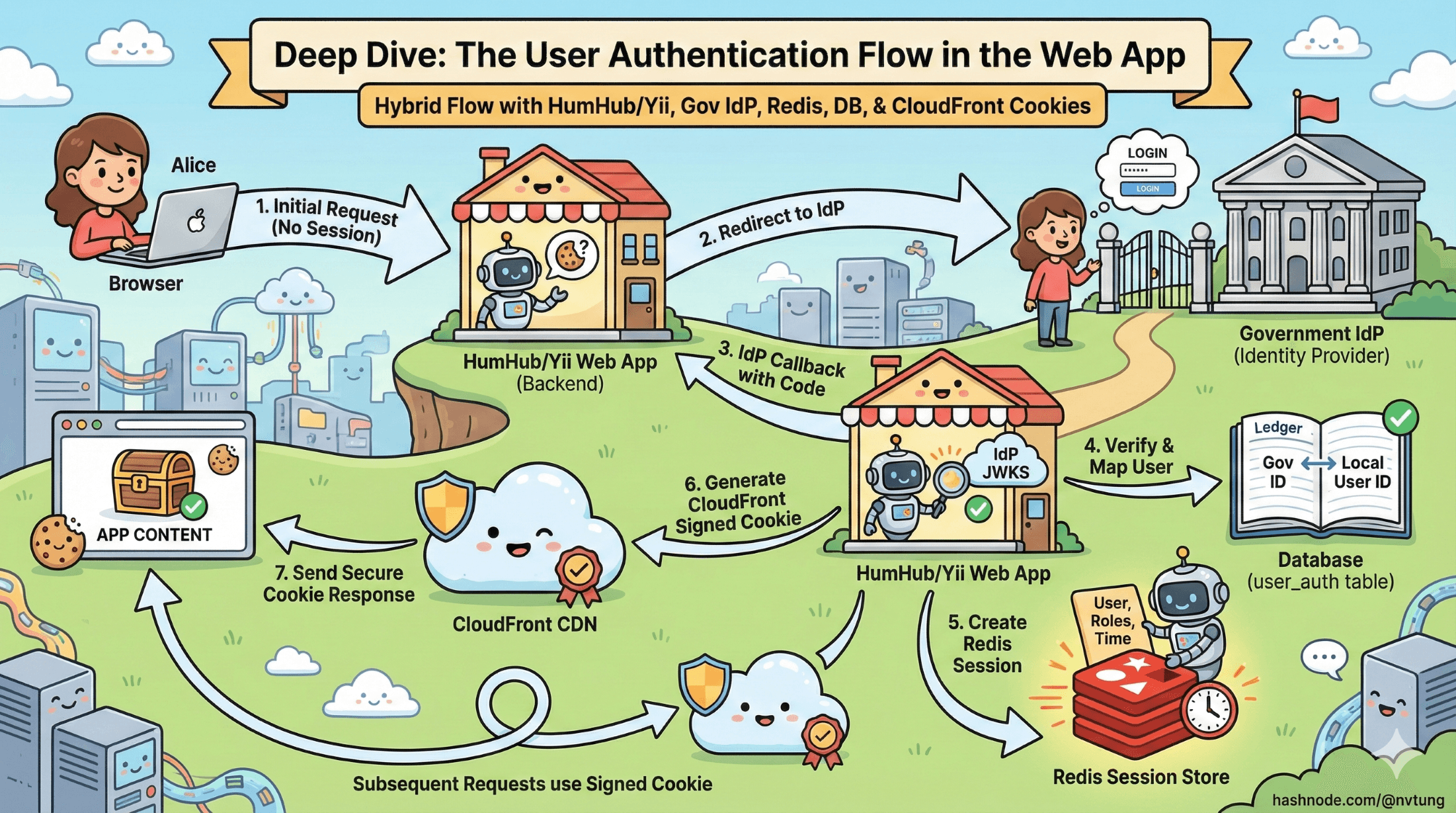
A step-by-step walkthrough of how the browser, IdP, Redis, HumHub, and CloudFront work together to authenticate a user in a real production system.
Series: Web Authentication Demystified — From Concepts to Real-World
ARC 2 — APPLYING THE THEORY: MY REAL IMPLEMENTATION
Previous: Architecture Overview of my implemented Web App Authentication System
Next: Security Analysis of my implemented Web App Authentication System
We’ve already explored the architecture behind the CSL authentication system and why it blends OIDC with server-side sessions. Now it’s time to walk through the full login journey step by step—exactly how a user moves through the system, how identity is established, and how the application creates a secure session that powers the rest of their experience.
This is the practical, request-by-request breakdown that ties my real infrastructure together: HumHub/Yii, the government IdP, Redis sessions, the user_auth table, CloudFront signed cookies, and the hybrid flow that makes it all work.
Disclaimer
The articles in this current arc are based on a real authentication system I integrated and implemented for a government education department. Due to the Non-Disclosure Agreement (NDA) between myself and the client, certain internal details, configurations, and architectural specifics have been intentionally generalized or omitted. All explanations focus on the conceptual and technical patterns rather than sensitive operational information. I’ve made every effort to describe the system as accurately as possible while fully respecting confidentiality and security requirements.
1. The User Requests the CSL Page

A teacher opens the CSL web application. The very first checks happen before any external redirects:
✓ Does the browser have a PHPSESSID cookie?
No → The request is unauthenticated; redirect to login
Yes → Continue to session validation
✓ Does Redis have a session for this PHPSESSID?
No → Cookie is invalid or expired → redirect to login
Yes → Session belongs to a logged-in user → move to permission checks
✓ Does the user have permission to access the CSL module?
No → Show an error page or redirect to an access-restricted message
Yes → Serve the requested page
If all checks fail at any point, the user is sent to the app’s login route:
/user/auth/login
This initiates the external authentication process.
2. Web App Redirects to the External IdP

From the login route, HumHub/Yii triggers its OAuth client configuration:
/user/auth/external?authclient=idm
This sends the browser to the government IdP’s /authorize endpoint.
Now the browser is officially outside my app’s domain, viewing the government login screen.
3. User Authenticates with the Government IdP

At the IdP:
The user enters their credentials
MFA may be required
The IdP verifies the teacher’s identity
A browser session is created on the IdP side
The IdP prepares an authorization code
When login succeeds, the IdP redirects the browser back to CSL:
/user/auth/external?code=XYZ123&state=...
This marks the completion of the front-channel authentication flow.
4. Web App Exchanges the Authorization Code for Tokens

The CSL backend performs a back-channel request to the IdP:
POST /token
Receiving:
access_token (JWT or opaque)
token_type (Bearer)
expires_in
Optional id_token
The browser never sees these tokens. They exist only inside server memory.
5. Token Validation & Identity Mapping

Once CSL receives the access token, it validates the identity:
Token Validation
Verify signature (using IdP’s JWKS keys)
Verify issuer (
iss)Verify audience (
aud)Verify expiration (
exp)Extract the
sub(unique user identifier)
Identity Mapping
The sub is mapped to an internal user record using the user_auth table.
Does a mapping exist?
No → CSL creates a new user_auth record
Yes → CSL retrieves the internal user_id
This process ensures that no matter how many external systems the teacher interacts with, my application controls its own local user representation.
6. User Status & Access Checks

Once identity is resolved, CSL performs:
✓ Is the local user enabled?
No → authentication rejected
Yes → continue
This is an important deviation from textbook OIDC:
Even though IdP authentication succeeded, my application remains the final authority on whether the user may enter the system.
7. Creating the Server-Side PHP Session (Redis)

At this point, the user is officially authenticated.
CSL now creates a local session stored in Redis:
session[user_id] = 4821
session[name] = "Nguyen Van A"
session[role] = "teacher"
session[expires] = ...
A new PHPSESSID value is generated and sent to the browser.
Browser receives:
- One secure HTTP-only cookie: PHPSESSID
This cookie identifies the session but contains no sensitive tokens or identity claims.
This session is now the source of truth for all authenticated requests to CSL.
8. Generating CloudFront Signed Cookies

After the server session is created, the app generates CloudFront signed cookies, allowing the browser to access protected static assets through AWS CloudFront.
These cookies contain:
Policy information
Signature
Key pair ID
They ensure that only authenticated users with valid sessions may retrieve restricted content (videos, PDFs, internal documents).
This keeps static content secure even at the CDN level.
9. The User Is Fully Logged In

From this point on:
Browser → CSL
Every request includes:
Cookie: PHPSESSID=abc123
CSL → Redis
The backend hydrates the user context using the Redis session.
No token validation is required on every request—just a lookup.
My application now treats the user as authenticated.
10. Handling Errors & Edge Cases

My system includes several important safeguards:
Disabled User
If a user is disabled in CSL (even if still valid at the IdP), login fails.
Missing user_auth Mapping
If no mapping exists, CSL auto-provisions a new mapping record.
Invalid or Expired Token
The token exchange or validation step fails → redirect to login.
User has IdP session but no local session
IdP will not ask user to log in again, but CSL will re-run provisioning and create a new session.
User lacks required permissions
CSL denies access even if the government IdP authenticated them correctly.
These checks ensure that external identity does not override internal authorization logic.
Why This Hybrid Approach Works for PHP Systems

My implementation combines the strengths of OAuth2/OIDC with the safety and simplicity of server-managed sessions:
✓ No tokens in the browser
Greatly reduces attack surfaces (XSS, token leakage).
✓ IdP handles identity
Government-level authentication assurance.
✓ My app handles authorization and access
Local permissions and roles remain under CSL’s control.
✓ Redis-backed sessions allow horizontal scaling
Multiple web servers can share user sessions seamlessly.
✓ CloudFront signed cookies protect static assets
Static content security is integrated into the authentication workflow.
✓ Logout is instant
Deleting the Redis session invalidates login immediately.
This approach respects modern authentication standards while fitting naturally with PHP’s session-driven architecture.
Final Thoughts
This deep dive shows how each step in the authentication process contributes to a secure, maintainable, and scalable login system—one that blends identity from the government IdP with internal session control.
With the full authentication flow mapped out, we now have a clear picture of how the system moves a user from an external IdP login to a fully authenticated session inside the web app. The next step is to examine why this flow is secure. In the following article, we’ll break down the key security measures—CSRF protection, nonce usage, token validation, cookie hardening, CloudFront policies, and more—to understand how the system defends itself against real-world threats.




