

Multi-Env Setups (dev / test / staging)
Designing dev, test, and staging as one system
Series: Containers, Actually: Building Real Local Dev Environments
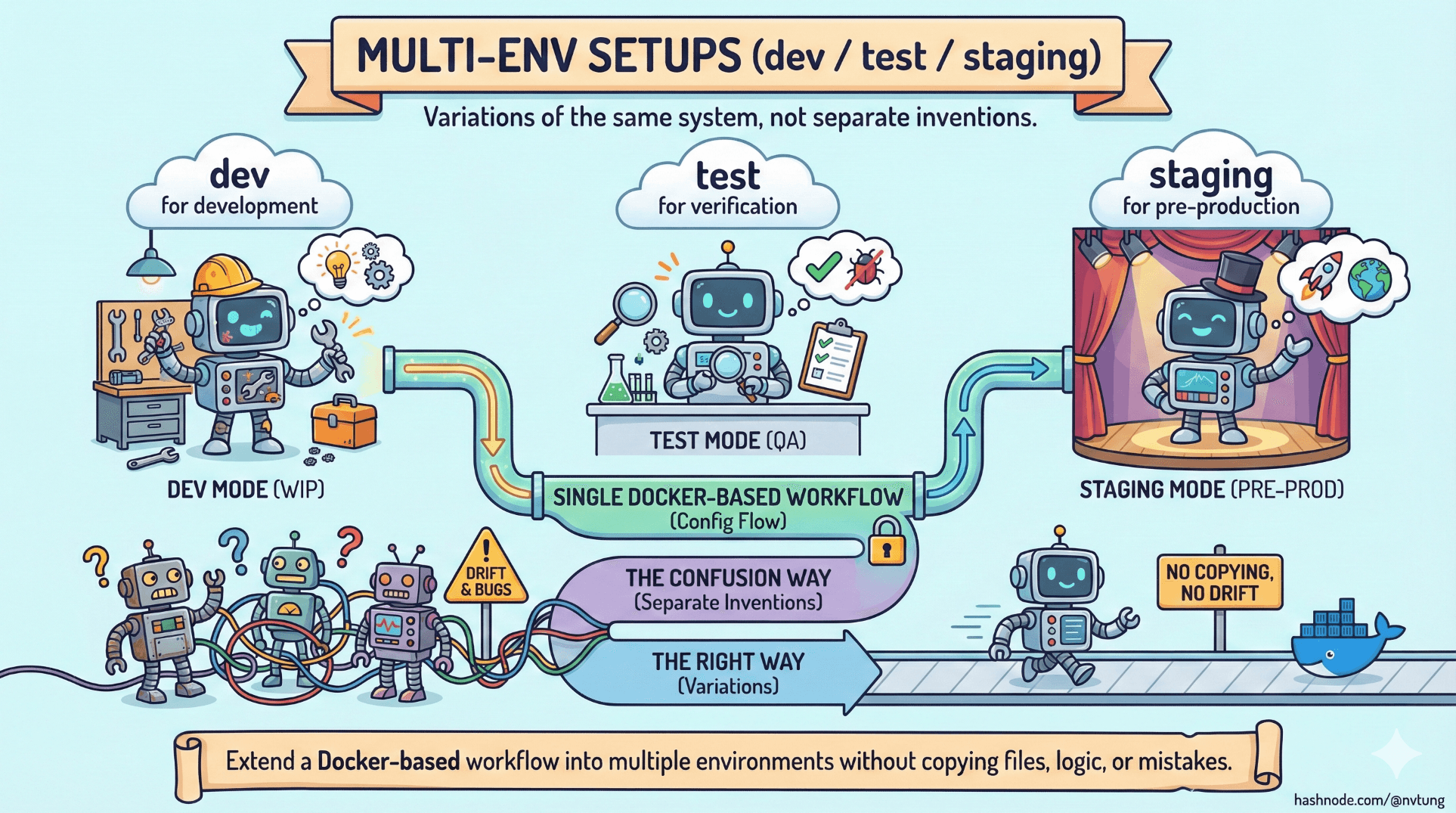
Multi-environment setups sound straightforward on paper:
dev for development
test for verification
staging for pre-production
In practice, they are one of the fastest ways to create confusion, drift, and subtle bugs—unless the environments are designed as variations of the same system, not separate inventions.
This article shows how to extend a Docker-based workflow into multiple environments without copying files, logic, or mistakes.
The Core Principle: One System, Multiple Contexts
The most important rule:
You do not have three systems.
You have one system, running under three contexts.

If dev, test, and staging are defined separately, they will diverge.
If they are derived, they stay aligned.
Docker Compose is particularly good at expressing this relationship.
What Actually Changes Between Environments
Before touching config, clarify what should differ.
Usually:
Environment variables
Data persistence
External integrations
Debug tooling
Resource limits

Usually not:
Service topology
Runtime versions
Inter-service communication
Build logic
If topology differs, bugs become non-reproducible.
Folder & File Structure for Multi-Env Compose
A proven, low-friction structure:
docker-compose.yml
docker-compose.dev.yml
docker-compose.test.yml
docker-compose.staging.yml

.env.dev
.env.test
.env.staging
docker-compose.yml→ base systemenvironment-specific files → behavioral overrides
This structure scales cleanly without duplication.
Base Compose File: The System Contract
docker-compose.yml defines what exists.
version: "3.9"

services:
  app:
    build: ./docker/php
    environment:
      DB_HOST: mysql
      REDIS_HOST: redis
    depends_on:
      - mysql
      - redis

  mysql:
    image: mysql:8
    environment:
      MYSQL_DATABASE: app
      MYSQL_USER: app
      MYSQL_PASSWORD: password
    volumes:
      - mysql-data:/var/lib/mysql

  redis:
    image: redis:alpine

volumes:
  mysql-data:
This file should:
Be boring
Be stable
Change rarely
It’s the shape of the system.
Development Environment (dev)
Development optimizes for:
Speed
Visibility
Convenience
docker-compose.dev.yml
services:
  app:
    volumes:
      - ./app:/var/www/html
    environment:
      APP_ENV: dev
      APP_DEBUG: "true"

  mysql:
    ports:
      - "3306:3306"
.env.dev
APP_ENV=dev
DB_PASSWORD=dev-secret
Key traits:
Bind mounts enabled
Debug flags on
Ports exposed
Data persists
Test Environment (test)
Test environments optimize for:
Clean state
Determinism
Repeatability
docker-compose.test.yml
services:
  app:
    environment:
      APP_ENV: test
      APP_DEBUG: "false"

  mysql:
    volumes: []  # disable persistence
.env.test
APP_ENV=test
DB_PASSWORD=test-secret
Key traits:
No persistent volumes
No exposed ports
Clean startup every run
Ideal for CI and automated tests
This is where bugs surface honestly.
Staging Environment (staging)
Staging optimizes for:
Production similarity
Safety
Observation
docker-compose.staging.yml
services:
  app:
    environment:
      APP_ENV: staging
      APP_DEBUG: "false"

  mysql:
    volumes:
      - mysql-staging-data:/var/lib/mysql

volumes:
  mysql-staging-data:
.env.staging
APP_ENV=staging
DB_PASSWORD=staging-secret
Key traits:
Persistent data
No dev tooling
Same versions as prod
No bind mounts (often)
Running Each Environment
Development
docker-compose \
  -f docker-compose.yml \
  -f docker-compose.dev.yml \
  --env-file .env.dev \
  up -d
Test
docker-compose \
  -f docker-compose.yml \
  -f docker-compose.test.yml \
  --env-file .env.test \
  up --abort-on-container-exit
Staging
docker-compose \
  -f docker-compose.yml \
  -f docker-compose.staging.yml \
  --env-file .env.staging \
  up -d
Same system.
Different behavior.
Environment-Specific Volumes (Critical Detail)
Never reuse volumes across environments.
Bad:
mysql-data
Good:
mysql-data
mysql-test-data
mysql-staging-data
Volumes are state, and state must not bleed.
Avoiding the “Env Explosion” Trap
Common anti-patterns:
Copying entire compose files
Hardcoding environment logic in code
Creating
docker-compose-prod.ymllocally

Instead:
Keep overrides minimal
Push environment branching upward (compose, env vars)
Keep application logic environment-agnostic
If the app behaves wildly differently per env, the problem is in the app—not Docker.
Multi-Env vs Branch-Based Environments
A key insight:
Branches are for code.
Environments are for behavior.
Avoid:
“feature/dev”, “feature/staging” environments
Branch-specific Docker configs
Prefer:
Same Docker structure
Different
.envand overrides

This keeps mental overhead manageable.
How This Scales to CI/CD
This pattern integrates cleanly with CI:
docker-compose \
  -f docker-compose.yml \
  -f docker-compose.test.yml \
  --env-file .env.test \
  up
The test environment becomes:
Predictable
Disposable
Reproducible locally
That’s parity without pain.
What Multi-Env Setups Are Not
They are not:
Separate architectures
Separate repos
Separate Dockerfiles
Separate mental models

They are controlled variations of one system.
The Real Lesson
Multi-env setups fail when environments are treated as destinations.
They succeed when environments are treated as lenses—different ways of observing the same system.

Docker Compose makes this possible because it encourages:
Composition over duplication
Declaration over scripting
Structure over convenience
Final Takeaway
If dev, test, and staging behave differently, something is wrong.
If they behave the same under different constraints, you’ve done it right.
Multi-env setups aren’t about multiplying environments.
They’re about reducing surprises—before production does it for you.




