

Token Types Explained: ID Tokens, Access Tokens, Refresh Tokens, Opaque Tokens & JWTs
A clear, practical guide to understanding modern authentication tokens and how they power OAuth2 and OpenID Connect.
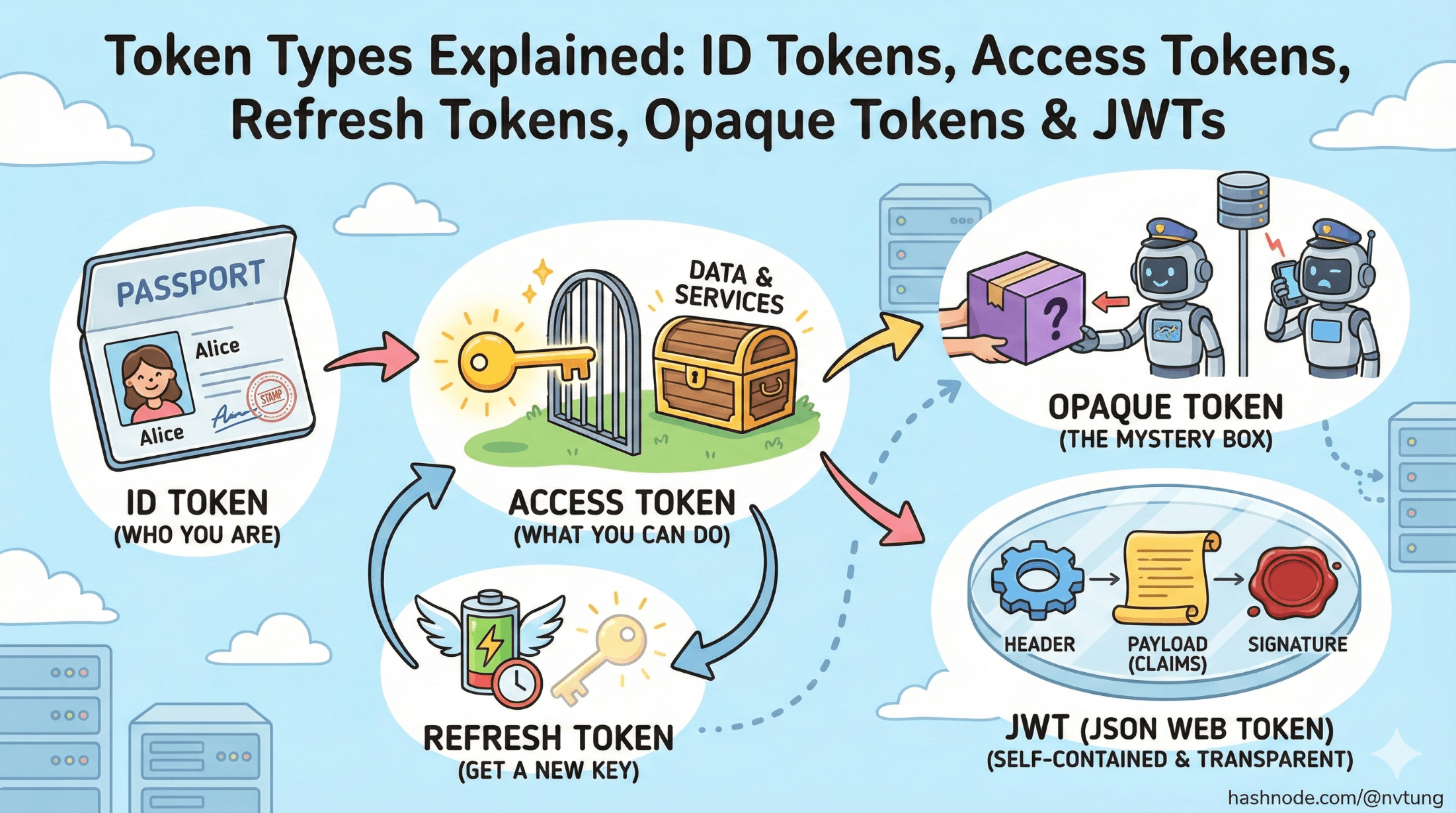
Series: Web Authentication Demystified — From Concepts to Real-World
ARC 1 — FOUNDATIONS OF USER AUTHENTICATION
Previous: What Is User Authentication?
Next: Understanding OAuth2 & OpenID Connect (OIDC)
Tokens sit at the core of modern authentication systems. They’re the small digital passports that apps use to validate identities, authorize access, and keep users logged in across multiple services. If previous article introduced the foundations of authentication, this article zooms into the world of tokens — what they are, why they exist, and how they actually work under the hood.
By the end, you’ll understand why tokens are everywhere in OAuth2 and OpenID Connect (OIDC), how different token types serve different purposes, and when you should or shouldn’t use formats like JWT.
What Are Tokens, and Why Do They Exist?
A token is simply a piece of data that represents:
Who the user is
What they’re allowed to do
For how long the system should trust them
In older systems, this was handled by server-side sessions tied to cookies. But modern architectures — especially mobile apps, SPAs, and microservices — need identity to travel between different systems without relying on a single server’s memory.
Tokens solve this by being:
Portable (can move between services)
Self-contained or server-validated
Short-lived (reduces risk if stolen)
Cryptographically secure (signed to prevent tampering)

In OAuth2/OIDC flows, tokens are the glue that connects the identity provider (IdP), backend APIs, and user-facing applications.
ID Token vs Access Token vs Refresh Token
These are the three primary token types you encounter in modern authentication systems.
1. ID Token — Proving Who the User Is
Purpose: Identity.
Format: Always a JWT in OIDC.
Audience: The client app (not APIs).
Contains: User identity claims (name, email, sub, etc.).
Think of it as a digital ID card issued after login.
Common use-cases:
Retrieving the user’s profile information
Mapping identities to internal user records
Displaying “Welcome, Tung!” in the UI
An ID token is not used for API access. That’s the job of access tokens.
2. Access Token — Proving What the User Can Access
Purpose: Authorization.
Format: JWT or opaque string.
Audience: Resource servers / APIs.
An access token tells an API:
“This request is allowed because the user has these permissions.”
Common use-cases:
Calling backend APIs
Accessing protected resources
Enforcing scopes (e.g.,
read:email,write:profile)
Access tokens are typically short-lived (minutes), reducing the risk if stolen.
3. Refresh Token — Getting New Access Tokens
Purpose: Long-term session continuity
Format: Usually opaque
Audience: Only trusted backend or secure client storage
Refresh tokens let clients request new access tokens without asking the user to log in again.
Characteristics:
Long-lived
High-value target for attackers
Must be stored securely (never in localStorage)
Only confidential or trusted clients should get refresh tokens.

Bearer Tokens vs Proof-of-Possession (PoP)
Tokens also differ in how they are validated.
Bearer Tokens — Whoever Has It, Can Use It
This is the default in most OAuth2 systems.
A bearer token works like cash:
If you possess it, you can spend it.
Characteristics:
Easy to use
Sent in
Authorization: Bearer <token>Dangerous if leaked
Most access tokens today are bearer tokens.
Proof-of-Possession Tokens — Verifying the Holder
PoP tokens bind the token to a cryptographic key the client must prove it holds.
Used in:
MTLS-bound tokens
DPoP tokens
High-security financial APIs
These prevent replay attacks because stealing the token alone is not enough.

JWT Structure — Header, Payload, Signature
A JSON Web Token (JWT) is the most common token format in modern identity systems.
A typical JWT content looks like this:
eyJhbGciOiJIUzI1NiIsInR5cCI6IkpXVCJ9
.eyJzdWIiOiIxMjM0NTY3ODkwIiwibmFtZSI6IkpvaG4gRG9lIiwiaWF0IjoxNTE2MjM5MDIyfQ
.dBjftJeZ4CVP-mB92K27uhbUJU1p1r_wW1gFWFOEjXk
Under the hood, it consists of three Base64URL-encoded parts:
header.payload.signature
Let's break them down.
Header
Contains metadata:
alg: signing algorithm (RS256,HS256)kid: key IDtyp: usually"JWT"
Example:
{
  "alg": "RS256",
  "typ": "JWT"
}
Payload (Claims)
This is where the useful information lives — identity, permissions, expiration, audience.
Common claims:
| Claim | Meaning |
sub | Subject (unique user ID from IdP) |
iss | Issuer (who created the token) |
aud | Audience (who the token is intended for) |
exp | Expiration time |
iat | Issued-at time |
nbf | Not before |
nonce | Replay protection (OIDC) |
email | User’s email |
roles | Authorization roles |
JWTs are powerful because they can carry identity and authorization info directly.
Signature
The token is signed with a private key so the server can verify it hasn’t been tampered with.
Verification uses:
The token’s algorithm
The IdP’s public key (fetched via JWKS)
If the signature doesn’t match → token is invalid.

Opaque Tokens and Introspection
Not all tokens are JWTs.
Opaque Tokens
These look like:
xYz983hsafSJHfsjlkjw0932hsdf
They contain no readable information.
The API must call the IdP’s introspection endpoint to validate them.
Pros:
Easy revocation
No readable information (more privacy)
Simple server-side checks
Cons:
Requires network call for every validation
Harder to debug compared to JWTs
Many companies (e.g., Okta, Auth0) use opaque access tokens for API calls unless configured otherwise.

When Should You Use JWTs vs Opaque Tokens?
Here’s a quick, practical decision guide:
Use JWTs when:
You need stateless, scalable API authentication
Microservices must validate tokens locally without calling the IdP
You want to embed claims directly inside the token
Latency and throughput matter
JWTs shine in distributed architectures.
Use Opaque Tokens when:
You want centralized security (IdP controls everything)
You prefer easy revocation and session termination
You don't need local inspection of claims
You want to minimize what identity information reaches clients
Opaque tokens shine in high-security environments with strong privacy requirements.

Summary
Tokens are the backbone of modern authentication systems. Each type exists for a specific role:
ID tokens → Identify the user
Access tokens → Authorize API access
Refresh tokens → Maintain long sessions securely
Opaque tokens → Hidden, introspection-based security
JWTs → Self-contained, signed tokens for scalable architectures
You now have a clear map of the token landscape — which becomes essential when you start learning the flows (Authorization Code, PKCE, hybrid) and how real-world systems stitch these tokens together.
In the next article, we’ll explore OAuth2 and OpenID Connect, the protocols that make these tokens work across browsers, apps, and APIs.




