

Containerized: Architecture Overview of my Humhub Stack
Understanding the real system before running it
Series: Containers, Actually: Building Real Local Dev Environments
ACT III — Real Implementation: My Humhub Stack
Previous: Tooling Stack for a Containerized Workflow
Next: Containerized: My Repository Structure & Design Decisions
Disclaimer (Important)
This article describes a real production-adjacent local development stack that I implemented.
Because of NDA and internal constraints, some configuration values, service names, credentials, and structural details are intentionally simplified, renamed, or omitted.The architecture, responsibilities, communication patterns, and Docker concepts are accurate.
The exact implementation details are representative—not copy-paste replicas.
With that out of the way, let’s talk about the system you’re about to build.
Why an Architecture Overview Matters
Most Docker guides fail in the same way: they start with commands.
You’re told to run docker-compose up, containers appear, ports open, and something responds in a browser—but you don’t actually know what you just launched or why those services exist. When something breaks, you’re left guessing.
This article exists to prevent that.
Before touching a terminal, you should know:
What services exist
What responsibility each one has
How they communicate
What Docker is orchestrating—and what it is not

Once you have that mental map, the commands become obvious instead of mystical.
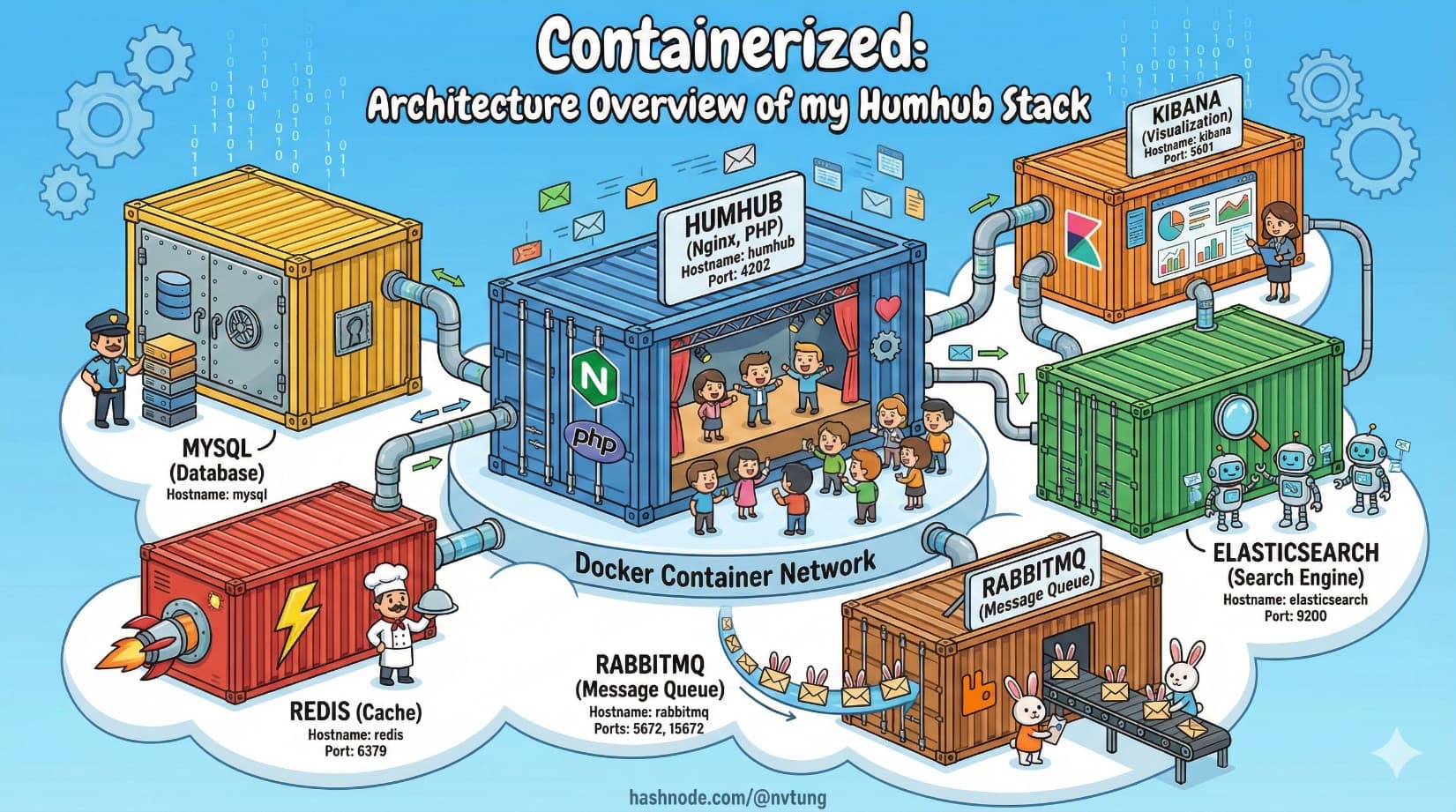
The Big Picture: A System, Not an App
At a high level, the local environment consists of:
A PHP web application served by Nginx
A relational database for persistent data
An in-memory cache for speed and coordination
A search engine for full-text queries
A message broker for async work
Supporting admin and observability tools
Conceptually, it looks like this:
Browser
   |
   v
Nginx
   |
   v
PHP-FPM (App)
   |
   +--> MySQL
   |
   +--> Redis
   |
   +--> Elasticsearch
   |
   +--> RabbitMQ
                |
                v
        Background Workers

Every arrow represents a networked service call, not a function call. Docker’s job is to make these connections predictable and reproducible.
Services Used — and Why They Exist
Let’s walk through each component, starting from the edge and moving inward.
Nginx + PHP-FPM: Request Handling and Execution
Why this split exists
Nginx and PHP-FPM are separate because they do different jobs well:
Nginx
Handles HTTP
Terminates connections
Serves static assets
Proxies dynamic requests
PHP-FPM
Executes PHP code
Manages worker processes
Scales independently of HTTP concerns

In container terms: one concern per container.
Typical communication
Nginx forwards PHP requests over FastCGI to PHP-FPM
They live on the same Docker network
No ports exposed externally for PHP-FPM
MySQL: Durable Source of Truth
MySQL exists for one reason: durable, relational data.
It stores:
Users
Content
Configuration
Relationships
In local development:
Data must survive container restarts
Schema must match production closely
Version consistency matters

That’s why MySQL:
Runs in its own container
Uses a Docker volume for persistence
Is never bundled into the app container
Redis: Speed, Coordination, and Ephemeral State
Redis is used where speed matters more than permanence.
Common responsibilities:
Caching database results
Session storage
Locks
Temporary flags
Queue coordination (depending on framework)

Redis data is disposable. Losing it should not break correctness—only performance.
That disposability makes Redis a perfect containerized service.
Elasticsearch + Kibana: Search and Visibility
Relational databases are not search engines.
Elasticsearch exists to handle:
Full-text search
Relevance scoring
Filtering and aggregation
Large datasets efficiently
Kibana exists purely as a developer-facing tool:
Inspect indexes
Debug queries
Visualize data

In local development, Kibana is invaluable. In production, it’s often restricted or isolated.
RabbitMQ: Asynchronous Work and Decoupling
Not all work should happen during a web request.
RabbitMQ provides:
Message queues
Backpressure handling
Decoupling between producers and consumers
The application publishes messages. Workers consume them.

This separation:
Improves responsiveness
Prevents cascading failures
Makes background processing observable
How These Services Communicate
The key thing to understand is this:
Containers do not talk to localhost. They talk to service names.
Docker Compose creates a private network and injects DNS.
That means:
The app connects to
mysql, not127.0.0.1Redis lives at
redis:6379Elasticsearch lives at
elasticsearch:9200RabbitMQ lives at
rabbitmq:5672

This is not configuration trivia. It’s how Docker replaces manual wiring with declarative structure.
docker-compose as the System Map
Now let’s look at a simplified example of how this architecture is expressed.
⚠️ Names, paths, and values are representative.
version: "3.9"

services:
  web:
    image: nginx:alpine
    volumes:
      - ./nginx:/etc/nginx/conf.d
      - ./app:/var/www/html
    ports:
      - "4202:80"
    depends_on:
      - app
    networks:
      - app-net

  app:
    build: ./php
    volumes:
      - ./app:/var/www/html
    environment:
      DB_HOST: mysql
      REDIS_HOST: redis
      QUEUE_HOST: rabbitmq
    networks:
      - app-net

  mysql:
    image: mysql:8
    volumes:
      - mysql-data:/var/lib/mysql
    environment:
      MYSQL_DATABASE: app
      MYSQL_USER: app
      MYSQL_PASSWORD: secret
    networks:
      - app-net

  redis:
    image: redis:alpine
    networks:
      - app-net

  elasticsearch:
    image: elasticsearch:8
    networks:
      - app-net

  kibana:
    image: kibana:8
    ports:
      - "5601:5601"
    depends_on:
      - elasticsearch
    networks:
      - app-net

  rabbitmq:
    image: rabbitmq:management
    ports:
      - "15672:15672"
    networks:
      - app-net

networks:
  app-net:

volumes:
  mysql-data:

This file does four critical things:
Declares what services exist
Declares how they connect
Declares what data persists
Declares what the outside world can see
It does not:
Install application logic
Contain business rules
Replace documentation
It is infrastructure-as-context.
What docker-compose Is Responsible For
docker-compose’s responsibility ends at coordination.
It:
Starts containers
Creates networks
Attaches volumes
Injects environment variables
Orders startup (loosely)
It does not:
Guarantee readiness
Enforce correctness
Replace application-level config
Magically fix bad architecture

Understanding this boundary is critical. Compose sets the stage; your services perform the play.
Why This Architecture Works Well Locally
This setup works because:
Each service has one responsibility
Failures are isolated
State is explicit
Dependencies are visible
Rebuilds are cheap

More importantly, it mirrors production structurally, even if scale and security differ.
That parity is what makes bugs reproducible and development sane.
What You Should Understand Before Proceeding
Before running a single command, you should be able to answer:
Which service serves HTTP?
Where does data persist?
Which services are disposable?
How does the app reach its dependencies?
What happens if one container restarts?

If those answers are clear, the next steps—installation and bootstrapping—will feel mechanical instead of risky.
What Comes Next
In the next article, we’ll move from architecture to execution:
Bootstrapping the environment
Building images
Starting services
Verifying health
Because now, you know exactly what you are building—and why it’s shaped this way.
Docker doesn’t remove complexity.
It puts it somewhere you can finally see it.




