

What a Modern Full-Stack App Really Is
Understanding the services behind today’s web apps
Series: Containers, Actually: Building Real Local Dev Environments
ACT I — Foundations: Containerized Local Development
Previous: Why Containerized Local Development Exists
Next: Core Docker Concepts Without the Mysticism
If you strip away frameworks, cloud providers, and deployment scripts, most confusion around modern web development comes from one mistaken assumption:
“My app is a single thing.”
It isn’t.
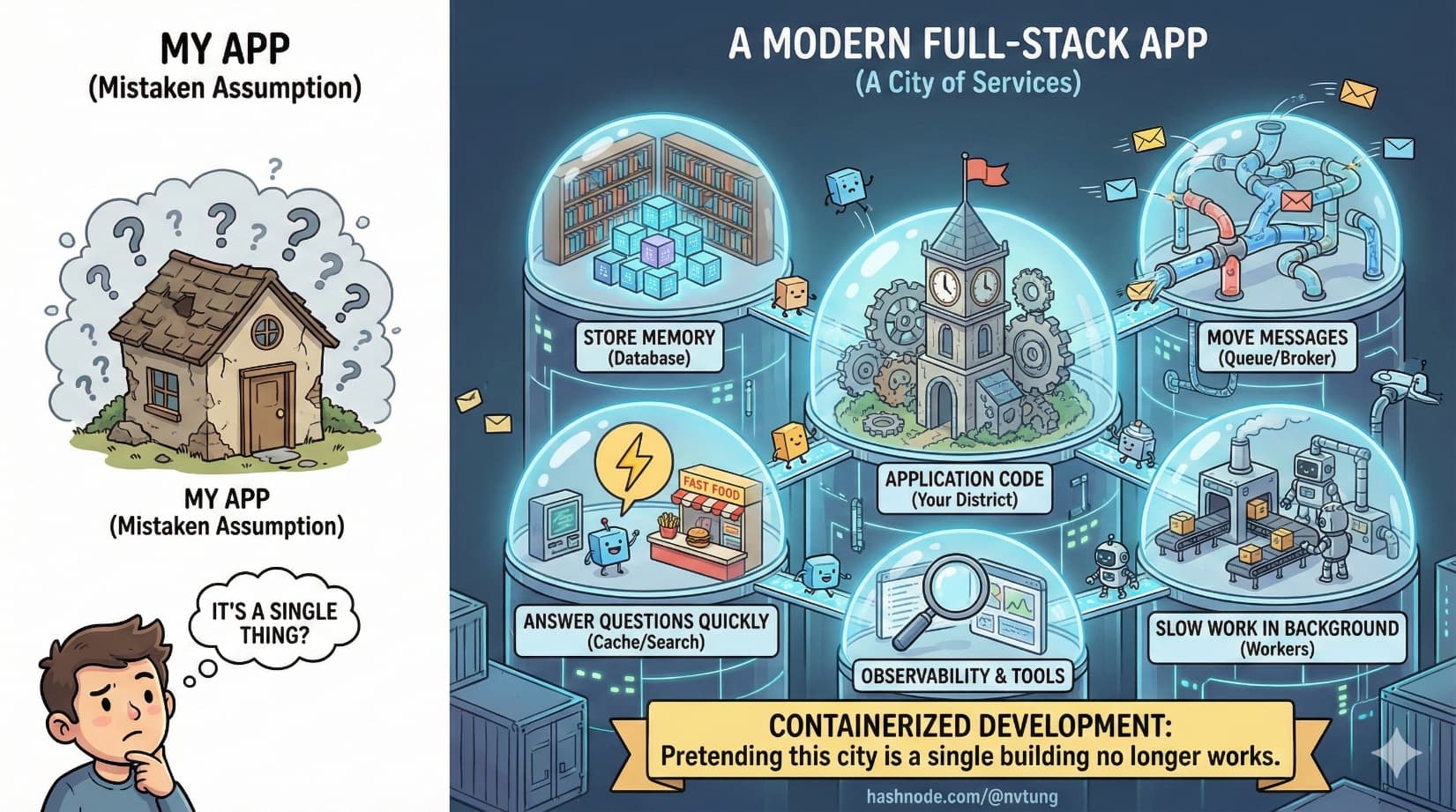
A modern full-stack application is not a program you run. It’s a city of services that cooperate to produce behavior. Some store memory. Some move messages. Some answer questions quickly. Some do slow work in the background. Your application code is only one district in that city.
Containerized development exists because pretending this city is a single building no longer works.
The Old Model: One Server, One Brain
Historically, web apps followed a simple shape:
A web server
Some application logic
A database
All of this often ran on the same machine. Scaling meant buying a bigger machine. Complexity lived inside the code.
That model breaks down as soon as:
Traffic grows
Features diversify
Performance expectations rise
Reliability matters

To survive those pressures, responsibilities get split out. Not because engineers enjoy complexity, but because specialization works.
The Anatomy of a Modern Web Application
Let’s walk through the typical components you’ll find in a modern full-stack system, and what each one actually does.

App Server: The Decision Maker
This is the part developers usually think of as “the app”.
It:
Handles HTTP requests
Applies business logic
Validates input
Coordinates other services
Returns responses
Whether it’s Node.js, PHP, Python, or something else, the app server is primarily a coordinator, not a warehouse of data or a performance engine. Its strength is logic, not storage or speed at scale.
This is why app servers should stay relatively stateless. They are brains, not memory.
Database: Long-Term Memory
The database exists because memory is fragile.
It:
Stores durable data
Enforces structure and constraints
Allows querying and relationships
Survives restarts and crashes
Databases are optimized for correctness and durability, not for raw speed. Writing everything directly to the database works—until it doesn’t. That’s when other services appear.
Cache: Short-Term Memory
Caches exist to avoid repeating expensive work.
They:
Store frequently accessed data
Reduce database load
Improve response times
Trade perfect accuracy for speed
Caches are fast because they live in memory. They are also disposable. If a cache is lost, the system should recover by recomputing or reloading data.
This separation—database for truth, cache for speed—is foundational to scalable systems.
Search Engine: Asking Better Questions
Databases are good at structured queries. They are not great at:
Full-text search
Relevance scoring
Fuzzy matching
Analytics over large datasets
Search engines exist to answer questions like:
“Find posts similar to this”
“Search across millions of documents”
“Rank results by relevance”
They maintain their own indexes, optimized for reading, not writing. That’s why they live outside the main database and outside the app server.
Message Broker: Asynchronous Communication
Not all work should happen during a request.
Message brokers exist to:
Decouple producers from consumers
Smooth traffic spikes
Enable asynchronous processing
Prevent slow tasks from blocking users
Instead of doing everything immediately, the app can say:
“This needs to happen, but not right now.”
That message goes into a queue. Something else handles it later.
This pattern dramatically improves responsiveness and resilience.
Background Workers: The Labor Force
Background workers are where delayed or heavy tasks actually run.
They:
Process queued jobs
Send emails
Generate reports
Sync external systems
Perform batch operations
Workers scale independently from the app server. You can add more workers without touching the app itself. This separation is critical for reliability and performance.
Why These Services Exist at All
Each service exists because it does one thing well:
Databases preserve truth
Caches accelerate access
Search engines optimize discovery
Brokers coordinate work
Workers do heavy lifting
App servers make decisions
Trying to collapse all of this into a single process creates a system that is:
Hard to scale
Hard to debug
Hard to reason about
Hard to reproduce

Splitting responsibilities is not overengineering. It’s how complexity is managed without becoming chaos.
Why These Services Should NOT Live Inside Your App Container
A common early mistake in containerized setups is bundling everything into one container: app, database, cache, and workers all together.
This is seductive—and wrong.
Here’s why.

Different Lifecycles
Each service evolves differently:
Databases upgrade cautiously
App code changes frequently
Caches may be reset often
Workers scale dynamically
Tying them together forces synchronized changes that don’t make sense.
Different Failure Modes
Services fail differently:
A database crash is catastrophic
A cache crash is recoverable
A worker crash is acceptable
An app crash should be quick to restart
When everything lives together, one failure becomes everyone’s problem.
Different Scaling Needs
You don’t scale databases the same way you scale app servers. You don’t scale workers the same way you scale search engines.
Separate containers allow independent scaling, even in local development.
Different Resource Profiles
Databases want disk I/O.
Caches want memory.
Workers want CPU.
Bundling them causes resource contention and unpredictable performance.
The Mental Model That Actually Works
Think of your app as a city.
App servers are city hall
Databases are archives
Caches are bulletin boards
Search engines are libraries
Message brokers are postal services
Workers are construction crews

Docker is not the city. Docker is zoning law.
It enforces boundaries. It prevents factories from appearing in residential zones. It ensures services have clear borders and contracts.
Once you adopt this mental model, docker-compose files stop looking like magic incantations. They become maps.
Why This Matters for Local Development
Local development environments often fail because they pretend the city doesn’t exist.
They run:
The app without the queue
The app without caching
The app without search
Or worse, with mocked substitutes
This leads to:
Bugs that only appear later
Performance surprises
Integration failures
False confidence

Containerized local development allows you to run the city, not just city hall.
Where This Leads Next
Now that we understand what a modern full-stack application actually consists of, the next question becomes unavoidable:
How do we run all of this locally, especially on Windows, without melting our machines or our sanity?
That’s where Docker, WSL 2, and tooling choices enter the story—not as abstractions, but as pragmatic responses to a very real architectural reality.
In the next article, we’ll strip Docker down to its essential concepts and build a mental model that makes containerized systems predictable instead of mysterious.
Complex systems don’t become simple by ignoring their parts.
They become manageable by naming them clearly.




