

The Vue 3 API Layer of BFF: Composables, Error Boundaries & Type Safety
Building a clean, typed client-BFF contract in Vue 3. useApi composables, error handling strategies, and OpenAPI codegen.
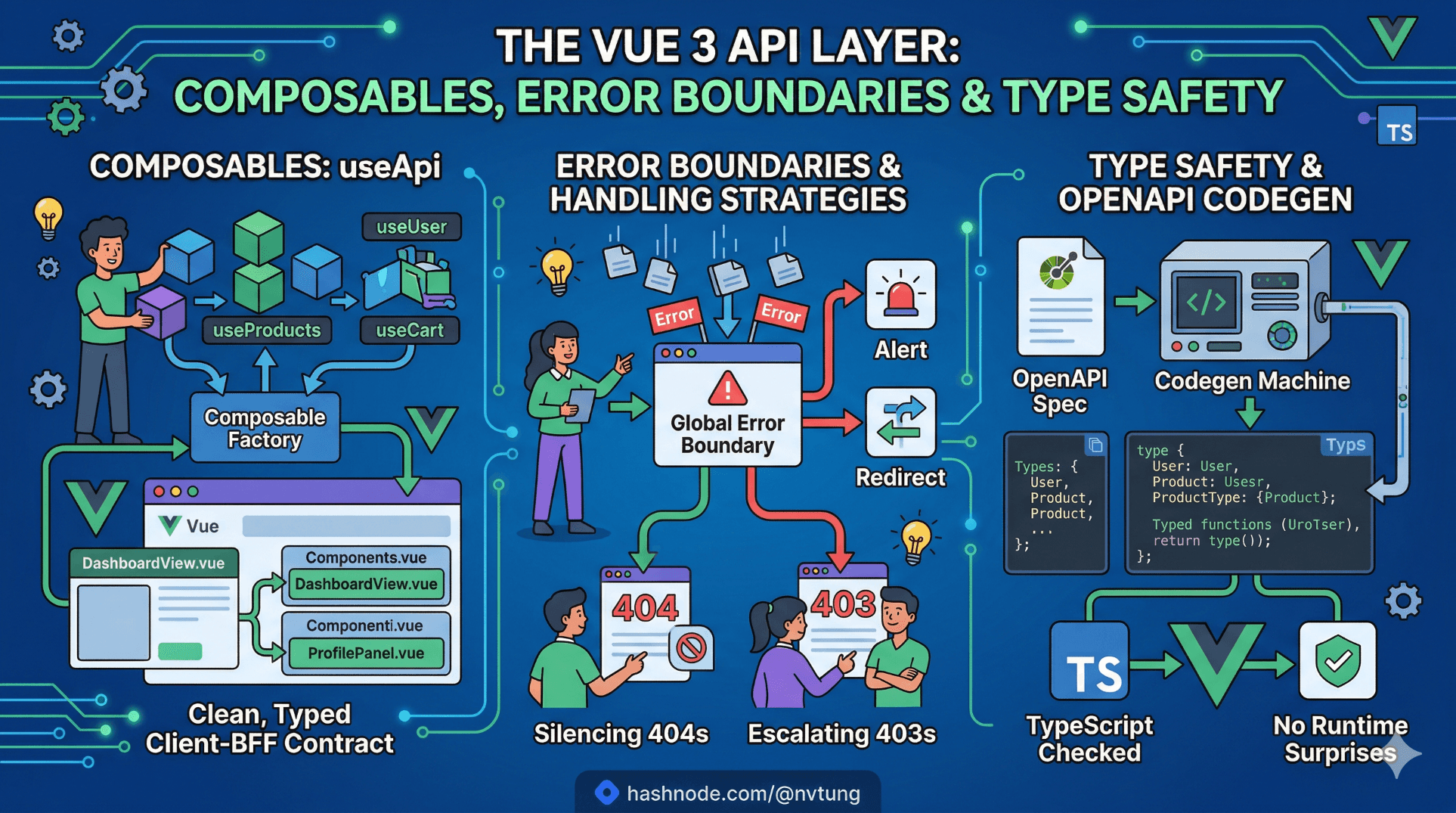
A note on the code in this article. The implementation shown here is derived from a production Vue 3 application built for a Norwegian enterprise education platform. Service names, domain models, and certain structural details have been generalised to meet NDA obligations. The composable patterns, type generation pipeline, error handling strategies, and the specific production problems each decision addresses are drawn directly from what was shipped and maintained in production.
Article 4 built the BFF service. This article builds the other side of the contract — the Vue 3 layer that consumes it. The BFF gives your frontend a stable, shaped API. What you do with that API on the client side determines whether your components stay clean or accumulate the same adapter logic the BFF was supposed to eliminate.
The goal is a client API layer where every component receives typed, ready-to-render data from a composable, error states are handled consistently and not improvised per-component, and a change to the BFF's response schema surfaces as a compile-time error in TypeScript before it reaches the browser. This is achievable — the production system this series is based on ran this setup in CI — but it requires deliberate structure from the start.
This article covers the full stack: OpenAPI type generation, the base useApi composable, screen-level composables built on top of it, error boundary strategy, and the patterns that did not survive contact with production alongside the ones that did.
The type generation pipeline
The contract between the Vue application and the BFF should be enforced by the type system, not by convention or documentation. The mechanism is straightforward: the BFF publishes an OpenAPI spec, a generation script turns that spec into TypeScript interfaces, and those interfaces are imported wherever the API response is consumed.
Install the generator:
npm install -D openapi-typescript
Add the generation script to package.json:
{
  "scripts": {
    "generate:api": "openapi-typescript http://localhost:5000/swagger/v1/swagger.json --output src/api/types.gen.ts",
    "generate:api:ci": "openapi-typescript $BFF_SWAGGER_URL --output src/api/types.gen.ts"
  }
}
The generate:api script targets the local BFF running in development. The generate:api:ci variant uses an environment variable pointing to the staging BFF — the same version that will be deployed alongside the frontend build. This matters: generating types from a different BFF version than the one you are deploying against defeats the purpose of the pipeline.
Running this against the BFF built in Article 4 produces a file like this (abbreviated):
// src/api/types.gen.ts — generated, do not edit manually
export interface components {
  schemas: {
    DashboardResponse: {
      user: components['schemas']['UserProfileResponse'];
      courses: components['schemas']['CourseResponse'][];
      upcomingSessions: components['schemas']['SessionResponse'][];
      notifications: components['schemas']['NotificationSummary'];
      partialFailures: string[];
    };
    UserProfileResponse: {
      displayName: string;
      role: string;
      avatarUrl: string | null;
    };
    CourseResponse: {
      id: string;
      title: string;
      code: string;
      enrollmentLabel: string;
      enrollmentPercent: number;
      status: string;
    };
    SessionResponse: {
      id: string;
      title: string;
      startsAt: string;
      courseTitle: string;
      locationLabel: string;
    };
    NotificationSummary: {
      count: number;
    };
  };
}
Create a single re-export file that the rest of the application imports from. Never import from types.gen.ts directly — doing so couples every consumer to the generated file's internal structure, which changes every time the generator runs:
// src/api/types.ts
import type { components } from './types.gen'

export type DashboardResponse = components['schemas']['DashboardResponse']
export type UserProfileResponse = components['schemas']['UserProfileResponse']
export type CourseResponse = components['schemas']['CourseResponse']
export type SessionResponse = components['schemas']['SessionResponse']
export type NotificationSummary = components['schemas']['NotificationSummary']
This indirection layer is the difference between a type generation pipeline and a type generation obligation. The generated file changes freely; the re-export file changes only when the public contract deliberately changes.
Make type generation a CI gate. In the production system, the CI pipeline ran generate:api:ci and then tsc --noEmit. A BFF response shape change that broke the Vue application's types failed the build before deployment. This caught contract mismatches three times in the project's lifetime — each time before a broken build reached staging.
The base composable: useApi
Every API call in the application goes through a single base composable. This is the most important structural decision in the client API layer, and the one most frequently skipped in Vue projects that start simple and grow into a tangle of inconsistent error handling.
The base composable is responsible for three things and only three things: executing a fetch function, managing the loading/error/data state lifecycle, and normalising errors into a consistent shape.
// src/composables/useApi.ts
import { ref, readonly, type Ref } from 'vue'

export interface ApiError {
  status: number
  title: string
  detail: string
  traceId: string | null
}

export interface UseApiReturn<T> {
  data: Ref<T | null>
  error: Ref<ApiError | null>
  isLoading: Ref<boolean>
  execute: () => Promise<void>
}

export function useApi<T>(
  fetchFn: () => Promise<T>,
  options: { immediate?: boolean } = {}
): UseApiReturn<T> {
  const data = ref<T | null>(null) as Ref<T | null>
  const error = ref<ApiError | null>(null)
  const isLoading = ref(false)

  const execute = async () => {
    isLoading.value = true
    error.value = null

    try {
      data.value = await fetchFn()
    } catch (e) {
      error.value = normaliseError(e)
      data.value = null
    } finally {
      isLoading.value = false
    }
  }

  if (options.immediate) {
    execute()
  }

  return {
    data: readonly(data) as Ref<T | null>,
    error: readonly(error) as Ref<ApiError | null>,
    isLoading: readonly(isLoading) as Ref<boolean>,
    execute
  }
}

function normaliseError(e: unknown): ApiError {
  // BFF returns Problem Details (RFC 7807) — parse the structured body
  if (e instanceof ApiResponseError) {
    return {
      status: e.status,
      title: e.title,
      detail: e.detail,
      traceId: e.traceId
    }
  }

  // Network failure — no response body
  if (e instanceof TypeError && e.message.includes('fetch')) {
    return {
      status: 0,
      title: 'Network error',
      detail: 'Could not reach the server. Check your connection.',
      traceId: null
    }
  }

  // Unexpected — still normalise
  return {
    status: -1,
    title: 'Unexpected error',
    detail: e instanceof Error ? e.message : 'An unknown error occurred.',
    traceId: null
  }
}
The readonly wrappers on data and error are deliberate. Components receive the state refs but cannot mutate them directly — mutations go through execute. This prevents a class of bugs where a component sets data.value = null as a local workaround and breaks another component consuming the same state.
The HTTP client and error class
The base composable uses an ApiResponseError that wraps the BFF's Problem Details response. This is the class that bridges the HTTP layer with the composable's error normalisation:
// src/api/client.ts
export class ApiResponseError extends Error {
  constructor(
    public readonly status: number,
    public readonly title: string,
    public readonly detail: string,
    public readonly traceId: string | null
  ) {
    super(`\({status}: \){title}`)
  }
}

async function handleResponse<T>(response: Response): Promise<T> {
  if (response.ok) {
    return response.json() as Promise<T>
  }

  // Attempt to parse Problem Details body
  let problem = { title: 'Error', detail: 'An error occurred.', traceId: null }
  try {
    const body = await response.json()
    problem = {
      title: body.title ?? problem.title,
      detail: body.detail ?? problem.detail,
      traceId: body.traceId ?? null
    }
  } catch {
    // Non-JSON error body — use defaults
  }

  throw new ApiResponseError(
    response.status,
    problem.title,
    problem.detail,
    problem.traceId
  )
}

export const apiClient = {
  async get<T>(path: string, init?: RequestInit): Promise<T> {
    const response = await fetch(`/api${path}`, {
      ...init,
      headers: {
        'Accept': 'application/json',
        ...init?.headers
      },
      credentials: 'include' // Send session cookie
    })
    return handleResponse<T>(response)
  },

  async post<T>(path: string, body: unknown, init?: RequestInit): Promise<T> {
    const response = await fetch(`/api${path}`, {
      ...init,
      method: 'POST',
      headers: {
        'Content-Type': 'application/json',
        'Accept': 'application/json',
        ...init?.headers
      },
      body: JSON.stringify(body),
      credentials: 'include'
    })
    return handleResponse<T>(response)
  }
}
credentials: 'include' ensures the session cookie is sent with every request — the BFF's authentication is cookie-based, as established in the architecture. This is a single configuration point; forgetting it per-request was a failure mode caught in development.
The path prefix /api is injected once here. Components and composables never construct full URLs — they pass paths (/dashboard, /courses/c-1) and the client handles the rest.
Screen-level composables
The base composable handles mechanics. Screen-level composables handle intent — they know which BFF endpoint to call, what type the response is, and what derived state the component tree needs.
// src/composables/useDashboard.ts
import { computed } from 'vue'
import { useApi } from './useApi'
import { apiClient } from '@/api/client'
import type { DashboardResponse } from '@/api/types'

export function useDashboard() {
  const { data, error, isLoading, execute } = useApi<DashboardResponse>(
    () => apiClient.get<DashboardResponse>('/dashboard'),
    { immediate: true }
  )

  // Derived state — components consume these, not raw data
  const user = computed(() => data.value?.user ?? null)
  const courses = computed(() => data.value?.courses ?? [])
  const upcomingSessions = computed(() => data.value?.upcomingSessions ?? [])
  const notificationCount = computed(() => data.value?.notifications.count ?? 0)

  // Surface partial failure state for component-level degradation handling
  const hasPartialFailure = computed(
    () => (data.value?.partialFailures?.length ?? 0) > 0
  )
  const partialFailures = computed(() => data.value?.partialFailures ?? [])

  return {
    // State
    user,
    courses,
    upcomingSessions,
    notificationCount,
    hasPartialFailure,
    partialFailures,
    // Loading / error
    isLoading,
    error,
    // Manual refresh
    refresh: execute
  }
}
Three things to notice here.
Derived computed refs, not raw data. The component does not receive data.value?.courses — it receives courses, a computed ref with a [] fallback. This removes null-guard boilerplate from every component that consumes this composable. The fallback values are defined once, in the composable, not scattered across template expressions.
partialFailures is surfaced explicitly. The BFF returns this field (built in Article 4) when some upstream services failed but the response was still structurally valid. The composable exposes hasPartialFailure and partialFailures so components can render degraded states with a specific message rather than a generic error.
immediate: true fires the fetch on composable creation. The dashboard fetches its data as soon as the composable is created — which happens when the component mounts. For detail screens that require a parameter (a course ID, a session ID), immediate is false and execute is called explicitly once the parameter is available.
Using the composable in a component
<!-- src/views/DashboardView.vue -->
<script setup lang="ts">
import { useDashboard } from '@/composables/useDashboard'
import UserProfileCard from '@/components/UserProfileCard.vue'
import CourseListPanel from '@/components/CourseListPanel.vue'
import UpcomingSessionsList from '@/components/UpcomingSessionsList.vue'
import NotificationBadge from '@/components/NotificationBadge.vue'
import PartialFailureBanner from '@/components/PartialFailureBanner.vue'
import LoadingSpinner from '@/components/LoadingSpinner.vue'
import ErrorDisplay from '@/components/ErrorDisplay.vue'

const {
  user,
  courses,
  upcomingSessions,
  notificationCount,
  hasPartialFailure,
  partialFailures,
  isLoading,
  error,
  refresh
} = useDashboard()
</script>

<template>
  <div class="dashboard">
    <LoadingSpinner v-if="isLoading" />

    <ErrorDisplay
      v-else-if="error"
      :error="error"
      @retry="refresh"
    />

    <template v-else>
      <PartialFailureBanner
        v-if="hasPartialFailure"
        :failures="partialFailures"
      />

      <UserProfileCard v-if="user" :profile="user" />

      <div class="dashboard-body">
        <CourseListPanel :courses="courses" />
        <UpcomingSessionsList :sessions="upcomingSessions" />
      </div>

      <NotificationBadge :count="notificationCount" />
    </template>
  </div>
</template>
The component contains no fetch calls, no try/catch, no null guards beyond v-if="user", and no type assertions. It destructures the composable and binds to named refs. If the BFF's UserProfileResponse type changes — say, displayName is renamed to fullName — TypeScript flags every component binding that uses the old name before the code compiles.
Parameterised composables: detail screens
Not all composables fire immediately. Detail screens receive an ID from the route and fetch on mount with that ID.
// src/composables/useCourseDetail.ts
import { computed, watch, type Ref } from 'vue'
import { useApi } from './useApi'
import { apiClient } from '@/api/client'
import type { CourseDetailResponse } from '@/api/types'

export function useCourseDetail(courseId: Ref<string>) {
  const { data, error, isLoading, execute } = useApi<CourseDetailResponse>(
    () => apiClient.get<CourseDetailResponse>(`/courses/${courseId.value}`),
    { immediate: false } // Do not fire until courseId is known
  )

  // Fire whenever courseId changes — handles navigation between detail pages
  watch(courseId, () => execute(), { immediate: true })

  const course = computed(() => data.value ?? null)
  const sessions = computed(() => data.value?.sessions ?? [])
  const enrollmentOpen = computed(() => data.value?.enrollment.isOpen ?? false)

  return { course, sessions, enrollmentOpen, isLoading, error, refresh: execute }
}
The watch with { immediate: true } fires on mount with the initial courseId value, and re-fires whenever the ID changes — which happens when the user navigates from one course detail to another without unmounting the view. Forgetting this watch was a bug caught in dev: navigating from course A to course B showed course A's data until the component was destroyed and recreated. The watch fixes it structurally.
Using the composable in the view:
<!-- src/views/CourseDetailView.vue -->
<script setup lang="ts">
import { toRef } from 'vue'
import { useRoute } from 'vue-router'
import { useCourseDetail } from '@/composables/useCourseDetail'

const route = useRoute()
const courseId = toRef(() => route.params.courseId as string)

const { course, sessions, enrollmentOpen, isLoading, error, refresh } =
  useCourseDetail(courseId)
</script>
toRef(() => ...) creates a reactive ref from the route param — it updates when the route changes, which triggers the watch in the composable.
Error boundaries: the component-level strategy
The base composable normalises errors into ApiError. But where errors are rendered is a component-level concern, and three distinct strategies apply depending on the screen.
Strategy 1: Inline error with retry
For primary data on a screen where failure should be surfaced and recoverable:
<!-- src/components/ErrorDisplay.vue -->
<script setup lang="ts">
import type { ApiError } from '@/composables/useApi'

defineProps<{
  error: ApiError
}>()

const emit = defineEmits<{
  retry: []
}>()
</script>

<template>
  <div class="error-display" role="alert">
    <p class="error-title">{{ error.title }}</p>
    <p class="error-detail">{{ error.detail }}</p>
    <p v-if="error.traceId" class="error-trace">
      Reference: {{ error.traceId }}
    </p>
    <button @click="emit('retry')">Try again</button>
  </div>
</template>
The traceId renders in the UI. Support engineers ask users for it when investigating incidents. This is a small detail with outsized operational value — when a user reports a 503 and can read out a trace ID, an engineer can find the exact request in Application Insights in seconds.
Strategy 2: Partial failure banner
For degraded responses where some data loaded and some did not — surfaced via partialFailures from the BFF:
<!-- src/components/PartialFailureBanner.vue -->
<script setup lang="ts">
const props = defineProps<{
  failures: string[]
}>()

const failureLabels: Record<string, string> = {
  courses: 'course list',
  sessions: 'upcoming sessions',
  notifications: 'notifications'
}

const failureDescription = computed(() =>
  props.failures
    .map(f => failureLabels[f] ?? f)
    .join(' and ')
)
</script>

<template>
  <div class="partial-failure-banner" role="status">
    Some content could not be loaded ({{ failureDescription }}).
    The page may be incomplete.
  </div>
</template>
This component renders alongside the data that did load, rather than replacing it. The user sees a partially populated dashboard with an honest explanation — not a full-screen error for a non-critical failure.
Strategy 3: Silent fallback for non-critical widgets
For widgets where failure is genuinely inconsequential — a notification count badge, a "last login" display:
<!-- src/components/NotificationBadge.vue -->
<script setup lang="ts">
defineProps<{ count: number }>()
// count arrives as 0 from the composable fallback if the upstream failed.
// No error state needed — 0 is a valid, renderable value.
</script>

<template>
  <span v-if="count > 0" class="badge">{{ count }}</span>
</template>
The composable's notificationCount defaults to 0 when the notification service failed. The badge component renders nothing if the count is 0 — which is indistinguishable from "no notifications" to the user. This is the correct trade-off for a non-critical UI element.
The principle: choose the error strategy based on what the user can do in response to the failure, not based on technical severity. A 503 on the profile service warrants a full error display with retry. A 503 on the notification service warrants silence.
Write operations: POST, PATCH, and mutation composables
Read composables are straightforward — fire on mount, expose derived state. Write composables are different: they are triggered by user interaction, need to track submission state separately from loading state, and must handle validation errors from the BFF distinctly from network errors.
// src/composables/useCourseEnrollment.ts
import { ref } from 'vue'
import { apiClient, ApiResponseError } from '@/api/client'
import type { EnrollmentRequest, EnrollmentResponse } from '@/api/types'

export function useCourseEnrollment() {
  const isSubmitting = ref(false)
  const validationErrors = ref<Record<string, string>>({})
  const submitError = ref<string | null>(null)
  const isSuccess = ref(false)

  const enroll = async (courseId: string, payload: EnrollmentRequest) => {
    isSubmitting.value = true
    validationErrors.value = {}
    submitError.value = null
    isSuccess.value = false

    try {
      await apiClient.post<EnrollmentResponse>(
        `/courses/${courseId}/enrollment`,
        payload
      )
      isSuccess.value = true
    } catch (e) {
      if (e instanceof ApiResponseError) {
        if (e.status === 422) {
          // BFF returns validation errors as an extensions object
          validationErrors.value = (e as any).extensions?.errors ?? {}
        } else {
          submitError.value = e.detail
        }
      } else {
        submitError.value = 'Could not complete enrollment. Please try again.'
      }
    } finally {
      isSubmitting.value = false
    }
  }

  return {
    enroll,
    isSubmitting,
    validationErrors,
    submitError,
    isSuccess
  }
}
The distinction between validationErrors (field-level, from a 422) and submitError (message-level, from any other error) mirrors how the BFF handles these two failure modes. The BFF returns structured validation errors on 422; the component receives them as a record and maps them to field labels. Any other failure becomes a banner message, not a field annotation.
Shared state: when a composable is not enough
Most composables are created per-component and their state is local to that component's lifetime. Occasionally, state needs to be shared across components that are not in a parent-child relationship — the authenticated user's profile is the clearest example.
The solution in the production system was a Pinia store for session state only, with everything else in per-screen composables:
// src/stores/session.ts
import { defineStore } from 'pinia'
import { ref, computed } from 'vue'
import { apiClient } from '@/api/client'
import type { UserProfileResponse } from '@/api/types'

export const useSessionStore = defineStore('session', () => {
  const profile = ref<UserProfileResponse | null>(null)
  const isAuthenticated = computed(() => profile.value !== null)

  async function fetchProfile() {
    try {
      profile.value = await apiClient.get<UserProfileResponse>('/auth/me')
    } catch {
      profile.value = null
    }
  }

  function clearSession() {
    profile.value = null
  }

  return { profile, isAuthenticated, fetchProfile, clearSession }
})
The session store is initialised once in App.vue on mount. Every component that needs the user's display name or role reads from the store rather than making another BFF call. Everything else — courses, sessions, notifications — stays in per-screen composables. This is the minimum viable use of global state: use it only when the data genuinely needs to outlive any single component's lifetime.
The complete data flow, end to end
To make the layers concrete:
BFF OpenAPI spec
  ↓  openapi-typescript
src/api/types.gen.ts
  ↓  re-exported via
src/api/types.ts
  ↓  imported by
src/composables/useDashboard.ts
  ↓  typed return value consumed by
src/views/DashboardView.vue
  ↓  typed props passed to
src/components/CourseListPanel.vue
Every link in this chain is type-checked. A change at the BFF end propagates as a TypeScript error through every layer until every consumer is updated. No runtime surprises. No "it worked in development" moments in staging.

What the production system learned
A few failure modes that did not survive contact with production and the decisions that replaced them:
axios interceptors for error handling. The first implementation used an Axios response interceptor to normalise errors globally. This worked until two endpoints needed different error handling behaviour — one needed to suppress 404s silently, another needed to escalate 403s to a full-page redirect. Interceptor configuration became conditional logic that was harder to reason about than per-composable handling. The apiClient wrapper with handleResponse replaced it: explicit, co-located, composable-specific where needed.
Loading state in Vuex before Pinia. The early implementation tracked isLoading for every API call in a Vuex module keyed by endpoint name. Components dispatched actions and read loading state from the store. This scaled poorly — the store grew large, loading state leaked between navigations, and testing required mocking the entire store for any component test. Per-composable isLoading refs fixed all three problems.
Direct fetch calls in components. Several components in the early sprint made fetch calls directly in onMounted. This was fast to write and immediately problematic: no shared loading state, no consistent error handling, no type safety, and no way to test the fetch logic independently of the component. The useApi base composable was introduced at sprint 4 and all direct fetch calls were migrated over two weeks.

What comes next
The API layer is complete on both sides — the BFF shapes and serves, the Vue composables consume and distribute. The next article addresses the most architecturally consequential decision in the implementation: authentication. Specifically, how Feide — Norway's government-issued identity provider for the education sector — is integrated via the BFF using the Token Handler pattern, why this requires server-side session management, and why tokens should never reach the browser in this architecture.




