

Authentication Is Not Login
Why modern authentication systems fail when identity, login, and security are treated as the same thing
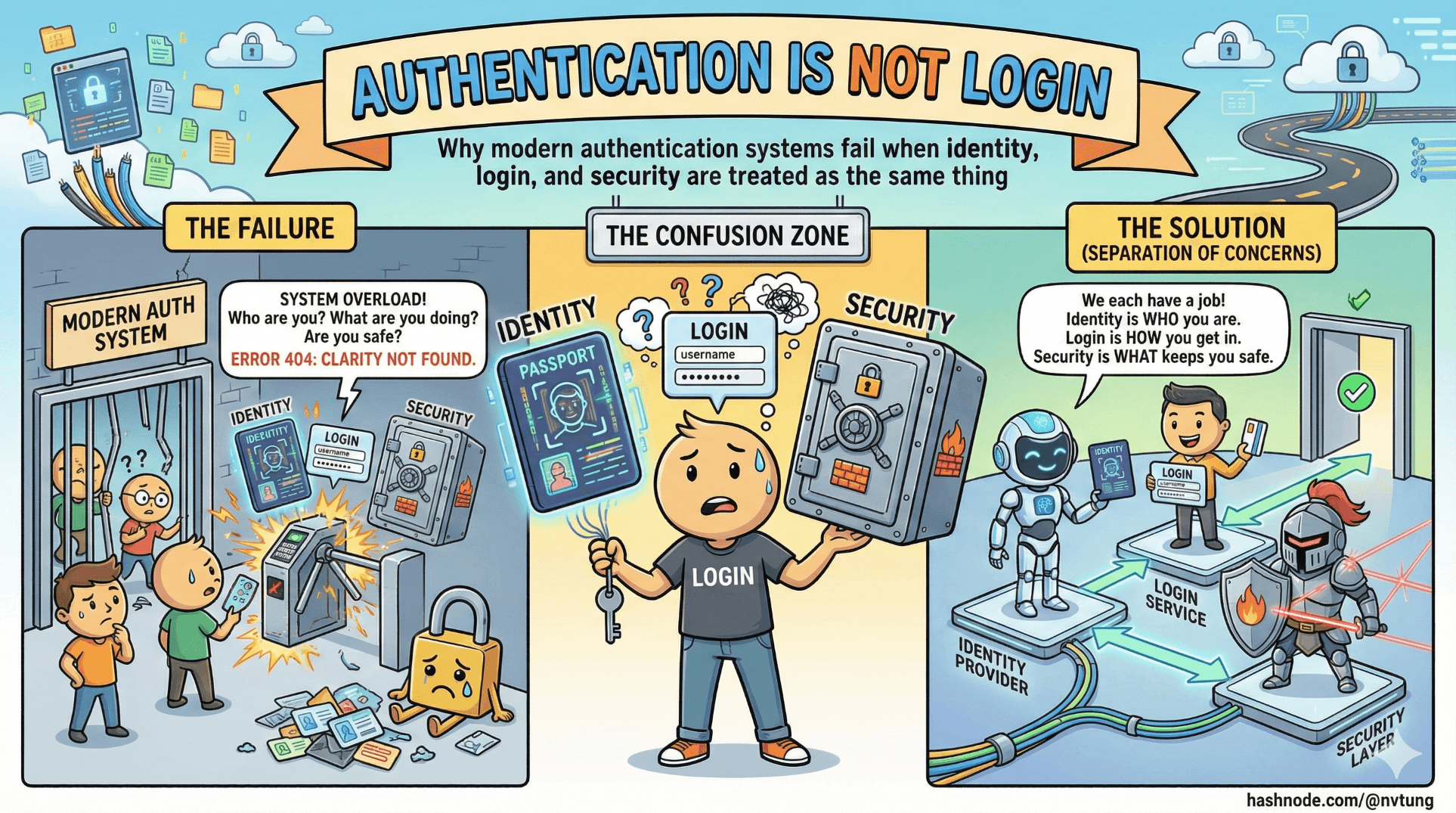
Modern web applications are full of login screens — but surprisingly few of them have a well-designed authentication system.
This distinction matters more than it sounds.
If you treat authentication as a UI feature instead of a security system, every decision that follows will be reactive, fragile, and hard to evolve. Passwordless authentication, biometrics, passkeys, and federated identity all fail when they are bolted onto the wrong mental model.
Before we talk about FIDO, WebAuthn, or PWAs, we need to untangle three ideas that are constantly conflated: identity, authentication, and authorization.
Identity, authentication, and authorization are not the same thing
They often appear together, but they solve different problems.
Identity answers the question: Who is this user supposed to be?
An identity is a logical construct. It might be an email address, a student ID, an employee number, or a subject identifier from an identity provider. Identity exists even when no one is logged in.
Authentication answers the question: Can this user prove they control that identity right now?
Authentication is an event. It happens at a moment in time, using evidence: something the user knows, has, or is. When authentication succeeds, the system gains confidence that the user is who they claim to be.
Authorization answers the question: What is this authenticated identity allowed to do?
Authorization is policy. It decides access to resources after authentication has already happened.

A login screen collapses all three into a single gesture.
A well-designed system does not.
When people say “login,” they usually mean:
identify the user,
authenticate them,
create a session,
and authorize access — all at once.
This compression hides complexity, which is why authentication systems often break under real-world pressure.
Why passwords became a liability
Passwords weren’t always terrible. They were simple, portable, and easy to implement. But they were never designed for the environment they now inhabit.
The modern web has:
thousands of services per user,
phishing at industrial scale,
automated credential testing,
shared devices,
password managers,
and users trained to ignore security warnings just to get work done.
Passwords fail not because users are careless, but because the model is brittle.
A password:
must be remembered,
must be transmitted (even if hashed),
must be reused or rotated,
and must remain secret — forever.
Every one of those constraints breaks under scale.
Once a password exists, it becomes:
a reusable secret,
a target for phishing,
a commodity for attackers,
and a liability for operators.
The security industry tried to patch this with:
complexity rules,
forced rotation,
MFA bolted on afterward,
CAPTCHA,
and endless UX friction.
The result was predictable: more prompts, more fatigue, more insecure workarounds.

Passwordless authentication didn’t emerge because passwords were inconvenient.
It emerged because passwords are structurally incompatible with modern threat models.
Threat models that actually matter for PWAs
Progressive Web Apps inherit all the threats of the web, plus a few of their own.
If you’re building a PWA, these are the threats that should shape your authentication design.
Phishing
Phishing works because passwords are portable secrets.
A fake site only needs to look convincing long enough for the user to type something.
No amount of password complexity fixes this.
If the user can type the secret, an attacker can ask for it.
This is the single strongest argument for WebAuthn-based authentication: credentials are bound to origin. The browser refuses to authenticate for the wrong site. Phishing stops working at the protocol level, not the UX level.
Credential stuffing
Attackers don’t guess passwords anymore. They replay them.
A breach in one system becomes an attack surface for thousands of others. PWAs are particularly exposed because they often serve global audiences with minimal friction to sign up.
Once a password database exists, credential stuffing is inevitable.
Replay attacks
If an authentication response can be reused, it will be.
Tokens, cookies, and session identifiers must be scoped, time-bound, and rotated correctly. PWAs complicate this because they blur the line between web app and installed app, often encouraging long-lived sessions.
Modern authentication systems rely on challenge–response instead of static secrets precisely to prevent replay.
Client compromise and shared devices
PWAs run on devices you do not control:
shared computers,
stolen phones,
locked-down corporate environments.

Authentication must assume that devices can be lost and recovered, not just trusted forever. This is where many “passwordless-only” designs quietly fail.
Why “just add biometrics” is a misunderstanding
Biometrics are not an authentication system.
They are a local user verification mechanism.
This distinction is subtle and critical.

When a user authenticates with biometrics in a WebAuthn flow:
the biometric never leaves the device,
it never identifies the user to the server,
and it is not the credential.
The real credential is a cryptographic key pair stored in the authenticator.
The biometric merely unlocks the private key.
This means:
biometrics do not replace identity,
biometrics do not replace account recovery,
biometrics do not replace authorization,
biometrics do not remove the need for backend logic.
“Adding biometrics” without redesigning the authentication flow usually results in:
biometric prompts guarding a password,
biometrics unlocking stored tokens,
or biometrics acting as cosmetic MFA.
These designs feel modern but inherit all the weaknesses of the underlying system.
True passwordless authentication requires:
server-issued challenges,
public-key verification,
device-bound credentials,
and a fallback strategy for when devices are lost or unavailable.
Biometrics are part of the experience, not the architecture.
Authentication is a system, not a screen
The core mistake teams make is treating authentication as a moment instead of a lifecycle.
A real authentication system must account for:
enrollment,
authentication,
failure,
retry,
recovery,
device loss,
account linking,
and evolution over time.
This is why modern systems combine approaches:
passwordless for speed and phishing resistance,
federated identity for portability and recovery,
policy for authorization,
and UX as an explicit security control.
The goal is not to eliminate login screens.
The goal is to design a system where authentication decisions are deliberate, layered, and resilient.

In the next article, we’ll narrow the scope and define what “passwordless” actually means — and what it does not mean — before diving into WebAuthn and FIDO2 themselves.
Because once the mental model is right, the APIs finally make sense.
☰ Series Navigation
Core Series
→ Article 1 — Authentication is Not Login
Article 7 — A Real Passwordless PWA Flow (Architecture Walkthrough)
Article 9 — Integrating OIDC (Feide) as Fallback and Recovery




