

WebAuthn & FIDO2, Explained Without the Spec
Understanding how WebAuthn works, why it’s secure by design, and what problems it actually solves
If you read the WebAuthn specification end to end, you’ll come away with two thoughts:
This is extremely well designed.
No human should be expected to learn it this way.
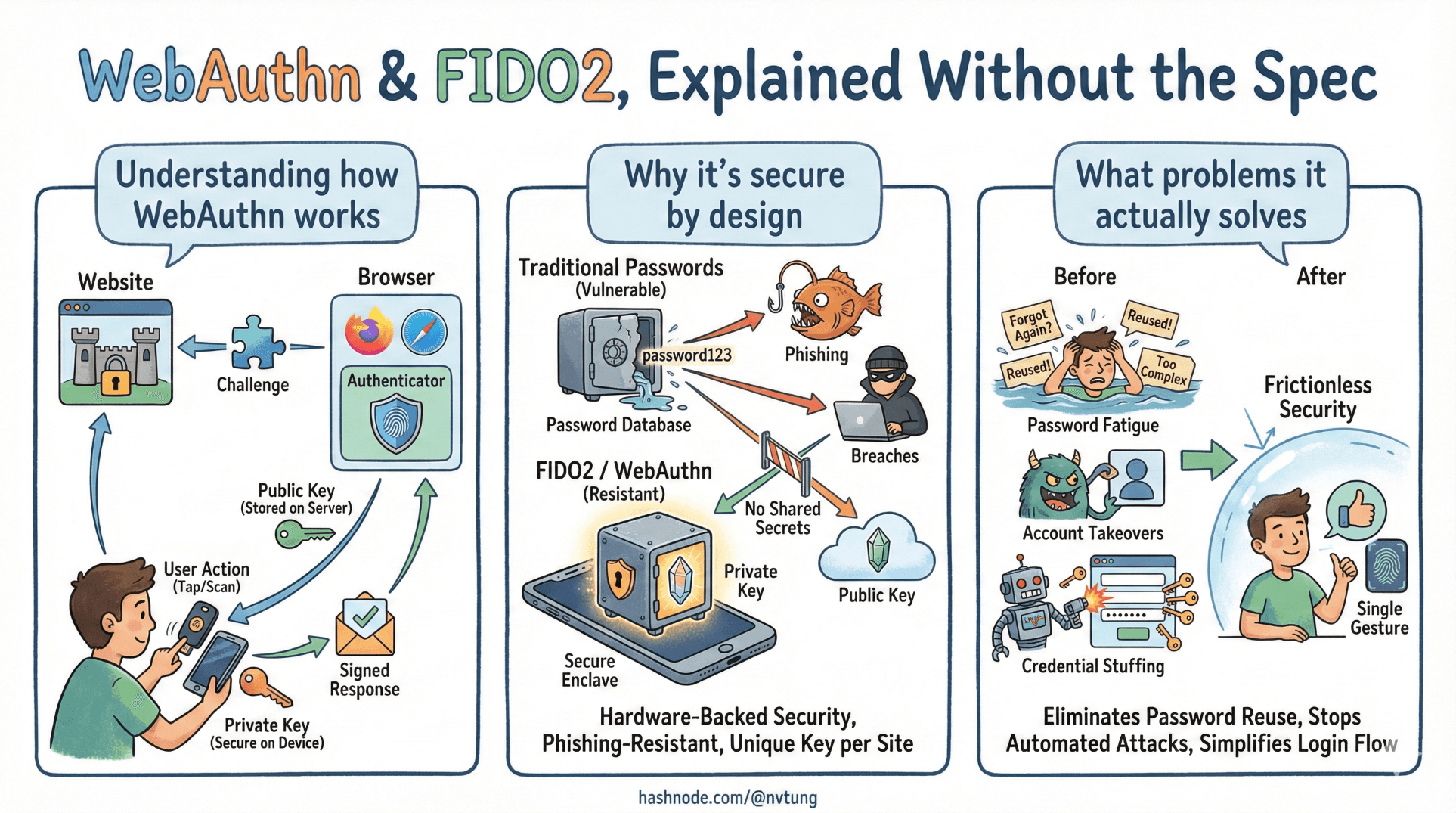
WebAuthn didn’t appear to make logins prettier. It exists because the web needed a way to authenticate users without shared secrets, without training users to detect phishing, and without centralizing catastrophic risk.
This article explains what WebAuthn and FIDO2 solve, how they work at a conceptual level, and why their security properties emerge naturally from the design — not from UI tricks or user behavior.
No spec quotes. No diagrams full of acronyms. Just the moving parts that matter.
The problems WebAuthn was designed to solve
WebAuthn doesn’t fix “bad passwords.”
It eliminates the need for passwords entirely.
The core problems it targets are structural:

Shared secrets don’t scale
Passwords are secrets shared between user and server. That single fact creates:
phishing,
credential stuffing,
password reuse,
database breach fallout.
As long as the same secret can be typed and replayed, attackers will find ways to collect it.
Servers shouldn’t need to keep login secrets
Even well-hashed passwords are still verifier secrets.
If an attacker steals the database, they gain:
offline attack capability,
reusable material,
leverage across systems.
WebAuthn removes this entire category of risk by design.
Authentication should not rely on user judgment
Security systems that depend on users spotting fake URLs are already lost.
WebAuthn pushes phishing resistance into the browser and protocol layer, where it belongs. Users don’t need to “be careful.” The system refuses to cooperate with the attacker.
The core idea: public-key credentials
WebAuthn is built on public-key cryptography, but you don’t need to think in equations.

Here’s the mental model:
Each user registers a credential for a specific website.
That credential is a key pair:
a private key stored securely on the user’s device,
a public key stored on the server.
The private key never leaves the device.
The public key is useless on its own.
This immediately changes the trust model:
stealing the server database doesn’t let attackers log in,
stealing one device doesn’t compromise other accounts,
credentials can’t be replayed or reused elsewhere.
Challenges and assertions: proving freshness
If the server never sees a secret, how does authentication work?
Through challenge–response.

The challenge
When a user wants to authenticate:
the server generates a random, unpredictable challenge,
the challenge is tied to the session and expires quickly,
the server sends it to the client.
This ensures freshness.
An old response will never work again.
The assertion
The client asks the authenticator:
- “Sign this challenge for this site.”
The authenticator:
verifies the user locally (if required),
signs the challenge with the private key,
returns a signed assertion.
The server:
verifies the signature using the stored public key,
confirms the challenge matches,
checks counters to detect replay or cloning.
No secrets compared.
No passwords transmitted.
No reusable proof created.
Platform vs roaming authenticators
Authenticators come in different forms, and WebAuthn treats them explicitly.

Platform authenticators
These are built into devices:
phone biometrics,
laptop fingerprint readers,
OS-level secure enclaves.
Characteristics:
excellent UX,
tightly integrated with the device,
private keys stored in hardware-backed storage.
They are ideal for PWAs because:
they feel native,
they require no extra hardware,
they encourage passwordless adoption.
Roaming authenticators
These are external devices:
USB security keys,
NFC or Bluetooth tokens.
Characteristics:
portable across devices,
extremely strong isolation,
ideal for high-assurance environments.
They solve a different problem: portability without centralization.
Well-designed systems allow both, because users have different constraints.
User presence vs user verification
This distinction is subtle and often misunderstood.
User presence (UP)
User presence means:
the user performed a conscious action,
such as touching a button or tapping a key.
It prevents silent, background authentication.
User verification (UV)
User verification means:
the authenticator verified who is using it,
via biometrics or a PIN.
UV answers: is this the legitimate user of this device?
UP answers: did someone physically interact with the device?

WebAuthn supports both:
some flows require UV,
others accept UP only,
policy decides what’s acceptable.
This flexibility allows systems to balance:
security,
accessibility,
device capability.
Why WebAuthn is phishing-resistant by design
This is the most important property — and it’s not accidental.
WebAuthn credentials are bound to origin.

That means:
a credential created for
example.comwill not work for
examp1e.com(notice the difference)or inside an iframe on another site
or on a cloned login page.
The browser enforces this binding.
The user never sees the decision.
A phishing site can:
perfectly mimic your UI,
use the same text,
even embed your real site visually.
But when it asks the browser to authenticate:
no matching credential exists,
the authenticator refuses,
the attack fails silently.
No warning dialogs.
No user training.
No race against social engineering.
This is what “security by design” looks like.
What WebAuthn does not do
Clarity here prevents bad architecture later.
WebAuthn does not:
manage identities across systems,
recover lost accounts,
replace authorization logic,
eliminate the need for backend validation,
solve UX by itself.

WebAuthn solves one problem extremely well:
How can a user prove control of a credential securely, without shared secrets, and without being phishable?
Everything else still requires system design.
WebAuthn as infrastructure, not magic
When WebAuthn works well, it feels invisible:
a prompt,
a touch,
and you’re in.
That simplicity hides real complexity:
cryptography,
device trust,
browser enforcement,
careful server validation.

But that complexity exists whether you manage it or not.
WebAuthn simply exposes it in a form that can be reasoned about and secured.
In the next article, we’ll step back from the protocol and look at how WebAuthn fits into a full PWA architecture — including sessions, fallback paths, and real-world failure modes.
Because passwordless authentication doesn’t live in a vacuum.
It lives inside systems built by humans, for humans, on devices that get lost.
☰ Series Navigation
Core Series
→ Article 3 — WebAuthn & FIDO2, Explained Without the Spec
Article 7 — A Real Passwordless PWA Flow (Architecture Walkthrough)
Article 9 — Integrating OIDC (Feide) as Fallback and Recovery




