

Passwordless: What Worked, What Didn’t, What I’d Change
Production lessons from building a passwordless-first PWA with WebAuthn, Feide OIDC, and ASP.NET Core
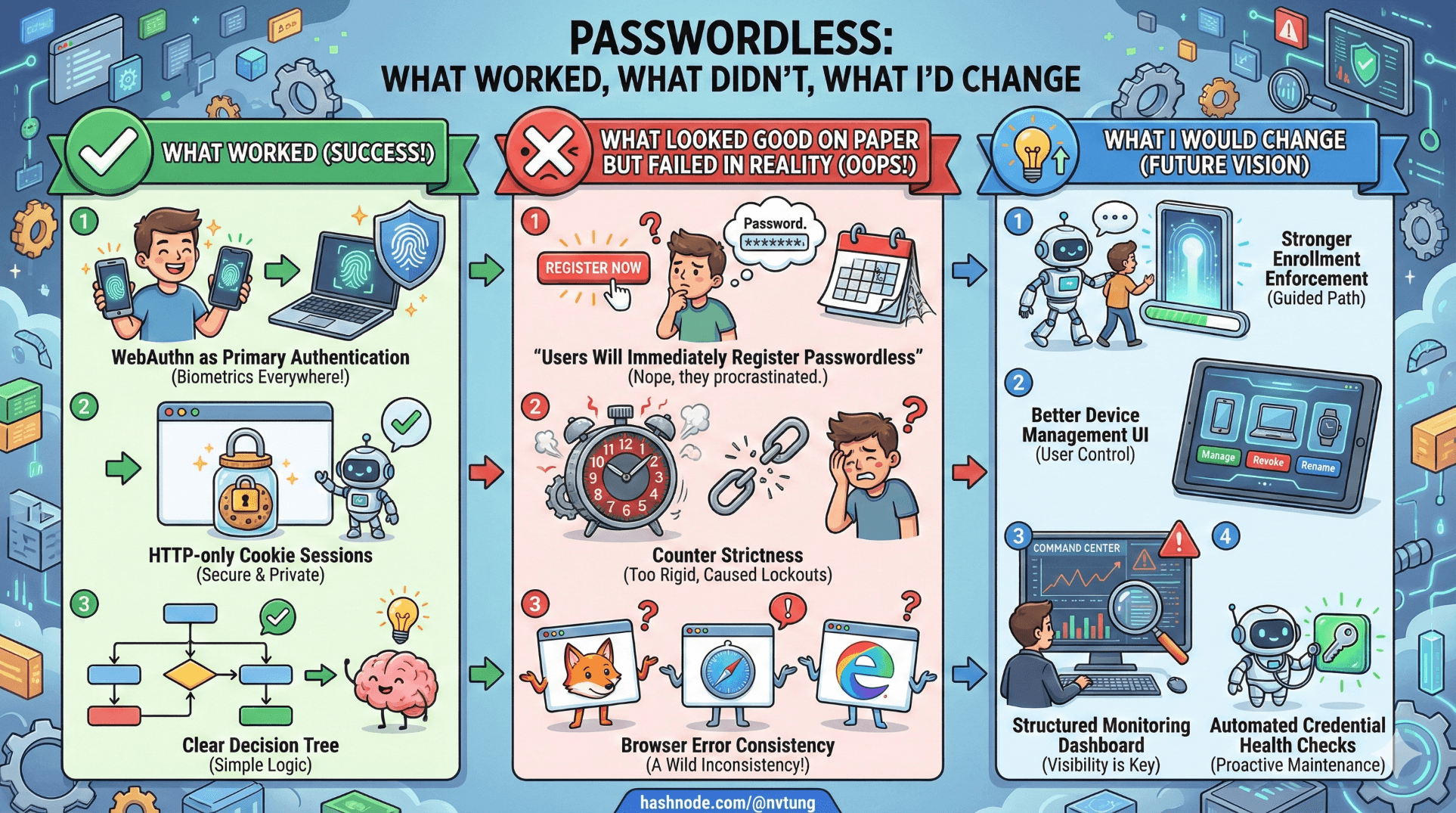
When designing a passwordless-first PWA architecture, the diagram looks elegant.
In production, elegance collides with:
Browser inconsistencies
Institutional identity constraints
Support tickets
Device lifecycle chaos
Monitoring blind spots
Let’s break it down honestly.
What Worked
1️⃣ WebAuthn as Primary Authentication
This worked better than expected.
Users quickly adapted to:
Fingerprint
Face recognition
Device PIN
Support requests about “forgot password” dropped to zero — because passwords were gone.
The combination of:
var result = await _fido2.MakeAssertionAsync(...)
and:
HttpContext.SignInAsync("Cookies", principal);
proved stable and predictable once encoding and session handling were correct.
The strongest success signal:
No phishing-related login issues after deployment.
That is not common.
2️⃣ HTTP-only Cookie Sessions
Avoiding JWT-in-localStorage was absolutely the right call.
options.Cookie.HttpOnly = true;
options.Cookie.SecurePolicy = CookieSecurePolicy.Always;
Benefits:
XSS impact minimized
Simpler revocation model
Clear session lifetime control
Operationally, this reduced attack surface significantly.
3️⃣ Clear Decision Tree
My initial flowchart saved me.
Because when things broke, I always knew which branch was responsible:
WebAuthn failure?
OIDC fallback?
Session misconfiguration?
Credential lifecycle issue?
That clarity matters more than people realize.
Trade-offs I Accepted Knowingly
1️⃣ No Attestation Verification
AttestationConveyancePreference.None
Trade-off:
No hardware manufacturer validation
No enforcement of hardware-backed keys
Why I accepted it:
Lower operational complexity
Better privacy posture
Reduced metadata dependency
In institutional context, identity assurance was already upstream via Feide.
2️⃣ Preferred Instead of Required User Verification
UserVerificationRequirement.Preferred
Trade-off:
Allows authenticators without biometric enforcement
Slightly lower strictness
Why:
Broader device compatibility
Fewer user lockouts
Reduced friction in older hardware environments
Security posture was balanced against accessibility.
3️⃣ No Offline Authentication
PWA expectation:
“It’s installed. It should work offline.”
Reality:
WebAuthn requires server challenge.
I chose not to simulate offline authentication using cached tokens beyond session lifetime.
Trade-off:
Some UX friction
Stronger trust model
Security > illusion of offline login.
What Looked Good on Paper But Failed in Reality
1️⃣ “Users Will Immediately Register Passwordless”
They didn’t.
Even after OIDC login, many skipped enabling passwordless.
The elegant flow:
if (!user.Credentials.Any())
    return Redirect("/enable-passwordless");
In reality:
Users ignored prompts.
Lesson:
Make passwordless enrollment prominent and incentivized.
2️⃣ Counter Strictness
Initially:
if (result.Counter <= storedCounter)
    throw new SecurityException("Possible cloned authenticator");
This caused false positives.
Some authenticators:
Always returned 0
Didn’t increment reliably
Lesson:
Spec compliance is messier than the spec implies.
Relaxed logic to handle zero counters more intelligently.
3️⃣ Browser Error Consistency
I assumed:
“All browsers implement WebAuthn uniformly.”
Reality:
Different error messages
Different cancellation behaviors
Slight timing differences
VueJS error handling needed refinement:
catch (err) {
  if (err.name === "NotAllowedError") {
    showRetry();
  } else {
    showFallbackOption();
  }
}
UX required careful branching.
Operational Lessons
1️⃣ Logging Matters More Than Crypto
You need logs for:
Challenge generation
Assertion verification result
Counter updates
OIDC callback mapping
Session creation
Example structured logging:
_logger.LogInformation("WebAuthn assertion verified for user {UserId}, counter updated to {Counter}",
    user.Id, result.Counter);
Without this, debugging failures becomes guesswork.
2️⃣ Monitoring Authentication Metrics
Track:
WebAuthn success rate
WebAuthn failure rate
OIDC fallback frequency
Credential registrations per day
Counter mismatch events
These reveal patterns:
Device compatibility issues
Misconfiguration
User confusion
Authentication is not “set and forget.”
3️⃣ Support Edge Cases
Real tickets included:
“My fingerprint stopped working after OS update.”
“I cleared my browser data and now can’t log in.”
“I logged in via Feide but it says no account.”
Each required:
Clear recovery path
Transparent error messaging
Internal documentation
Edge cases are not rare. They are normal.
4️⃣ Account Linking Confusion
Some users had:
Multiple institutional identities
Email changes
Duplicate accounts
Relying solely on email would have been disastrous.
Using sub claim for linking was critical:
var externalUserId = claims.FindFirst("sub")?.Value;
Stable identifiers are everything.
What I Would Change
1️⃣ Stronger Enrollment Enforcement
Instead of optional passwordless enablement:
I would require it after first successful OIDC login.
Security adoption improves when it’s default, not optional.
2️⃣ Better Device Management UI
Users should see:
List of registered devices
Last used timestamp
Revoke option
Backend model already supports it:
SELECT * FROM WebAuthnCredentials WHERE UserId = @UserId
But UX should surface it more clearly.
3️⃣ Structured Monitoring Dashboard
Real-time visibility into:
Assertion failures
Counter mismatches
OIDC errors
Would reduce reactive debugging.
4️⃣ Automated Credential Health Checks
Periodic validation:
Detect stale counters
Detect inactive credentials
Flag suspicious behavior
WebAuthn gives strong primitives. Monitoring must match.
The Big Lesson
The hardest part of passwordless authentication is not cryptography.
It is lifecycle management.
WebAuthn works.
OIDC works.
HTTP-only cookies work.

But the real challenge is designing:
Failure handling
Device transitions
Recovery paths
Operational visibility
Security architecture is not proven at deployment.
It is proven over time.
Final Reflection
If I rebuilt this system:
I would keep passwordless-first.
I would keep Feide federation.
I would keep server-controlled sessions.
I would invest earlier in monitoring and enrollment enforcement.
What surprised me most?
How much calmer authentication became once passwords were gone.
No resets.
No reuse.
No phishing alerts.
Just possession proof + federated identity continuity.
That combination feels less like a feature and more like an upgrade to the trust model of the application itself.
And that, ultimately, was the goal of the entire series. This concludes the series, but you can still check out my next optional extras articles next.
☰ Series Navigation
Core Series
Article 7 — A Real Passwordless PWA Flow (Architecture Walkthrough)
Article 9 — Integrating OIDC (Feide) as Fallback and Recovery
→ Article 10 — What Worked, What Didn’t, What I’d Change




