

Passwordless PWA Flow Architecture Walkthrough
Implementing WebAuthn, Feide OIDC, and secure sessions in a VueJS + .NET Core PWA
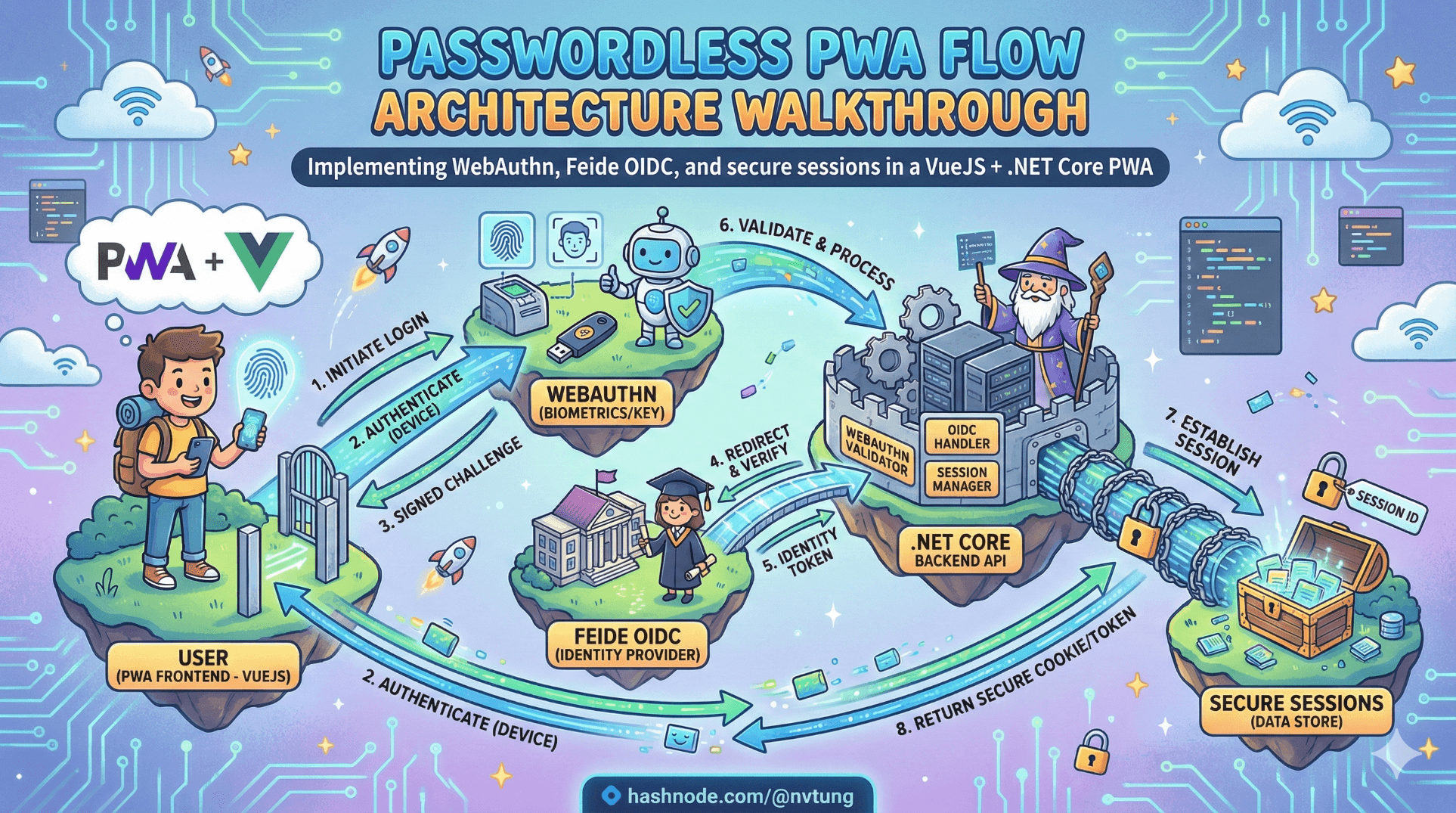
Modern authentication diagrams are clean.
Real systems are not.
My architecture intentionally combines:
WebAuthn (FIDO2) for phishing-resistant authentication
Feide (OIDC) for federated identity, recovery, and bootstrap
SQL Server for credential persistence
HTTP-only cookies for secure session handling
VueJS PWA as the user-facing layer
At the center of the system is one key decision:
Does this user already have passwordless enabled?
Everything branches from there.
Disclaimer
This article describes architectural patterns and technical approaches based on a real-world implementation. All examples, code snippets, and flow descriptions have been generalized and simplified for educational purposes. No proprietary business logic, confidential configurations, credentials, or organization-specific details are disclosed. The focus is strictly on publicly documented standards (WebAuthn, OIDC) and implementation patterns within a standard VueJS + ASP.NET Core + SQL Server stack.
The Real Flowchart: The System as a Decision Tree
My initial flowchart expresses the core logic clearly:
User requests authentication.
System checks: Has passwordless been enabled?
If yes → Attempt WebAuthn authentication.
If no → Redirect to Feide OIDC.
If WebAuthn fails → Allow retry.
If retries exhausted → End or fallback.
After successful OIDC → Offer passwordless registration.

This is not UX decoration.
This is an explicit trust state machine.
Let’s walk through it step by step with real code.
Step 1 — VueJS PWA: Begin Authentication
The PWA does not guess the strategy.
It asks the backend.
// VueJS (Composition API)
async function beginLogin(email) {
  const response = await fetch("/api/auth/begin", {
    method: "POST",
    headers: { "Content-Type": "application/json" },
    body: JSON.stringify({ email })
  });

  const result = await response.json();

  if (result.strategy === "webauthn") {
    await startWebAuthn(result.options);
  } else if (result.strategy === "oidc") {
    window.location.href = result.redirectUrl;
  }
}
The browser is a mediator.
It does not decide trust.
Step 2 — ASP.NET Core: Decide the Strategy
My backend controls the trust graph.
[HttpPost("begin")]
public async Task<IActionResult> Begin([FromBody] LoginRequest request)
{
    var user = await _db.Users
        .Include(u => u.Credentials)
        .FirstOrDefaultAsync(u => u.Email == request.Email);

    if (user == null || !user.Credentials.Any())
    {
        return Ok(new {
            strategy = "oidc",
            redirectUrl = BuildFeideRedirect()
        });
    }

    var fido2 = new Fido2(new Fido2Configuration
    {
        ServerDomain = "yourdomain.com",
        ServerName = "Your App",
        Origin = "https://yourdomain.com"
    });

    var options = fido2.GetAssertionOptions(
        user.Credentials.Select(c => new PublicKeyCredentialDescriptor(c.CredentialId)).ToList(),
        UserVerificationRequirement.Preferred
    );

    HttpContext.Session.SetString("fido2.challenge", options.Challenge);

    return Ok(new {
        strategy = "webauthn",
        options
    });
}
Why this branch exists:
WebAuthn only works if credentials exist.
Backend must know account state.
Trust decisions cannot be client-side.
Step 3 — WebAuthn Authentication (VueJS + Browser API)
async function startWebAuthn(options) {
  try {
    const assertion = await navigator.credentials.get({
      publicKey: options
    });

    const res = await fetch("/api/auth/verify-webauthn", {
      method: "POST",
      headers: { "Content-Type": "application/json" },
      body: JSON.stringify(assertion)
    });

    if (res.ok) {
      window.location.href = "/dashboard";
    } else {
      showRetryOption();
    }
  } catch (err) {
    showRetryOption();
  }
}
The browser enforces:
Origin binding
Authenticator interaction
User presence / verification
It does not verify the signature.
That’s backend responsibility.
Step 4 — Backend Verification with fido2-net-lib
[HttpPost("verify-webauthn")]
public async Task<IActionResult> Verify([FromBody] AuthenticatorAssertionRawResponse clientResponse)
{
    var challenge = HttpContext.Session.GetString("fido2.challenge");

    var storedCredential = await _db.Credentials
        .FirstOrDefaultAsync(c => c.CredentialId == clientResponse.Id);

    if (storedCredential == null)
        return Unauthorized();

    var fido2 = new Fido2(_config);

    var result = await fido2.MakeAssertionAsync(
        clientResponse,
        storedCredential.PublicKey,
        storedCredential.SignatureCounter,
        args => args.Challenge == challenge
    );

    storedCredential.SignatureCounter = result.Counter;
    await _db.SaveChangesAsync();

    SignInUser(storedCredential.UserId);

    return Ok();
}
This branch exists because:
Only the server verifies cryptographic proof.
Counters detect cloned authenticators.
Session issuance must be server-controlled.
Session Handling — HTTP-Only Cookie
private void SignInUser(Guid userId)
{
    var claims = new List<Claim>
    {
        new Claim(ClaimTypes.NameIdentifier, userId.ToString())
    };

    var identity = new ClaimsIdentity(claims, "Cookies");
    var principal = new ClaimsPrincipal(identity);

    HttpContext.SignInAsync("Cookies", principal, new AuthenticationProperties
    {
        IsPersistent = true,
        ExpiresUtc = DateTime.UtcNow.AddHours(8)
    });
}
Configured in Startup.cs:
services.AddAuthentication("Cookies")
    .AddCookie("Cookies", options =>
    {
        options.Cookie.HttpOnly = true;
        options.Cookie.SecurePolicy = CookieSecurePolicy.Always;
        options.Cookie.SameSite = SameSiteMode.Lax;
    });
Why HTTP-only cookie?
Protects against XSS token theft.
Avoids storing JWT in localStorage.
Keeps session server-controlled.
OIDC Fallback — Feide Integration
If passwordless is not enabled, redirect to Feide.
private string BuildFeideRedirect()
{
    return $"{_config["Feide:Authority"]}/authorize" +
           $"?response_type=code" +
           $"&client_id={_config["Feide:ClientId"]}" +
           $"&redirect_uri={_config["Feide:RedirectUri"]}" +
           $"&scope=openid profile email" +
           $"&code_challenge={GeneratePKCEChallenge()}" +
           $"&code_challenge_method=S256";
}
Callback endpoint:
[HttpGet("callback")]
public async Task<IActionResult> Callback(string code)
{
    var token = await ExchangeCodeForToken(code);

    var idToken = ValidateIdToken(token.IdToken);

    var user = await FindOrCreateUser(idToken.Sub);

    SignInUser(user.Id);

    if (!user.Credentials.Any())
        return Redirect("/enable-passwordless");

    return Redirect("/dashboard");
}
This branch exists because:
Devices are lost.
Users switch devices.
Federation provides lifecycle continuity.
OIDC provides bootstrap trust.
WebAuthn Registration After OIDC
When enabling passwordless:
[HttpPost("register-options")]
public IActionResult RegisterOptions()
{
    var user = GetCurrentUser();

    var options = _fido2.RequestNewCredential(
        new Fido2User
        {
            DisplayName = user.Email,
            Id = Encoding.UTF8.GetBytes(user.Id.ToString()),
            Name = user.Email
        },
        new List<PublicKeyCredentialDescriptor>(),
        AuthenticatorSelection.Default,
        AttestationConveyancePreference.None
    );

    HttpContext.Session.SetString("fido2.attestationChallenge", options.Challenge);

    return Ok(options);
}
Client registers via navigator.credentials.create.
Server verifies and stores:
_db.Credentials.Add(new Credential {
    UserId = user.Id,
    CredentialId = result.Result.CredentialId,
    PublicKey = result.Result.PublicKey,
    SignatureCounter = result.Result.Counter
});
Why this branch exists:
Passwordless-first upgrades users.
Registration is explicit.
Device lifecycle is managed.
Role Breakdown
Browser (VueJS PWA)
Initiates flows
Calls WebAuthn API
Handles redirects
Does not store session tokens
Authenticator
Stores private key
Verifies biometric locally
Signs challenges
Never exposes key
Backend (.NET Core)
Controls strategy
Generates challenges
Verifies assertions
Tracks counters
Integrates OIDC
Issues session cookie
Persists credentials in SQL Server

Trust is centralized.
Proof is decentralized.
Why Each Branch Exists
| Branch | Real-World Reason |
| WebAuthn first | Phishing-resistant primary auth |
| OIDC fallback | Recovery + cross-device bootstrap |
| Retry WebAuthn | Biometric glitches happen |
| Registration after OIDC | Upgrade path to passwordless |
| HTTP-only session cookie | Protect against XSS token theft |
| Counter tracking | Detect cloned authenticators |

None of these branches are decorative.
Each corresponds to a failure mode in reality.
Final Architectural Insight
This system is not:
“Biometric login.”
It is:
Identity bootstrap via federation.
Device-bound authentication via FIDO2.
Session integrity via secure cookies.
Lifecycle management via SQL persistence.
Explicit failure handling.
Clear decision tree.
Passwordless-first is not about removing complexity.
It is about relocating trust:
Away from shared secrets.
Toward cryptographic proof.
While preserving federated continuity.
And when drawn as a flowchart, the system looks clean.
When implemented in VueJS + ASP.NET Core + SQL Server + Feide + fido2-net-lib, it becomes real.
And real systems are where architecture proves itself.
Next article, we’ll explore what broke, what surprised us, and what we learned when this passwordless-first architecture moved from diagram to production.
☰ Series Navigation
Core Series
→ Article 7 — A Real Passwordless PWA Flow (Architecture Walkthrough)
Article 9 — Integrating OIDC (Feide) as Fallback and Recovery




