

Cron Lies: When Scheduled Jobs Don’t Run
Why scheduled jobs quietly fail—and how to design systems that don’t trust time blindly
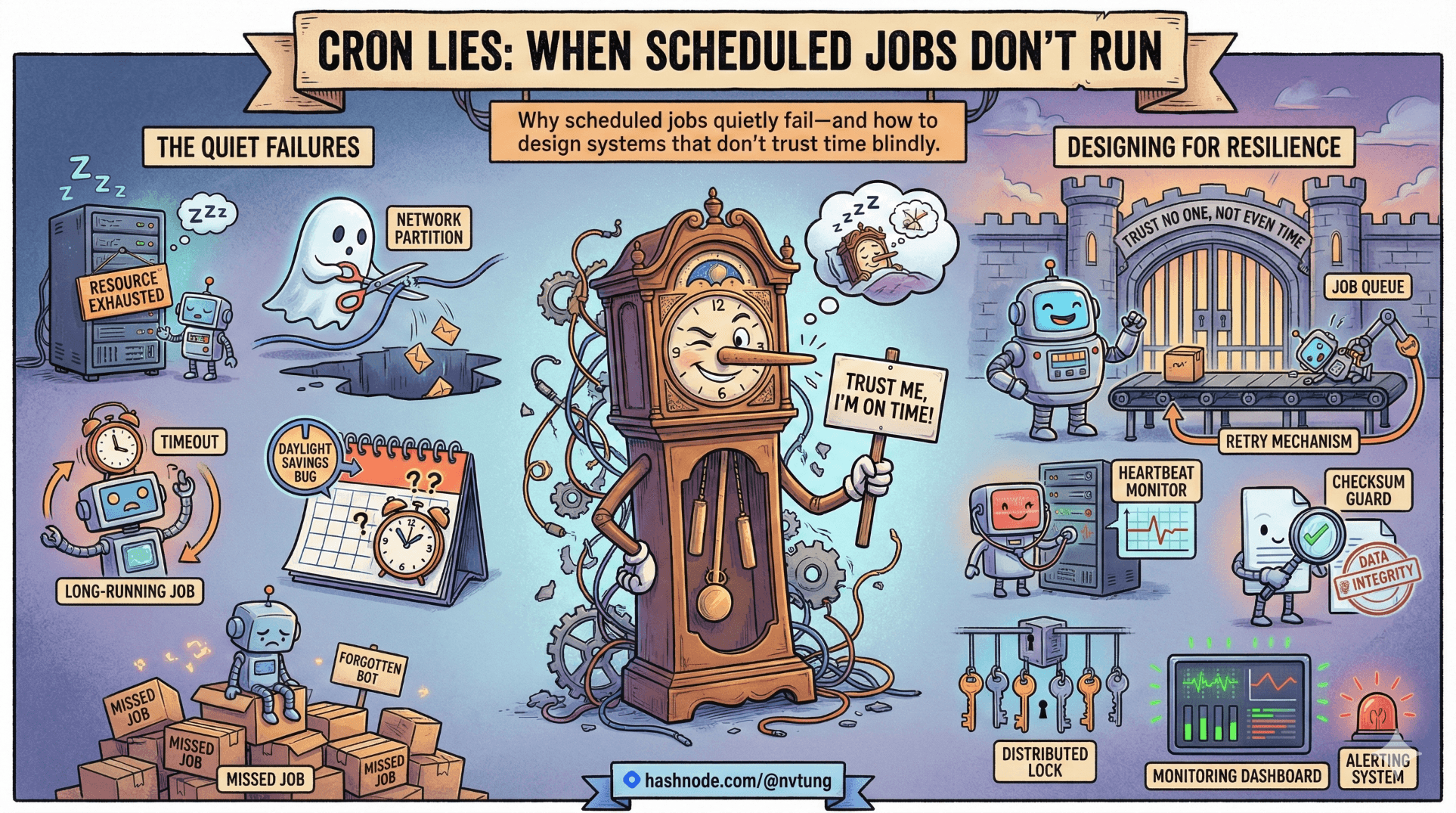
Cron has a reputation for honesty. You tell it when, it runs then. If something didn’t happen, the instinctive conclusion is: “the code must be broken.”
In production, that assumption is often wrong.
This article is about the more uncomfortable truth: cron can fail without lying to you explicitly. Jobs don’t run, or don’t run when you think they do, and the system emits no signal strong enough to attract attention. Everything looks calm. Until a human notices a missing effect.
This is where defensive thinking begins.
The Most Dangerous Failure Mode: Silence
Cron almost never crashes loudly. It fails quietly.
If a scheduled job:
Never executes
Executes under the wrong conditions
Executes later than expected
Executes and does nothing
…the system often produces the same observable result: nothing happens.
That silence is what makes cron failures expensive. They age quietly.
“Every Minute” Is a Filter, Not a Promise
Let’s start with the most common misunderstanding:
* * * * * php yii cron/run
This does not mean:
“This command will run every 60 seconds, no matter what.”
What it actually means:
“At each minute boundary where the system clock matches this expression, attempt execution.”
That distinction matters more than most people realize.
Cron does not:
Track last execution time
Compensate for downtime
Retry missed runs
Guarantee spacing between runs
It evaluates the current time, not elapsed time.
If the system clock jumps forward, backward, or disappears entirely for a while, cron does not reconcile history. It lives in the present tense only.
Downtime Windows: The Lie of Continuity
In my real production setup, this constraint existed:
Development and UAT servers were shut down daily from 00:00 to 08:00 SGT
During that window:
No cron daemon
No
cron/runNo
queue/run
From cron’s perspective, those minutes never existed.
Consider an interval job inside HumHub (which powered my real production web app) that conceptually runs “hourly”:
class CleanupJob extends \humhub\components\CronJob
{
    public function run()
    {
        // cleanup logic
    }

    public function getSchedule()
    {
        return self::SCHEDULE_HOURLY;
    }
}
If this job was due at:
01:00
02:00
03:00
…and the server was down?
Those executions are not “late.”
They are lost.
When the server boots at 08:00:
cron/runevaluates nowThe job decides whether now matches its schedule
Missed intent is not replayed unless explicitly coded
This is not a bug. It’s a property.
The Defensive Lesson
If a job must run for every interval, cron alone is insufficient.
You need state.
If a job can tolerate skips, cron is perfectly adequate—but only if you consciously design for that tolerance.
Silent Failure #1: Disabled Cron Services
One of the most insidious cron failures is also the simplest:
The cron daemon is not running.
This happens more often than people admit:
Servers reboot
Cron services fail to start
Containers don’t include cron at all
systemd timers are misconfigured
From the application’s point of view:
Nothing throws an error
No exception is logged
No stack trace exists
My Yii or HumHub code is innocent. It was never invoked.
Defensive Pattern
Treat cron as external infrastructure, not application logic.
At minimum:
Periodically log “cron heartbeat” execution
Alert if no cron activity is observed for a threshold window
Cron itself will not tell you it is dead.
Silent Failure #2: Output Suppression Without Compensation
Your production crontab did this:
>/dev/null 2>&1
That choice was intentional and reasonable. But it came with a requirement:
Every meaningful failure must be logged inside the application.
If a job does this:
public function run()
{
    $result = $this->callExternalApi();

    if (!$result) {
        return;
    }

    // continue
}
Then a failure looks identical to:
Job never ran
Job ran but exited early
Job ran and succeeded with no effect
From the outside, all three collapse into silence.
Defensive Pattern
Every cron job should answer at least one of these questions explicitly:
“I ran”
“I skipped myself”
“I failed”
Not necessarily loudly—but traceably.
Silence must be meaningful, not ambiguous.
Silent Failure #3: Clock Drift
Cron trusts the system clock. Completely.
If the clock is wrong:
Jobs run at the wrong time
Jobs cluster unexpectedly
Jobs appear to “randomly” skip
Clock drift is especially dangerous because:
It accumulates slowly
It rarely breaks tests
It rarely shows up in logs
You don’t need extreme drift for damage. A few minutes is enough to:
Break SLAs
Miss external deadlines
Violate assumptions baked into job logic
Defensive Pattern
Time-based systems should:
Assume time can be wrong
Avoid exact-time equality checks
Prefer ranges over instants
Cron is punctual only relative to the clock it’s given.
Silent Failure #4: Overlap That Cancels Itself Out
A job that overlaps itself can fail without error.
Example:
* * * * * php yii queue/run
If queue/run takes longer than one minute:
A second instance starts
Both compete for resources
One may exit early
Or both may do partial work
If jobs are idempotent, this is survivable.
If they are not, this is corruption without alarms.
Nothing crashes. No exception bubbles up.
The system simply does the wrong thing quietly.
The Big Lie: “If It Didn’t Happen, Something Would Have Alerted”
Cron does not alert.
Cron does not retry.
Cron does not remember.
Unless you build signals around it, cron failures degrade into:
Missing emails
Stale data
Incomplete cleanup
User-visible oddities discovered late
This is why cron failures are so often discovered by humans first.
Why This Is So Valuable to Learn Early
This article pairs perfectly with the dev/UAT downtime case because it reveals something deeper:
Cron teaches you what your system actually assumes about time.
Nightly downtime forces the issue.
Clock drift exposes it.
Silent failures make it undeniable.
Once you internalize this, your design changes:
Jobs become idempotent
Skipped runs are expected, not feared
“Every minute” is treated as best-effort
Observability moves into the application layer
You stop trusting time blindly.
The Defensive Mindset Cron Forces
Cron is not malicious.
It’s not broken.
It’s just honest in a way that software engineers aren’t used to.
It will:
Try to run things when time matches
Say nothing if it can’t
Move on without guilt
If you design with that truth in mind, cron becomes predictable—even comforting.
If you don’t, cron will lie to you politely for months.
And the worst part is not that scheduled jobs don’t run.
It’s that nobody notices when they don’t.
☰ Series Navigation
Core Series
Optional Extras
→ ⏳ Cron Lies: When Scheduled Jobs Don’t Run




